


DHT11 with Raspberry Pi: 7 Wiring and Python Checks

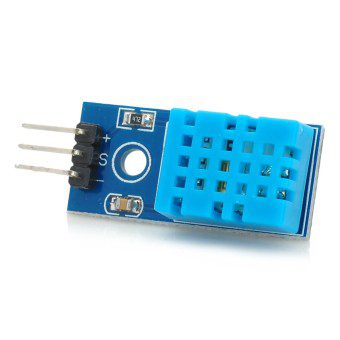
Last checked: 18 October 2026. Any prices below are dated Epro listing examples, not guaranteed current quotations. Confirm the exact model, stock and package before ordering.
Using a DHT11 with Raspberry Pi is a useful introduction to environmental sensing, but it differs from an Arduino project in two important ways: Raspberry Pi GPIO requires 3.3V-compatible signals, and Linux software support must match your board and operating system. A wiring diagram alone does not guarantee a working installation.

This guide describes a cautious starting workflow for supported Raspberry Pi setups. It does not claim that every Pi, every 64-bit distribution or every DHT breakout is compatible. Check the current library documentation before buying hardware or changing an existing installation.
1. Check DHT11 with Raspberry Pi software compatibility
The Adafruit CircuitPython DHT documentation describes supported GNU/Linux installations and also lists known reliability limitations, including uncertainty on some Linux 64-bit platforms and unreliable readings on Raspberry Pi Zero. These caveats matter: a sensor may be correctly wired while its timing-sensitive software still fails.
Read the current Raspberry Pi and Adafruit Blinka setup instructions for your exact platform. Do not install an old abandoned GPIO package just because a years-old tutorial names it. If your combination is unsupported, consider a supported modern digital sensor rather than repeatedly changing random system packages.
2. Verify sensor supply and data voltage
Raspberry Pi GPIO is not a 5V-tolerant input. Choose a DHT11 or breakout that is documented to operate at 3.3V, and ensure any data-line pull-up is connected to 3.3V. A breakout powered from 5V may also pull its signal to 5V. Do not connect that signal directly to the Pi.
For a compatible device, a typical arrangement uses the Pi’s 3.3V supply, a common ground and a chosen GPIO for data. Check physical pin numbers against a current Pi header diagram. Disconnect the Pi’s power before moving wires, and keep conductive objects away from adjacent header pins.
3. Distinguish GPIO numbers from header positions
In many Python examples, board.D4 means GPIO4, which is physical header pin 7 on the standard 40-pin layout. It does not mean physical pin 4. Mixing those numbering systems can put a signal wire on a power rail. Verify the board diagram rather than counting from a rotated photograph.
Newest in the store


4. Use an isolated Python environment
Follow the current library and operating-system guidance for installing Python dependencies. On systems that protect the system Python environment, use the recommended virtual-environment workflow instead of forcing a global package installation. Adafruit’s DHT package is named adafruit-circuitpython-dht; installing it is only one part of preparing a supported Blinka environment.
5. Start with a small reading loop
On a supported installation, the following illustrates the library interface. It assumes your data line is GPIO4 and that the platform supports this configuration; it has not been bench-tested on your particular Pi.
import time
import board
import adafruit_dht

sensor = adafruit_dht.DHT11(board.D4, use_pulseio=False)
try:
    while True:
        try:
            print("Temperature C:", sensor.temperature)
            print("Humidity %RH:", sensor.humidity)
        except RuntimeError as error:
            print("Read failed:", error)
        time.sleep(2)
finally:
    sensor.exit()
Occasional timing errors should be handled without an aggressive rapid retry loop. Persistent failures call for a wiring, power and compatibility check, not endless retries.
6. Place the sensor away from heat
A Pi processor, regulator or enclosed power supply can warm the air near a sensor. Keep the sensing element away from those heat sources, direct sunlight and moisture. Compare readings only after allowing the sensor and room conditions to settle. DHT11 tolerances limit what small differences mean.
7. Decide whether DHT11 is adequate
The sensor is suitable for simple learning displays, not medical measurements or safety-critical monitoring. Epro’s DHT11 listing — PKR 220 is a checked product example. Verify the actual pin arrangement and breakout components. For range and accuracy differences, read the DHT11 versus DHT22 comparison.
Common questions
Can I reuse Arduino code?
Not directly. The electrical constraints and Python/Linux software path differ. The Arduino DHT11 guide is useful for understanding the sensor, not as a Pi installation script.
What if the software cannot support my Pi?
Use a sensor with current support for the actual platform. Do not assume an electrical connection can fix an incompatible timing library.