


A4988 Stepper Motor Driver: 7 Setup Checks

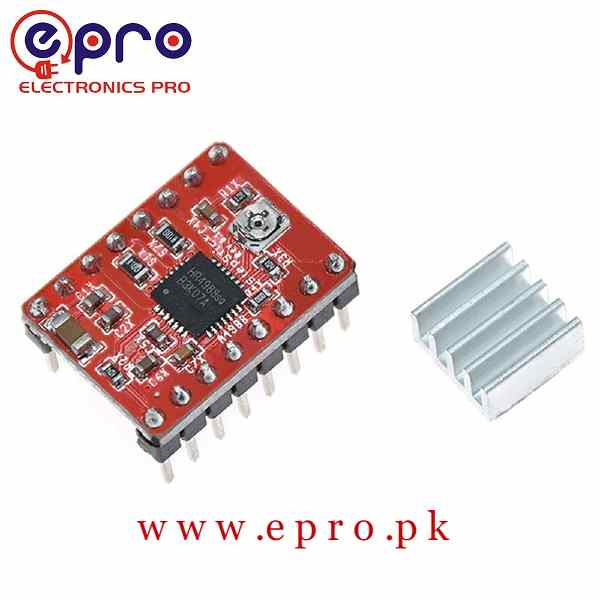
An A4988 stepper motor driver is a compact current-regulating driver for a suitable bipolar stepper motor. Its small size does not make setup optional: incorrect coil wiring, an excessive current limit or a power transient can damage the driver, motor or controller.
This guide is a pre-power checklist for a low-voltage bench project, not a universal wiring diagram for every clone carrier. Identify the exact board, motor and supply before connecting them. Do not copy a VREF value from an unrelated module.

1. Check the motor type first
A typical four-wire bipolar stepper has two isolated coil pairs. With the motor disconnected and all power removed, use resistance measurements to identify which two wires belong to each coil. The A4988 output pair for one phase must connect to one complete coil, not to a mixture of wires from both phases.
A standard five-wire 28BYJ-48 unipolar motor and its ULN2003 board are a different system. Do not plug that motor into an A4988 by matching wire colours. Likewise, NEMA 17 describes a mounting-frame family, not a guaranteed coil current, resistance or connection diagram.
2. Identify motor and logic power separately
The A4988 carrier listing describes a motor-supply range of 8–35 V and a separate logic supply range of 3–5.5 V. Confirm the exact carrier markings and documentation; VMOT and VDD serve different purposes. Reversing the board or confusing those rails can destroy the electronics.
Use a supply within the permitted range and allow appropriate margin. A motor’s winding voltage is not a complete power-supply selection rule for a current-regulating chopper driver. You still need the motor current rating and a correctly set driver limit. Never exceed the carrier’s ratings to chase more speed.
3. Plan decoupling and power wiring
Place the recommended bulk decoupling close to the carrier’s motor-supply connections, using correct polarity and a suitable voltage rating. Lead inductance and ceramic capacitors can create damaging supply spikes on compact carriers. Follow the exact carrier manufacturer’s guidance rather than treating the bench supply’s display as proof that no transient can occur.
Keep the motor-current path off a lightly built solderless breadboard. Use suitable connections and strain relief. Connect the controller reference as required by the interface, and make sure control inputs are not left floating during startup.
Newest in the store


4. Set the current limit from the actual hardware
The A4988 uses a reference voltage and current-sense resistors to establish its current limit. For the chip’s standard relationship, IMAX = VREF / (8 × RS), but the sense resistance and carrier implementation must be verified on the actual board. Check resistor markings against the carrier documentation; similarly coloured clones can use different values.
Do not assume that a commonly quoted volts-to-amps multiplier applies to your module. The advertised 2 A headline is also not a promise of continuous current without cooling. Choose a conservative limit within the motor and carrier capabilities and confirm thermal behaviour under the intended operating conditions.
5. Use the correct measurement procedure
Measure VREF and adjust the potentiometer only according to an authoritative procedure for the exact carrier, with appropriate tools and precautions against a slipped probe shorting nearby pins. If you are unfamiliar with powered measurements, get qualified help before proceeding.
Supply-input current is not the same as winding current in a chopper driver. In full-step mode, the measured phase current can also differ from the configured peak limit. Do not keep increasing the setting merely because an unrelated meter reading is lower than expected.
6. Verify enable, reset and microstep controls
STEP and DIR signals are only part of the interface. Check enable, reset, sleep and microstep pin requirements for your carrier. Select a documented mode and start with slow motion, an unloaded mechanism and conservative acceleration. Microstepping can smooth commanded motion but does not guarantee equally accurate tiny physical movements under load.
7. Power down before changing motor connections
Never connect or disconnect a motor while the driver is powered. Remove power and allow stored energy to discharge before changing wiring. If the motor only vibrates, recheck coil pairs and step timing before increasing current. If the driver becomes excessively hot or shuts down, stop and review cooling, load and limit settings.
Compare alternatives in the stepper motor price and driver guide. The Pololu A4988 carrier reference explains current limiting and supply precautions for its own board; use your carrier’s documentation for component-specific settings. A successful unloaded test is only the first stage of validating a complete motion system.