


PCF8574 Arduino: Button, LED Wiring and 7 Port Checks

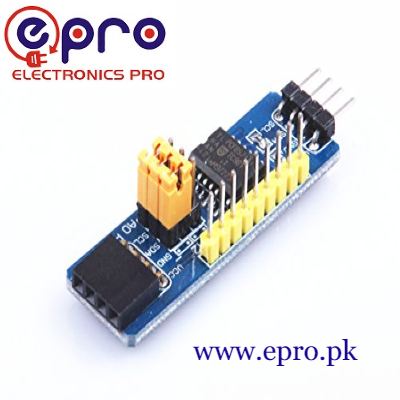
This PCF8574 Arduino example reads a button on P1 and controls one low-current LED on P0. It uses the standard Wire library so the whole-port byte and quasi-bidirectional behaviour remain visible.
Use a conventional 5 V Uno and a verified PCF8574 expansion board. Confirm address 0x20 before using the sketch. A PCF8574A or a board with different address straps needs a different confirmed address.

1. Make the PCF8574 Arduino bus connections
| Module pin | Conventional Uno |
|---|---|
| VCC | 5 V |
| GND | GND |
| SDA | A4 |
| SCL | A5 |
Switch off power while wiring. Check that the board’s address inputs have defined states and that the intended 0x20 setting matches its documentation. Do not leave address pins floating or guess the meaning of an unfamiliar jumper arrangement.
This is a 5 V Uno demonstration, not universal wiring for 3.3 V GPIO. If changing controllers, review supply and bus pull-up levels before connecting the module.
2. Add a button and a sinking LED
Connect a normally open pushbutton between P1 and GND. For the LED, connect 5 V through a 1 kΩ resistor to the LED anode, with the cathode connected to P0. Confirm LED polarity and use a suitable small indicator LED.
This arrangement turns the LED on when P0 is LOW. Do not omit the resistor. Leave all other port pins disconnected for the first test, and do not attach motors, relay coils or high-current loads.
3. Understand the released input bit
The device datasheet describes quasi-bidirectional ports. Writing a one to P1 allows the external button to pull it LOW; there is no separate pinMode call for this chip in the Wire-only example.
The output bytes below are 0xFF for LED off and 0xFE for LED on. Both preserve P1 as one. Copying a button’s LOW reading into the next output byte would incorrectly latch that input LOW.
4. Upload the button and LED example
#include <Wire.h>
const byte ADDRESS = 0x20; // confirm actual chip and strap setting
bool writePort(byte value) {
  Wire.beginTransmission(ADDRESS);
  Wire.write(value);
  return Wire.endTransmission() == 0;
}
void setup() {
  Serial.begin(9600);
  Wire.begin();
  Wire.setClock(100000);
  if (!writePort(0xFF)) {
    Serial.println("PCF8574 not responding");
    while (true) { delay(100); }
  }
}
void loop() {
  if (Wire.requestFrom(ADDRESS, (byte)1) != 1) {
    Serial.println("Port read failed");
    delay(500);
    return;
  }
  byte pins = Wire.read();
  bool pressed = (pins & (1 << 1)) == 0;
  byte nextPort = pressed ? 0xFE : 0xFF;
  if (!writePort(nextPort)) Serial.println("Port write failed");
  delay(20);
}
No third-party expander library is needed. Open Serial Monitor at 9600 baud for fault messages. With correct wiring, a pressed button should make the LED illuminate through the module’s sinking output.
Newest in the store


5. Interpret the timing honestly
The short delay makes this a slow manual demonstration. It is not a validated debounce algorithm, an event counter or a high-speed pulse detector. Brief button bounce may still affect the displayed state.
For counted presses, add a deliberate stable-state debounce rule and test it with the actual switch. I²C transfer latency must also be considered before using remote inputs for time-sensitive measurements.
6. Diagnose stuck states systematically
If the LED never lights, check its direction, resistor, P0 connection and whether the button really pulls P1 to ground. If the button seems permanently pressed, inspect for a short and confirm software always leaves P1 written HIGH.
If the device does not respond at all, first check address, power, shared ground and SDA/SCL. Changing LED wiring cannot fix an I²C address mismatch.
To verify the input behaviour independently, temporarily observe the P1 bit in a diagnostic print while leaving it written HIGH. With the button open it should remain released; pressing the button should pull it LOW. Power down before disconnecting or moving the button wiring.
To verify the output independently, use the two deliberate bytes already shown rather than copying an entire port reading into a write. This keeps the distinction between the observed pins and the intended latch values clear.
When adding more buttons, name each bit and maintain a documented mask of bits that must remain HIGH for input use. A single incorrect whole-port assignment can affect several channels at once even though the program appears to be changing only one LED.
7. Extend one function at a time
The PCF8574 I/O expander buying guide explains clock, address and current limits. Add more inputs or indicators only after the first pair works, preserving released input bits in every write. Keep the exercise separate from safety-critical switching or high-power control.