


5V Relay Module: Arduino Wiring and 7 Safety Checks

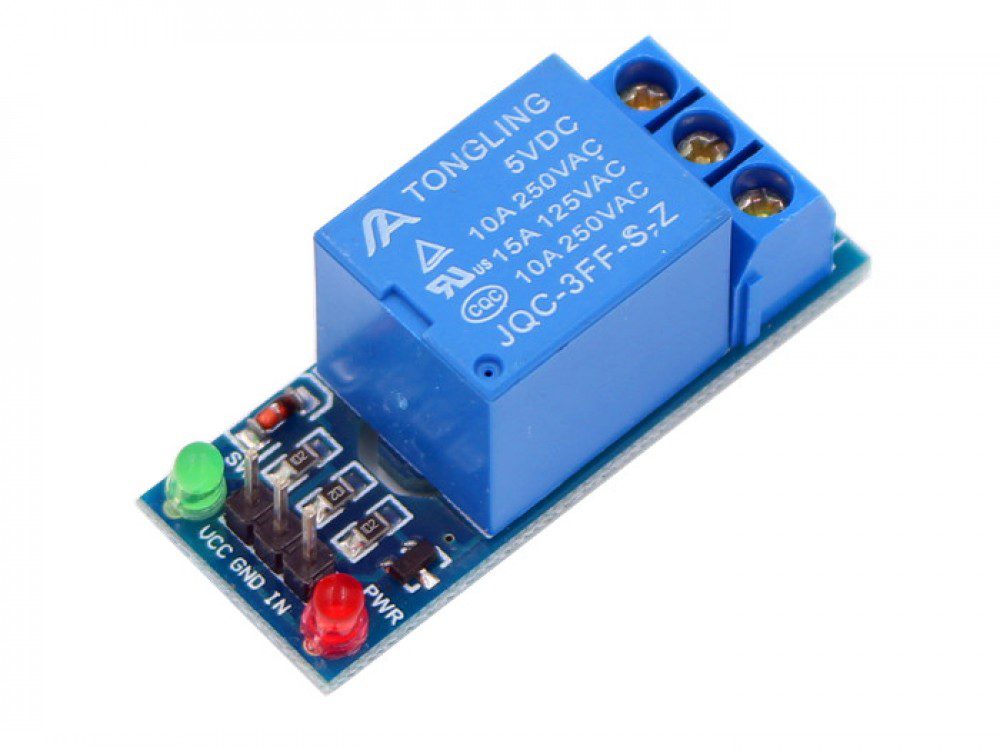
A 5V relay module lets a control signal operate a separate switch contact. The relay coil circuit and the switched load serve different roles, and both require careful identification. This guide deliberately uses a low-voltage bench demonstration rather than household mains equipment.
The example is for the single-channel 5 V relay module listing, which describes an active-low control input. Other modules can use different trigger levels, pin names and power arrangements. Verify the actual board before following the connections.

1. Separate the control side from the contacts
The module listing labels its control connections minus, plus and S: ground, 5 V supply and signal. The screw terminals are a different circuit, commonly labelled COM, NO and NC. COM is the moving contact, NO is normally open and NC is normally closed when the coil is not energized.
Do not confuse a contact terminal with the module’s 5 V input. Also distinguish a complete relay module from a bare relay coil, which requires a properly designed driver and suppression arrangement. A controller GPIO must not directly power a bare coil.
2. Keep this project low voltage
A printed contact rating such as 10 A does not establish that the complete module, terminals, enclosure and wiring are safe for mains use. DC switching and inductive loads also have different requirements from a simple resistive test load. This tutorial does not cover mains connections, household appliances, pumps or exposed high-energy supplies.
For the first demonstration use only a small, independently current-limited low-voltage LED circuit. Keep the wiring accessible and disconnect all power before changing contacts. Do not transfer this wiring example to a high-current motor merely because the relay clicks successfully.
3. Connect a compatible Arduino control circuit
With power removed, connect module ground to Uno ground, its rated 5 V input to a suitable regulated 5 V source and S to D7. Check the module’s required current and the supply capacity. When using a separate coil supply in this non-isolated example, the control side needs a common signal reference with the Uno.
Newest in the store


Do not casually join two independent positive rails. Boards with JD-VCC jumpers and optocouplers have specific wiring rules; neither a relay nor a visible optocoupler proves that your assembled circuit is electrically isolated. Follow the exact board documentation for any isolation requirement.
4. Test the active-low signal without a load
const byte RELAY = 7;
void setup() {
  digitalWrite(RELAY, HIGH);
  pinMode(RELAY, OUTPUT);
}
void loop() {
  digitalWrite(RELAY, LOW);  // On for this active-low module
  delay(1000);
  digitalWrite(RELAY, HIGH); // Off
  delay(1000);
}
This sketch intentionally matches an active-low board. Initializing the output latch high before enabling the output reduces one possible software transition, but does not guarantee a safe state throughout reset, upload or loss of controller power. If a known startup state is essential, it requires a suitable hardware design and system-level verification.
5. Add a small switched LED circuit
After the unloaded control test, remove power. For an independently verified 3.3 V LED source, connect its positive output to COM, NO to a 330-ohm resistor, the resistor to the LED anode and the LED cathode to that source’s ground. Verify the LED rating and actual current as explained in the breadboard LED guide.
The contact circuit does not need to share its ground with the Arduino merely for the mechanical contacts to switch. However, that functional separation is not a certification of safety isolation. Restore power only after confirming that the contact wiring is separate from the control input wiring.
6. Investigate unexpected behaviour
A clicking relay with no LED light suggests a contact-path, polarity or LED-resistor problem. An always-on relay can indicate reversed logic assumptions, an unsuitable input voltage or a wiring fault. Repeated clicking or controller resets may point to an inadequate supply. Stop and diagnose rather than increasing the supply voltage beyond ratings.
7. Choose channel count and module type carefully
More channels increase simultaneous coil demand and wiring complexity. An AC solid-state relay is not a direct substitute for switching this DC LED test. Check the switching technology and load requirements before buying. Compare current details on the 5 V relay product page and use the breadboard accessory guide for suitable low-voltage prototyping parts.