


DHT11 Sensor: Arduino Wiring, Code and 7 Checks

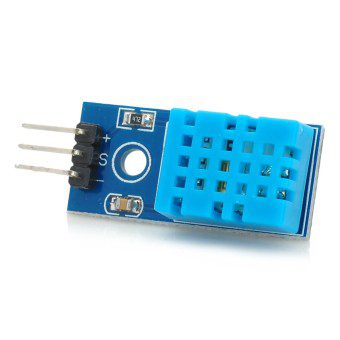
Last checked: 18 October 2026. Product prices and availability, where shown, are a snapshot of Epro listings checked on this date. Confirm the live listing before ordering.
A DHT11 sensor is a low-cost way to learn how a microcontroller reads temperature and relative humidity. It suits basic indoor demonstrations and classroom projects. Its limited accuracy and measurement range mean it is not a replacement for a calibrated instrument or a safety-critical control sensor.

This example uses an Arduino Uno with 5V logic. ESP32 and Raspberry Pi connections require separate attention to 3.3V signal levels. The physical pin order also differs between a bare sensor and some three-pin breakout modules.
DHT11 sensor: parts and wiring
You need an Uno-compatible board, the sensor or module, jumper wires and a USB data cable. A bare DHT sensor may need an external pull-up resistor on the data line; many breakout boards already include one. Check your module before adding components.
| Sensor connection | Arduino Uno connection |
|---|---|
| VCC or + | 5V, if supported by the specific sensor/module |
| DATA or signal | Digital pin 2 |
| GND or − | GND |
For the common bare four-pin sensor, the usual front-facing order is VCC, DATA, unused, GND, but verify the actual datasheet and orientation before applying power. A breakout’s silk-screen labels take priority over a generic photograph. Disconnect power while changing wiring.
Understand the measurement limits
Adafruit’s DHT overview lists the traditional DHT11 at 0–50°C with roughly ±2°C temperature accuracy, and 20–80% relative humidity with roughly ±5% accuracy. Check the datasheet supplied with your exact version because variants can differ. A displayed decimal place does not make a reading more accurate.
Install the Arduino libraries
In Arduino IDE’s Library Manager, install the DHT sensor library by Adafruit and its Adafruit Unified Sensor dependency when prompted. Select the correct Uno board and serial port. If a different DHT library is already installed, avoid mixing its example code with an incompatible API.
Newest in the store


Upload this basic reading sketch
#include <DHT.h>

#define DHTPIN 2
#define DHTTYPE DHT11
DHT dht(DHTPIN, DHTTYPE);

void setup() {
  Serial.begin(9600);
  dht.begin();
}

void loop() {
  delay(2000);
  float humidity = dht.readHumidity();
  float temperature = dht.readTemperature();
  if (isnan(humidity) || isnan(temperature)) {
    Serial.println("Sensor read failed; check wiring");
    return;
  }
  Serial.print("Humidity (%RH): ");
  Serial.println(humidity);
  Serial.print("Temperature (C): ");
  Serial.println(temperature);
}
Open Serial Monitor at 9600 baud. The two-second delay avoids excessive polling and also gives a simple starting interval if you later test a DHT22. This is illustrative code based on the library’s standard interface, not a claim of a physical bench test on your particular module.
Seven checks when readings fail
- Verify VCC, DATA and GND against the actual module labels.
- Make sure the sketch’s data pin matches the wiring.
- Select DHT11 rather than DHT22 in the sensor type.
- Check whether the required pull-up resistor is present.
- Use short, secure jumper connections for the initial test.
- Keep the sensor away from regulator heat and direct breath while evaluating readings.
- Allow time between readings and check power stability.
If values are plausible but differ from a reference instrument, consider sensor tolerance and placement before adding a fixed software offset. An offset cannot fix a sensor used outside its rated range or in condensing conditions.
Buying and upgrade choices
Epro’s DHT11 listing — PKR 220 is a checked price example. Confirm the actual package, pin arrangement and live availability. If you need a wider temperature range or finer measurements, use DHT11 versus DHT22 comparison before selecting a different sensor.
Common questions
Can I read the DHT11 with an analog input?
It uses a timed digital protocol; it is not a simple analog-voltage sensor. Use a compatible library.
Can I wire this 5V example directly to an ESP32?
Do not copy the supply and signal arrangement blindly. Verify 3.3V compatibility and ensure the data pull-up does not expose the ESP32 input to 5V.
Is it suitable for outdoor rain?
Not as an unprotected bare sensor. Choose a device and enclosure intended for the actual environment, and avoid condensation on the sensing element.