


Servo Motor SG90: Arduino Wiring, Code and 7 Checks

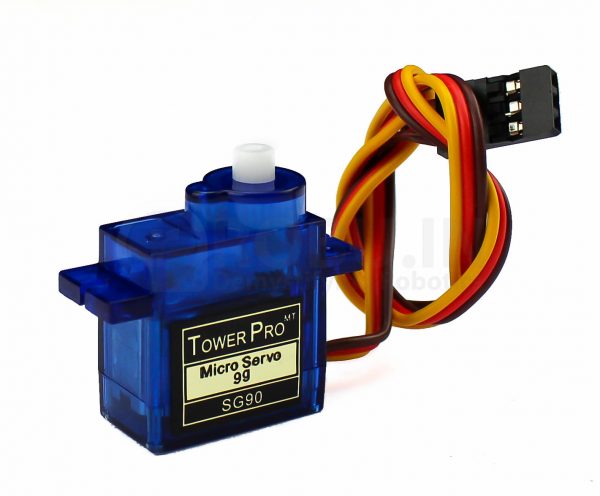
A servo motor SG90 project is a useful way to learn basic position control. The motor contains its own control electronics, so an Arduino sends a command signal rather than powering the motor through a digital pin. Stable power and careful mechanical setup matter as much as the sketch.
This guide uses an Uno-compatible board and a standard positional SG90-style servo. Check your exact model before wiring: a continuous-rotation replacement will not follow angle commands in the same way.

1. Check the SG90 package and ratings
The SG90 micro servo listing describes a small 9 g servo with accessories. Confirm the supplied horn, screws, connector and permitted supply range on the actual product. Do not infer guaranteed authenticity or precise angular travel solely from a case label or a listing photograph.
For a first test, remove the external linkage or load. Leave enough cable slack for movement. A small servo can still pinch fingers or strip gears if the horn strikes a rigid stop, so keep the bench clear and make power easy to disconnect.
2. Identify signal, supply and ground
SG90-style leads commonly use brown for ground, red for positive supply and orange for signal, but colour conventions are not a substitute for checking the exact unit. A reversed supply can damage the servo. Identify the connector order before applying power.
| Servo connection | Destination |
|---|---|
| Signal | Uno D9 |
| Positive supply | Suitable regulated external supply within the servo rating |
| Ground | External supply ground and Uno GND |
3. Use appropriate external power
For a servo explicitly rated for it, a regulated 5 V source is a common bench choice. Size it for the real current demand, including starts and load changes. The signal wire carries control information, not motor power. Avoid powering a servo from a GPIO or assuming a controller regulator can safely supply every moving load.
Join the grounds to give the signal a shared reference. Keep the external positive rail separate from the Uno’s 5 V pin unless you have deliberately designed and verified that power arrangement. Do not connect two independent positive supplies together by accident through breadboard rails.
Newest in the store


4. Try a restrained Arduino example
#include <Servo.h>
Servo arm;
void setup() {
  arm.attach(9);
  arm.write(90);
  delay(1000);
}
void loop() {
  arm.write(60);
  delay(1000);
  arm.write(90);
  delay(1000);
  arm.write(120);
  delay(1000);
}
Install or enable the Arduino Servo library for your selected board if necessary. This example requests three moderate positions instead of repeatedly driving to the endpoints. The numeric command is an approximate target, not evidence that the physical shaft reaches an exactly calibrated angle.
5. Centre before fitting the horn
Let the unloaded servo move to its centre command, then remove power before installing the horn as required by your mechanism. Recheck clearance across the intended motion. Do not force the output shaft by hand to find endpoints or use software commands to push against a mechanical obstruction.
Expand the travel gradually only after you understand the actual unit’s limits. Some products differ in pulse range or physical rotation. A sketch requesting 180 degrees does not establish that every servo can safely move through that full range.
6. Diagnose jitter and resets methodically
If the Uno restarts when the servo moves, suspect a supply dip or wiring problem before changing the library. Check ground continuity, supply rating and connector fit. If the servo buzzes while stationary, remove the load and inspect whether the mechanism is binding. Continued stall operation is not a valid way to measure available torque.
Do not add a large capacitor as a substitute for an undersized supply. Any decoupling must have correct polarity and voltage rating and belongs within an otherwise sound power design. A noisy or unstable control setup should be fixed before attaching a valuable payload.
7. Choose the right next step
Compare alternatives in the servo motor price in Pakistan guide if the SG90 is too small or the required operating mode differs. Arduino’s official servo guide and Servo library documentation provide useful references. This introductory sketch does not include feedback for confirming the actual load position or protection for a safety-critical mechanism.