


I2C OLED Display: Arduino Wiring and SSD1306 Code

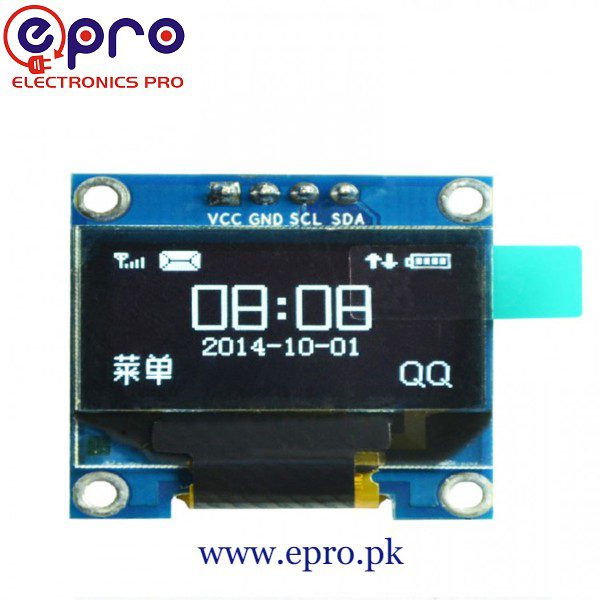
An I2C OLED display needs only two signal lines alongside power and ground, making it useful for a small Arduino status screen. A successful first test still depends on the exact controller, resolution, bus voltage and address. Four pins alone do not guarantee that every module runs the same sketch.
This guide uses a compatible 128 × 64 SSD1306 I2C module such as the Epro four-pin OLED listing and a conventional Arduino Uno. It is starter code, not a claim that the supplied module has been independently tested.

1. Check the I2C OLED display variant
Confirm SSD1306, 128 × 64 resolution and the four labelled connections on the actual board. A 128 × 32 screen needs different dimensions in the constructor. A controller such as SH1106 needs appropriate software support, and a seven-pin SPI module does not use this wiring.
Read the module’s voltage requirements before connecting it. The reference listing supports a supply range including 5 V, suitable for this specific Uno example. A different module or a 3.3 V controller requires a separate check of both supply and bus pull-up voltage.
2. Connect the Uno with power removed
| Display pin | Uno connection |
|---|---|
| GND | GND |
| VCC | 5 V only for a module rated for it |
| SDA | A4 / SDA |
| SCL | A5 / SCL |
Verify the board labels because some displays reverse the physical order of power and ground. Keep wires short for the initial test. On other Arduino models, the hardware I2C pins can differ; do not reuse A4 and A5 without checking the controller documentation.
3. Install libraries and confirm the address
Install Adafruit SSD1306 and Adafruit GFX through Library Manager, accepting required dependencies. The official library repository documents supported displays. Use an I2C scanner or the exact module documentation to establish the address before relying on an example.
The sketch below uses 0x3C as a common example, not a guaranteed address for every board. If your verified address differs, change OLED_ADDRESS. An address response confirms that a device is present; it does not prove that the selected display controller and dimensions are correct.Newest in the store


4. Upload a minimal SSD1306 example
#include <Wire.h>
#include <Adafruit_GFX.h>
#include <Adafruit_SSD1306.h>
const byte OLED_ADDRESS = 0x3C; // Verify for your module
Adafruit_SSD1306 display(128, 64, &Wire, -1);
void setup() {
  Serial.begin(9600);
  if (!display.begin(SSD1306_SWITCHCAPVCC, OLED_ADDRESS)) {
    Serial.println("Display initialization failed");
    while (true) { delay(100); }
  }
  display.clearDisplay();
  display.setTextSize(1);
  display.setTextColor(SSD1306_WHITE);
  display.setCursor(0, 0);
  display.println("Epro OLED test");
  display.println("SSD1306 128x64");
  display.display();
}
void loop() {
}
The minus-one reset argument assumes a module without a separately controlled reset line. Follow the exact hardware’s reset requirements if that is not your arrangement. The example draws into a memory buffer, and display.display() sends that buffer to the screen. Printing alone is not enough to refresh it.
5. Diagnose a blank or distorted screen
Check power polarity, SDA/SCL labels and the detected address first. Then verify the controller and resolution. If the screen shows shifted or missing columns, suspect an incompatible driver rather than assuming the glass is broken. Disconnect power before changing wires.
If initialization fails only after combining projects, inspect memory use. A 128 × 64 monochrome frame buffer takes 1,024 bytes before other overhead. Large bitmaps and extra libraries can exhaust a small controller’s available SRAM even when the wiring is correct.
6. Add live values without hiding failures
Once text works, clear or overwrite the appropriate area before drawing a new value and call display.display() after the update. Label stale or invalid sensor readings instead of showing the last valid value as fresh. For a first sensor integration, the soil moisture raw-reading guide provides a simple independent test.
7. Expand only after the basic test is repeatable
Check for address conflicts before adding another I2C device. A DS3231 RTC can share a correctly designed bus, but module voltage and pull-ups still need checking. For product selection and the important differences between display listings, use the OLED display module buying guide.