


DS3231 with Arduino: Wiring, Time Setting and 7 Checks

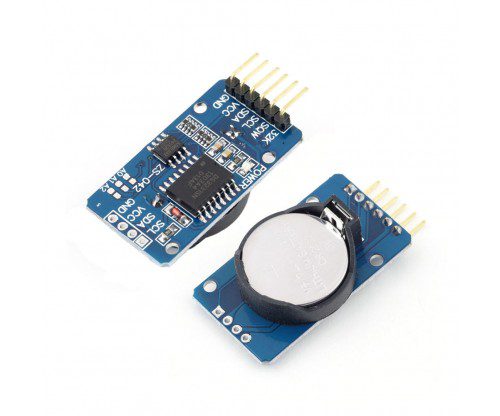
A DS3231 with Arduino project can keep calendar time while the controller performs other tasks. Before adding a display or data logger, prove that the controller can communicate with the RTC and read a sensible date. A battery-backup test comes later, after the module’s battery circuit is verified.
This guide uses an Uno-compatible controller and the basic DS3231-style RTClib interface. The Epro RTC module listing mixes DS3231 and DS3231M wording, so confirm the actual supplied chip and its documentation rather than assuming one variant’s precision specifications apply to another.

1. Check the DS3231 with Arduino hardware
Inspect VCC, GND, SDA and SCL labels on the actual board. Confirm its supported supply range and I2C pull-up arrangement. This example uses a module explicitly rated for 5 V with a conventional Uno; a 3.3 V controller needs a separate review of bus voltage.
Leave any coin cell out during the initial test. Some low-cost RTC modules include a charging path, and a primary CR2032 must never be charged. A holder size or an ambiguous product description is not enough to establish safe battery chemistry.
2. Connect the I2C bus without power
| RTC pin | Uno connection |
|---|---|
| VCC | 5 V only if the actual module is rated for it |
| GND | GND |
| SDA | A4 / SDA |
| SCL | A5 / SCL |
Leave optional square-wave and clock-output pins disconnected for this demonstration. The RTC commonly uses I2C address 0x68; a module can also carry a separate EEPROM at another address. Detecting the EEPROM alone does not prove that the clock chip is communicating.
3. Install RTClib and understand initial time setting
Install Adafruit RTClib and its required dependencies using Library Manager. The official DS3231 example shows the lost-power check and adjustment call. Use the correct RTC class for the verified hardware.
The starter sketch below uses compilation time only when the clock reports lost power. Compilation time is approximate and depends on the computer’s clock and upload delay. For accurate timestamps, set a verified reference time deliberately through an appropriate one-time procedure.Newest in the store


4. Upload a basic time-reading sketch
#include <Wire.h>
#include <RTClib.h>
RTC_DS3231 rtc;
void setup() {
  Serial.begin(9600);
  if (!rtc.begin()) {
    Serial.println("RTC not found");
    while (true) { delay(100); }
  }
  if (rtc.lostPower()) {
    rtc.adjust(DateTime(F(__DATE__), F(__TIME__)));
    Serial.println("Approximate compile time set; verify it");
  }
}
void loop() {
  DateTime now = rtc.now();
  Serial.print(now.year()); Serial.print('-');
  Serial.print(now.month()); Serial.print('-');
  Serial.print(now.day()); Serial.print(' ');
  Serial.print(now.hour()); Serial.print(':');
  Serial.print(now.minute()); Serial.print(':');
  Serial.println(now.second());
  delay(1000);
}
Open Serial Monitor at 9600 baud. The simple output is not zero-padded and does not embed timezone information. Decide whether your application stores UTC or a documented local time convention; the RTC itself does not manage daylight-saving rules or know the user’s location.
5. Do not reset the clock on every boot
Calling rtc.adjust() unconditionally would repeatedly overwrite the stored time, often with an old compilation timestamp. The lost-power check avoids that particular mistake, but does not prove that a running clock is correct. Verify the displayed date and compare it with a trusted reference after setup.
6. Verify backup only with an approved battery
After confirming the board’s battery circuit and approved chemistry, install the appropriate cell according to its instructions with power removed. Set a known time, remove the main supply for a measured interval and then compare the reading after restoring power. Do not assume the battery can power the entire Arduino or display.
If time resets, inspect battery compatibility, polarity, contact and module condition rather than continuously rewriting the clock and hiding the fault. A long-term drift assessment needs a longer observation period than one brief unplugging test.
7. Add displays and logging gradually
A compatible I2C OLED display can share the bus when addresses, voltage and pull-ups are appropriate. Add it after the RTC works independently. For selection limits and variant differences, read the DS1307 vs DS3231 comparison. This example does not make a hobby RTC a secure or independently verified timestamp source.