


MPU6050 Code: ESP32 Wiring and 7 Reading Checks

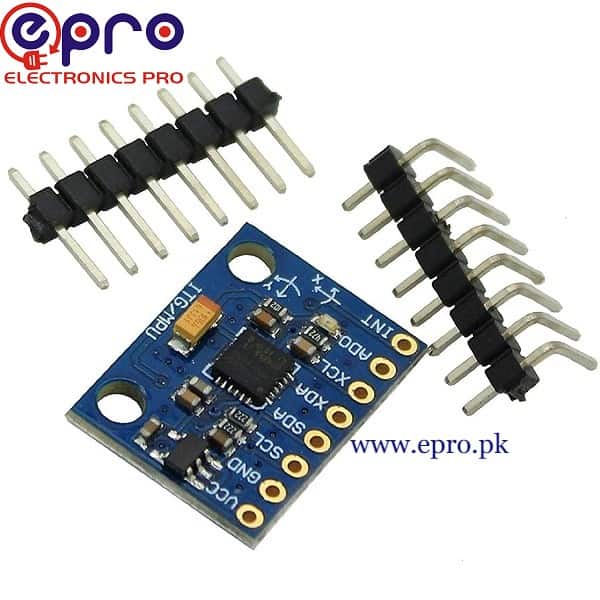
MPU6050 code is most useful when the first sketch makes the units and limitations clear. Acceleration is not automatically tilt, and angular rate is not automatically a compass heading. Begin with repeatable sensor readings before adding a complex motion algorithm.
This example uses a compatible GY-521-style module and a classic ESP32-WROOM-style development board. Check the actual module’s voltage arrangement and your controller’s available pins. It is a learning demonstration, not a tested flight controller or stabilization system.

1. Check the MPU6050 code hardware assumptions
The Epro MPU6050 listing describes a module supply range including 3.3 V. Use a compatible 3.3 V arrangement for this example and verify the actual board’s markings. Do not assume that an onboard regulator also makes every signal pin 5 V tolerant.
With power removed, connect module VCC to the supported 3V3 supply, GND to GND, SDA to GPIO21 and SCL to GPIO22. These pin choices are for a conventional ESP32 board, not every ESP32-C3 or ESP32-S3 model.
2. Verify the I2C configuration
The example uses the common 0x68 address. If the actual module is configured for 0x69, change the initialization address after verifying its address-pin arrangement. An I2C scanner is a diagnostic aid, not proof that an arbitrary responding device is the expected sensor.
Confirm that bus pull-ups use a safe voltage. Leave optional interrupt and auxiliary connections unused for this polling test unless the actual board documentation requires another connection. Avoid floating configuration inputs where the board does not already define them.
3. Install the library and dependencies
Install Adafruit MPU6050, Adafruit BusIO and Adafruit Unified Sensor through Library Manager. Select the correct ESP32 board package. The official basic-readings example documents the event fields and units used below.
Newest in the store


4. Upload a physical-unit reading sketch
#include <Wire.h>
#include <Adafruit_MPU6050.h>
#include <Adafruit_Sensor.h>
Adafruit_MPU6050 mpu;
void setup() {
  Serial.begin(115200);
  Wire.begin(21, 22);
  if (!mpu.begin(0x68, &Wire)) {
    Serial.println("MPU6050 not found");
    while (true) { delay(100); }
  }
  mpu.setAccelerometerRange(MPU6050_RANGE_8_G);
  mpu.setGyroRange(MPU6050_RANGE_500_DEG);
  mpu.setFilterBandwidth(MPU6050_BAND_21_HZ);
}
void loop() {
  sensors_event_t a, g, t;
  mpu.getEvent(&a, &g, &t);
  Serial.print("Accel m/s^2: ");
  Serial.print(a.acceleration.x); Serial.print(", ");
  Serial.print(a.acceleration.y); Serial.print(", ");
  Serial.println(a.acceleration.z);
  Serial.print("Gyro rad/s: ");
  Serial.print(g.gyro.x); Serial.print(", ");
  Serial.print(g.gyro.y); Serial.print(", ");
  Serial.println(g.gyro.z);
  delay(500);
}
Open Serial Monitor at 115200 baud. Range-setting names may use degrees per second, while the library’s event output is in radians per second. Keep those distinct when comparing a graph, threshold or calculation. The acceleration event is in metres per second squared.
5. Check stationary behaviour before movement
Place the module on a stable surface. A stationary accelerometer is not expected to report zero on every axis because it senses gravity. Slowly rotate the board through known orientations and observe how that component moves among axes.
A stationary gyroscope may show a small nonzero bias and noise. Do not label a few decimal places as evidence of equivalent accuracy. Record stable observations and investigate board movement, vibration or heating before choosing a correction method.
6. Keep rate, angle and position separate
Integrating angular rate can estimate an angle change, but bias produces drift. The MPU6050 has no built-in magnetometer, so it does not independently provide an absolute compass bearing. Accelerometer readings during movement also include motion effects, not just gravity.
This starter sketch intentionally avoids claiming a reliable orientation or position solution. Any balancing robot or other moving system needs a separate control and safety design, appropriate filtering and validation beyond a serial-monitor demonstration.
7. Diagnose and expand systematically
If initialization fails, check power, address, SDA/SCL labels and the selected controller pins before replacing the module. Keep connections short and secure. Review the MPU6050 buying guide for axis and voltage limits. If adding another I2C sensor such as a BMP280, check address compatibility, pull-ups and shared-pin use before combining the circuits.