


BMP280 Pinout: ESP32 Wiring and Pressure Sensor Code

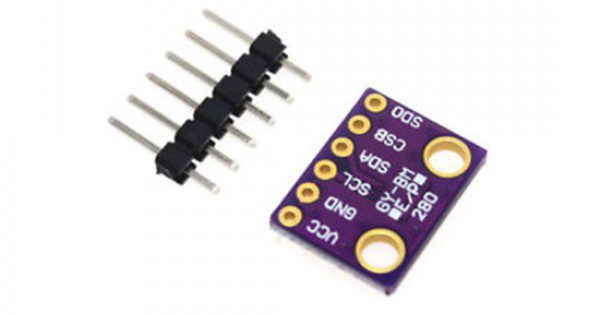
The BMP280 pinout must be checked on the actual breakout, not inferred from the chip name alone. Modules can expose different interfaces and arrange power pins differently. A careful first test reads pressure and temperature without trying to turn those values into a guaranteed altitude.
This guide uses a conventional ESP32-WROOM-style development board and a compatible low-voltage BMP280 module. Other ESP32 families can use different pins. It is starter code rather than a tested weather station or calibrated measuring instrument.

1. Confirm the BMP280 pinout and voltage
The Epro BMP280 listing gives a 1.71–3.6 V supply range. Use a suitable 3.3 V arrangement and verify the actual board markings. Do not apply 5 V simply because a different branded breakout in another tutorial supports it.
For this example, connect module ground to ESP32 GND, its rated supply input to 3V3, SDA to GPIO21 and SCL to GPIO22. These are the chosen pins for a classic ESP32 board, not universal defaults for every controller model.
2. Define interface and address pins
If the breakout exposes CSB, the BMP280 requires the documented I2C configuration, including a defined high CSB state. If it exposes SDO, connect it as specified for the intended address: low selects 0x76 and high selects 0x77. The Bosch datasheet warns against leaving SDO floating.
Some modules already make those connections internally. Check the exact circuit before adding wires or solder bridges. Confirm that SDA and SCL are pulled up to a safe logic voltage; do not add a second arbitrary set of resistors without considering those already on the bus.
3. Install the correct driver
Install Adafruit BMP280 Library and its required dependencies through Library Manager. Select the correct ESP32 board package. The official library repository documents the API used here.
This library is for the BMP280. A different device at a familiar I2C address does not become compatible just because the address responds. If the module turns out to contain another chip, use the appropriate driver and its documented wiring.Newest in the store


4. Upload pressure and temperature code
#include <Wire.h>
#include <Adafruit_BMP280.h>
Adafruit_BMP280 bmp;
void setup() {
  Serial.begin(115200);
  Wire.begin(21, 22);
  if (!bmp.begin(0x76) && !bmp.begin(0x77)) {
    Serial.println("BMP280 not found; check wiring and chip");
    while (true) { delay(100); }
  }
}
void loop() {
  Serial.print("Temperature C: ");
  Serial.println(bmp.readTemperature(), 2);
  Serial.print("Pressure hPa: ");
  Serial.println(bmp.readPressure() / 100.0f, 2);
  delay(1000);
}
Open Serial Monitor at 115200 baud. The example tries the two documented addresses, while the driver checks the expected device. The library pressure result is in pascals, so division by 100 produces hectopascals. Two printed decimal places do not establish equivalent measurement accuracy.
5. Diagnose missing or implausible data
If initialization fails, inspect power, ground, SDA/SCL labels and configuration pins with power removed before changing connections. Use an I2C scanner as one diagnostic step, not as proof of sensor identity. Short, stable wiring is preferable for the initial test.
If pressure seems wrong by a large factor, check the units first. If it differs from a weather app, determine whether that app displays sea-level-adjusted pressure while your sensor reports local station pressure. Those values are not directly interchangeable.
6. Avoid false humidity or altitude claims
A BMP280 measures pressure and temperature, not humidity. An altitude estimate also depends on a suitable reference pressure and changes with weather. This sketch intentionally prints the measured quantities instead of presenting a fixed-assumption calculation as a reliable elevation.
Keep the sensor away from avoidable board heating when assessing temperature. Do not block or contaminate the pressure port, and protect the electronics from liquids without unintentionally isolating the sensor from ambient pressure.
7. Expand the bus carefully
Before adding a display or another sensor, check addresses, pull-up voltage and shared-pin use. The BMP280 buying guide covers interface and measurement limits. Consult the Bosch datasheet for the electrical requirements of a complete design.