


Rotary Encoder KY-040: 7 Checks Before Buying

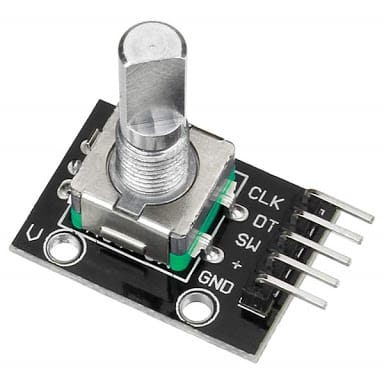
A rotary encoder can provide a compact turn-and-select input for a project menu or adjustable setting. The common KY-040 module is an incremental mechanical input, not an absolute angle instrument or a complete motor-positioning system.
Choosing it well means understanding the two pulse signals, push switch and software counting. This guide focuses on a low-voltage user-interface project and does not claim industrial durability or independently measured rotation accuracy.

Rotary encoder module price and scope
| Listed item | Price (PKR) | Project role |
|---|---|---|
| Rotary Encoder Sensor KY040 Module Brick Sensor | 145 | KY-040 mechanical incremental encoder module |
Price snapshot: Epro listings checked on 18 October 2026. Confirm the current price, availability, delivery charges and package quantity on the linked page before ordering. These are dated listing prices, not a quotation or an independent performance test.
The KY-040 module listing describes a compact encoder board. Check the actual pin labels, mounting arrangement and supplied parts before planning an enclosure. A small user-input encoder should not be assumed suitable for every shaft speed, vibration level or environmental condition.
1. Distinguish an encoder from a potentiometer
A potentiometer produces a position-related analog voltage within a finite mechanical travel. An incremental encoder instead produces transitions on two digital channels as the shaft turns. Software can infer relative movement and direction from their sequence.
Those are different interfaces. Connecting an encoder channel to an analog input and treating its reading as a calibrated angle does not decode rotation correctly. Decide whether the project needs a relative menu knob or a physical position value before ordering the hardware.
2. Separate incremental and absolute position
An incremental count begins from a software-defined reference. After power loss, the controller does not inherently know the previous physical shaft angle. An absolute encoder is a different type of device designed to represent position directly within its stated measurement arrangement.
For a menu, resetting a relative count at startup may be acceptable. For a machine axis, reference finding, travel limits and failure handling are separate engineering requirements. Do not present a hobby input module as an independent safety or position-verification system.
3. Understand the two quadrature channels
The channel names often appear as CLK and DT on a KY-040 board. Their phase relationship lets a decoder determine direction. A separate SW connection is normally associated with pressing the shaft, not with a third rotation channel.
Newest in the store


The PJRC Encoder library documentation explains transition counting and the benefit of suitable interrupt pins. Software choice matters: simply counting one edge of one channel is not equivalent to a full quadrature decoder.
4. Do not equate detents and library counts
A tactile click is a mechanical feature. Electrical cycles, transitions, counts and detents are not interchangeable units. The product listing’s resolution terminology needs to be interpreted alongside the actual signal pattern and the software’s decoding method.
A four-times decoder can report several transitions for one electrical cycle. Observe a slow turn on the actual module before deciding how many counts should advance a menu item. Do not advertise a universal one-count-per-click result from a generic library example.
5. Match voltage and controller inputs
For a conventional Uno bench test, use an appropriately rated module and logic arrangement. On a different controller, inspect the pull-ups and ensure the output signals remain within its GPIO limits. A supply label alone does not establish compatibility with every 3.3 V board.
Disconnect power when wiring and verify ground before signal testing. The output channels are digital inputs to the controller, not outputs that can directly drive a motor. An actuator needs its own suitable driver and power design.
6. Plan for bounce and missed movement
Mechanical contacts can bounce, and fast movement or blocked interrupts can cause decoding problems. A demonstration that works with slow turns is not proof that it will capture every transition at high speed or while other libraries disable interrupts.
Use short connections and an appropriate decoder first. If menu values jump, distinguish contact behaviour, wiring faults and software scaling instead of immediately dividing the count by an assumed constant. Apply bounds to any adjustable setting before it is used elsewhere.
7. Prototype before designing the panel
Follow the rotary encoder Arduino wiring and code guide to observe the raw transition count on a conventional Uno. Confirm direction, button behaviour and the actual count per detent before building a finished menu. Check shaft clearance, cap fit and mounting support on the physical module rather than relying on a generic drawing.