


Rotary Encoder Arduino: Wiring, Code and 7 Checks

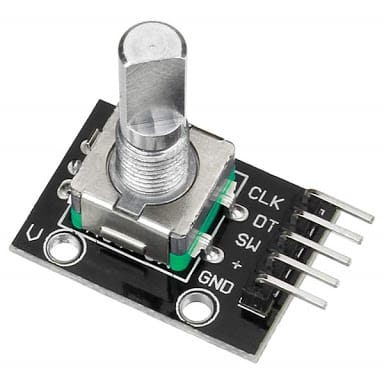
A rotary encoder Arduino test should first show how the raw count changes while the knob turns slowly. That establishes the electrical direction and counting behaviour before the input is connected to a menu or adjustable output.
This example uses a conventional 5 V Uno-compatible board, a compatible KY-040 module and Paul Stoffregen’s Encoder library. It does not convert the knob into an absolute angle sensor or guarantee accurate counting at an unspecified high speed.

1. Identify the module connections
Inspect the actual KY-040 module for CLK, DT, SW, supply and ground labels. CLK and DT are the two incremental channels. SW is a separate push-button connection and is not needed for the first rotation-only test.
Check the module’s supply and pull-up arrangement. The Uno test below must not be copied unchanged to a 3.3 V-only controller with 5 V signal pull-ups. Disconnect USB before fitting or moving the wires.
2. Wire the rotary encoder Arduino test
| KY-040 signal | Conventional Uno destination |
|---|---|
| GND | GND |
| Supply / + | 5 V for an appropriately rated module |
| CLK | D2 |
| DT | D3 |
| SW | Leave unconnected for this rotation-only example |
On a conventional Uno, pins 2 and 3 support the interrupts used for the library’s best counting arrangement. Other controllers have different capabilities and pin mappings. Consult the library’s board table rather than assuming those numbers are universal.
3. Install the Encoder library
Install Encoder by Paul Stoffregen through Arduino Library Manager. The library documentation explains supported pins, reading the accumulated count and four-times decoding. Select the correct board and port before uploading.
This decoder tracks transitions of the two-channel signal. The first program deliberately prints the raw accumulated value without converting it into degrees or dividing it into menu steps. Those conversions depend on the actual encoder and intended interface.
4. Upload a change-only count example
#include <Encoder.h>
Encoder knob(2, 3);
long previous = 0;
void setup() {
  Serial.begin(9600);
  knob.write(0);
  Serial.println("Turn the knob slowly");
}
void loop() {
  long current = knob.read();
  if (current != previous) {
    Serial.print("Raw count: ");
    Serial.println(current);
    previous = current;
  }
}
Open Serial Monitor at 9600 baud. Turn several detents in one direction and then reverse. The program prints only when the observed value changes, which keeps the serial output simpler than continuously repeating an unchanged reading.
Newest in the store


5. Establish direction and count per detent
Record how the value changes during a slow, deliberate movement. Reversing the order of the two constructor pins reverses the decoded sign. Choose the sign convention that matches the final enclosure and user interface.
Do not assume one raw count equals one tactile click. The library uses four-times transition counting, while the relationship between electrical cycles and detents depends on the hardware. Establish that relationship experimentally before scaling a menu value.
The write(0) call resets the software count. It does not rotate the shaft, locate a mechanical zero or create absolute angle knowledge. After a restart, this sketch begins from a new relative reference.
6. Diagnose jumps without hiding the fault
If slow motion gives unexpected jumps, inspect common ground, short connections and the actual module outputs. Mechanical bounce and poor contacts can affect readings. Adding an arbitrary division factor can hide symptoms without proving that the signal is decoded reliably.
Keep interrupts available. Long interrupt-blocking operations in other code can make transitions disappear. The library documentation warns that missed transitions can corrupt the count; this simple bench sketch is not evidence of reliable high-speed machine feedback.
7. Add the button and application bounds separately
For a later button test, verify the switch wiring and use an appropriate input pull-up and debounce method. Detect a stable press event rather than repeatedly acting while the shaft is held down. Keep that behaviour separate from rotation decoding during diagnosis.
Before an encoder changes an actual setting, constrain the resulting value to a safe application range. The rotary encoder buying guide explains incremental versus absolute position and why a menu knob should not be treated as a certified motion-control or safety device.