


TM1637 Display: 7 Checks Before Buying

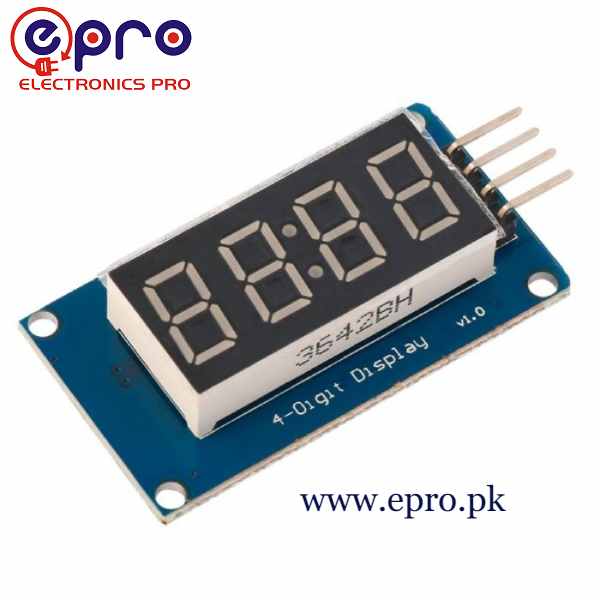
A TM1637 module is a compact way to display a short number using a four-digit seven-segment panel. It can suit a counter, timer readout or simple sensor value when a full character LCD would take more space than necessary.
The important limitations are also practical: there are only four digit positions, seven-segment characters are restricted, and the two signal wires do not make the module a conventional addressable I2C peripheral.

TM1637 display price and package
| Listed item | Price (PKR) | Project role |
|---|---|---|
| TM1637 4 Digit 7 Segment Module in Pakistan | 250 | Four-digit seven-segment display module |
Price snapshot: Epro listings checked on 18 October 2026. Confirm the current price, availability, delivery charges and package quantity on the linked page before ordering. These are dated listing prices, not a quotation or an independent performance test.
The Epro TM1637 listing specifies a 5 V module with CLK and DIO connections. Check the actual board photograph for its colon or decimal-point arrangement, mounting holes and connector order. A similar driver number does not guarantee identical visible punctuation.
1. Design the four-digit screen first
Write down the largest and smallest values the application must show, including any minus sign or decimal point. Four digits are not enough for every count or measurement. A display library cannot create extra physical positions when a value becomes too long.
Plan an overflow or error indication rather than allowing a truncated number to look valid. For a sensor readout, decide how units will be communicated; there may not be room to show both a detailed label and a four-digit value at the same time.
2. Verify colon and decimal-point hardware
Some modules are arranged for a clock-like central colon, while others expose decimal points in different positions. Examine the exact panel and library support. A software request to light a segment cannot illuminate an LED that is not present or connected in that module.
If a project depends on a decimal fraction, check its appearance before designing the enclosure label. A small colon can be mistaken for a decimal point at a distance, and arbitrary letters may be hard to distinguish on seven segments.
3. Understand the two-wire interface
CLK carries the clock signal and DIO carries bidirectional data. The protocol is I2C-like, but this module is not a standard I2C device with an address selected in a Wire scanner. Use a library specifically designed for the driver.
Newest in the store


The TM1637Display library allows the two signals to be assigned to suitable digital pins. Power and ground are additional connections, so a two-wire signal interface still normally means four physical wires for the complete module.
4. Match module supply and controller levels
The current listing describes a 5 V board. A conventional Uno provides a straightforward logic match for a small bench test, provided its power budget is checked. Do not assume that a 3.3 V controller can be connected directly to every 5 V module.
DIO is bidirectional and module pull-ups may be tied to the supply. Review both the permitted controller input voltage and the module’s logic requirements before changing platforms. A display that appears to work is not a measurement of safe voltage margins.
5. Separate brightness from the power budget
The library provides software brightness control. Starting at a low setting makes a bench test easier to view, but total supply demand still depends on illuminated segments and the board design. Never source the display’s supply from a GPIO pin.
Check the controller’s available power after including other peripherals. For a separate display supply, plan common ground and avoid casually joining its positive rail to another active supply. A finished battery-powered counter also needs a realistic duty-cycle and energy budget.
6. Choose a library with the required formatting
TM1637Display provides number display, raw segment control and brightness methods. Other similarly named libraries may have different class names and initialization calls. Follow one library’s instructions consistently rather than mixing fragments from several examples.
Raw segment access is useful for a small error pattern, but it is not a full text-rendering system. A countdown also needs timing logic outside the display driver. The module is not a real-time clock and does not retain the current time by itself when power is removed.
7. Prove a fixed number before a clock
Follow the TM1637 Arduino wiring and code guide to display a simple count on a conventional Uno. Confirm all positions, brightness and connector labels first. If actual clock time is required, use an appropriate time source and deliberately handle resets rather than treating a display update delay as a precision clock.