


Buzzer Code in Arduino: Safe 5 V Active-Buzzer Guide

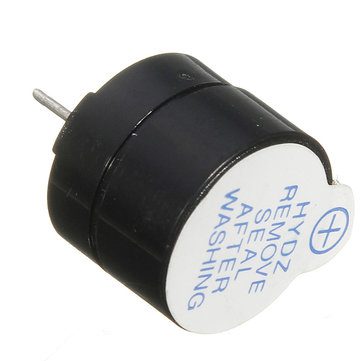
This buzzer code in Arduino example switches a 5 V active sounder on and off through a transistor. The buzzer’s own oscillator creates its tone, so the controller only needs to decide when the supply current should flow.
The circuit is for a conventional 5 V Uno-compatible board and a small documented active buzzer. It is not a passive-speaker melody circuit, a calibrated sound-level test or a certified emergency alarm.

1. Identify the active sounder and current
The 5 V active buzzer listing specifies a maximum rated current of 30 mA. Do not treat that as an automatic safe direct-GPIO load. This example uses an NPN transistor to switch the sounder current separately.
Check the buzzer polarity and actual transistor package. Parts sold as 2N2222, PN2222 or related variants can have different lead arrangements. Identify base, collector and emitter from the exact part documentation before fitting the circuit.
2. Build the low-side switching circuit
| Connection | Test arrangement |
|---|---|
| Buzzer positive | Appropriate regulated 5 V supply |
| Buzzer negative | NPN collector |
| NPN emitter | Ground |
| Uno D9 | 1 kΩ resistor to NPN base |
| Base pull-down | 10 kΩ between base and emitter |
| Ground reference | Supply ground and Uno GND |
Use an NPN transistor rated appropriately for the sounder’s current, voltage and dissipation. The resistor values are a starter arrangement for this small 5 V load, not a universal driver design for a large siren. Check saturation and current requirements for the actual parts.
If the sounder is an electromagnetic load requiring flyback protection, provide an appropriately rated suppression diode across it, cathode to positive and anode to the collector side. Identify the load rather than assuming all buzzers are electrically identical.
3. Review power before uploading
Assemble with power disconnected. With an external buzzer supply and USB-powered Uno, share ground but do not casually parallel the positive supply outputs. Ensure the transistor is wired correctly before using software to turn it on.
The Freenove buzzer guide illustrates why a driver may be needed instead of sourcing load current from GPIO. A working short beep does not prove an incorrectly wired transistor will remain safe during prolonged use.Newest in the store


4. Upload the buzzer code in Arduino
const byte BUZZER_CONTROL = 9;
void setup() {
  digitalWrite(BUZZER_CONTROL, LOW);
  pinMode(BUZZER_CONTROL, OUTPUT);
}
void loop() {
  digitalWrite(BUZZER_CONTROL, HIGH);
  delay(150);
  digitalWrite(BUZZER_CONTROL, LOW);
  delay(1850);
}
With the described NPN low-side circuit, HIGH turns the transistor on and LOW turns it off. The sketch requests a short beep followed by a longer pause. No extra library or tone call is required for this active sounder.
5. Interpret active and passive behaviour
If the part only clicks briefly when switched, confirm whether it is actually passive. A passive transducer needs an alternating drive signal to sustain a tone. Do not repeatedly increase voltage to imitate the missing oscillator.
Conversely, applying different tone frequencies to an active buzzer is not a reliable way to make a melody. The oscillator inside the device largely determines its pitch; this circuit’s purpose is deliberate on/off indication.
6. Diagnose wiring and startup states
If the buzzer stays on, inspect the transistor pinout, base wiring and pull-down. If it never sounds, check polarity, supply, shared ground and the path through the collector and emitter. Stop on unexpected heating.
Keep the sounder away from ears and use brief tests. The software delays block other work, so a responsive multi-input application would normally replace them with a suitable non-blocking timing design.
7. Keep the finished application honest
This example provides no independent fault monitoring or guaranteed audible warning performance. The buzzer buying guide covers voltage, current and sound-level limitations. Use appropriately specified equipment for any alarm whose failure could cause harm.