


Joystick Module Arduino: Wiring, Code and 7 Checks

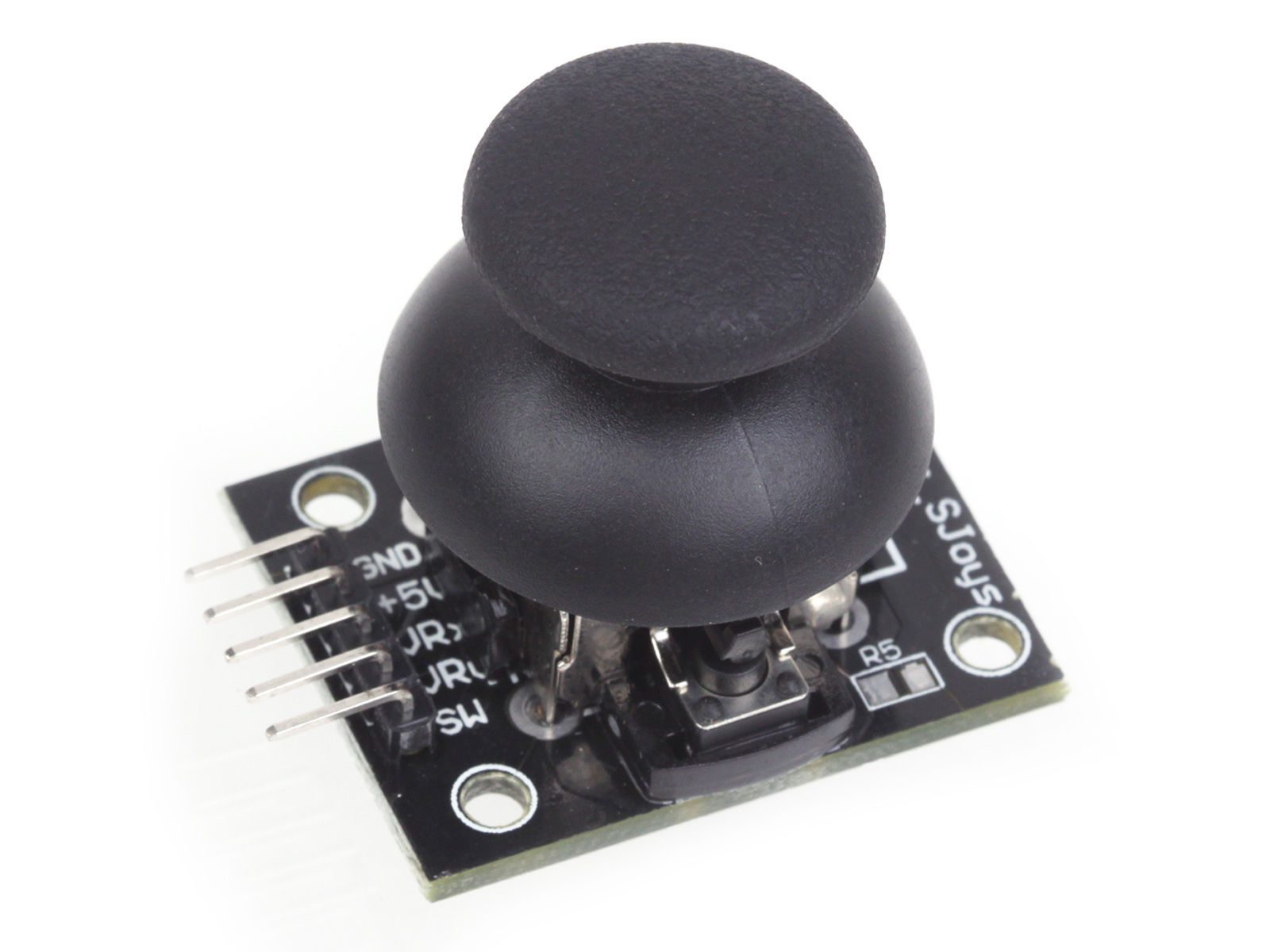
A joystick module Arduino test should begin with raw axis values and a clearly labelled button state. That makes it possible to verify the wiring before the values are used for a menu, animation or robot command.
This tutorial uses a conventional 5 V Uno-compatible board and the KY-023 analog module. It does not operate a motor, claim calibrated angles or turn the board into a USB game controller. Those are separate projects with additional requirements.

1. Identify the five module labels
Find GND, supply, VRx, VRy and SW on the actual KY-023 module. Board orientation and connector order can differ. Work from labels rather than applying a pin sequence copied from a photograph viewed from another side.
The two VR signals are analog outputs from potentiometers. SW is a mechanical button connection. They need different input configurations, even though all three eventually become numbers or states in a program.
2. Wire the joystick module Arduino circuit
| KY-023 label | Conventional Uno connection |
|---|---|
| GND | GND |
| Supply / 5V | 5 V for the rated module |
| VRx | A0 |
| VRy | A1 |
| SW | D2, configured with INPUT_PULLUP |
Disconnect USB while assembling the wiring. Confirm that the module switch connects SW to ground when pressed before relying on active-low behaviour. The internal pull-up provides a defined idle state for this arrangement.
This 5 V analog circuit is not safe direct-wiring advice for a 3.3 V-only ADC. Check the controller and module electrical requirements again if changing platforms; a pin-name substitution does not change the output voltage.
3. Upload a raw-input example
const byte X_PIN = A0;
const byte Y_PIN = A1;
const byte BUTTON_PIN = 2;
void setup() {
  Serial.begin(9600);
  pinMode(BUTTON_PIN, INPUT_PULLUP);
}
void loop() {
  int x = analogRead(X_PIN);
  int y = analogRead(Y_PIN);
  bool pressed = digitalRead(BUTTON_PIN) == LOW;
  Serial.print("X="); Serial.print(x);
  Serial.print(" Y="); Serial.print(y);
  Serial.print(" button=");
  Serial.println(pressed ? "pressed" : "released");
  delay(100);
}
Open Serial Monitor at 9600 baud. No additional joystick library is required for these basic analogRead and digitalRead calls. The delay keeps the display readable; it is not a precision sampling schedule or a debounce algorithm.
4. Measure the actual center and travel
Leave the stick untouched and note the range of resting readings. Then move it slowly to each end of travel. A conventional Uno’s ADC returns values on a 0–1023 scale, but the module need not reach both limits or center at exactly 512.Newest in the store


Record observations for each axis separately. A mechanical offset is not fixed by merely printing a percentage. If later mapping to a command range, use the observed minimum, center and maximum appropriately and constrain the output to the intended limits.
5. Check direction and build a deliberate deadband
Decide what left, right, forward and backward mean after the module is mounted. Rotation of the board changes the physical interpretation, and a project’s preferred axis direction may be opposite to the raw voltage trend. Verify it rather than swapping supply wires.
For a later control sketch, subtract the measured center and ignore a small range around zero. Choose that deadband from actual resting variation. It should suppress drift without hiding useful movement; one arbitrary threshold is not a calibration procedure for all joysticks.
6. Handle the button as a separate input
The example prints the current button state repeatedly. A press can therefore appear on many lines, and mechanical bounce may cause brief transitions. If the eventual interface needs one action per press, add a suitable debouncer and detect a stable state change.
Do not use a raw LOW reading to repeatedly trigger a consequential action. Test the button logic independently before combining it with a menu or actuator. A held button and a newly pressed button are different events in an interactive program.
7. Keep the next project within its limits
Inspect loose wires and supply stability if readings jump unexpectedly. Filtering can help a noisy signal but cannot correct an incorrectly connected output. The joystick module buying guide explains analog-controller compatibility and why a motor driver, external ADC or HID-capable platform may be needed for a different application.