


IR Sensor Price in Pakistan: 7 Obstacle-Module Checks

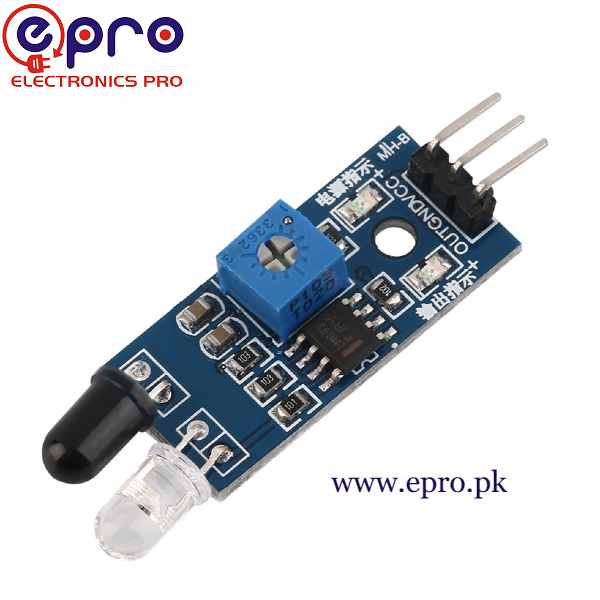
An IR sensor price in Pakistan search can return several different kinds of hardware. A reflective obstacle module, a remote-control receiver and a passive motion detector do not measure the same thing, even though all may be described using the word infrared.
This guide focuses on the low-voltage reflective obstacle module used in educational robotics. Choosing by function first helps avoid buying a cheaper-looking part that needs a different circuit or cannot perform the intended detection task.

IR sensor price in Pakistan and different interfaces
| Listed item | Price (PKR) | Project role |
|---|---|---|
| IR Sensor, IR Obstacle Detection Sensor Module in Pakistan | 110 | Three-wire reflective obstacle-detection module |
| TCRT5000 Reflective optical IR sensor in Pakistan | 100 | TCRT5000 optical sensor listing; not an identical complete module |
| HX1838 IR Infrared Receiver Module in Pakistan | 95 | HX1838 remote-control receiver module; a different purpose |
Price snapshot: Epro listings checked on 18 October 2026. Confirm the current price, availability, delivery charges and package quantity on the linked page before ordering. These are dated listing prices, not a quotation or an independent performance test.
The obstacle module listing describes VCC, GND and a digital output with adjustable threshold. The TCRT5000 listing provides little interface detail, while the HX1838 receiver is intended for a different kind of infrared signal. Do not compare their prices as though they are interchangeable finished sensors.
1. Distinguish reflection from passive motion sensing
A reflective module emits infrared light and looks for a returned signal from a nearby target. A PIR motion sensor instead responds to changes in infrared radiation across its sensing zones. Neither should be selected solely because a project description says IR.
A remote-control receiver is another category: it is designed to receive an appropriately modulated signal rather than continuously illuminate and detect an obstacle. Confirm the sensing principle before choosing code or designing a robot around the module.
2. Understand the threshold output
The basic three-wire obstacle module provides a digital state after comparing the received signal with a threshold. That is not a calibrated distance measurement. Turning the potentiometer changes sensitivity; it does not turn the output into a centimetre reading.
For a simple demonstration, the output can indicate that the reflected signal crossed the chosen threshold. If the application needs actual distance, choose a sensor and interface designed for ranging and validate it for the target material and environment.
3. Match supply and output voltage
The Epro module listing specifies 3.3–5 V operation. Check both the supply rating and the output circuit on the actual board. An output pulled to a 5 V supply must not be connected blindly to a 3.3 V-only controller input.
Newest in the store


A conventional 5 V Uno is a straightforward first test platform for the documented module arrangement. Moving to an ESP32 or another controller needs a fresh logic-level review, even if the same code can read a digital input.
4. Test the actual target colour and surface
Infrared reflection depends on material, angle, finish and geometry. A pale matte card and a dark glossy object may cross the threshold at very different positions. A hand test is not a calibration for every object a robot might encounter.
The Waveshare reflective-sensor overview explicitly notes colour-dependent range for its own module. Its numbers are not specifications for the Epro board, but the underlying reflectivity limitation is important when evaluating this type of sensor.
5. Treat range statements cautiously
The Epro description includes inconsistent distance wording. Do not select a design limit from the most optimistic number. Confirm the actual module documentation and test with the intended target under repeatable conditions.
A sensitivity control can increase response to weak reflections but can also increase unwanted triggering. A reliable application needs operating margin, not a threshold adjusted until a single demonstration just barely works at the furthest possible position.
6. Consider sunlight and placement
Ambient infrared, direct sunlight, nearby reflective surfaces and other emitters can influence detection. A small indoor breadboard success does not establish dependable outdoor performance. Position and shielding need testing in the real installation.
Keep the emitter and receiver unobstructed and avoid assuming an enclosure window is transparent to the relevant infrared light. Dirt, tape or an unsuitable cover can change the returned signal. Review these mechanical details before blaming the program.
7. Begin with a visible indicator test
Follow the IR sensor Arduino connection and code guide to observe the raw output and the built-in LED. Verify polarity and threshold behaviour before connecting a motor. A hobby obstacle module is not a certified collision-prevention or personal-safety sensor and should not be relied on to protect people.