


LM2596 Buck Converter: 8 Safe Setup Checks

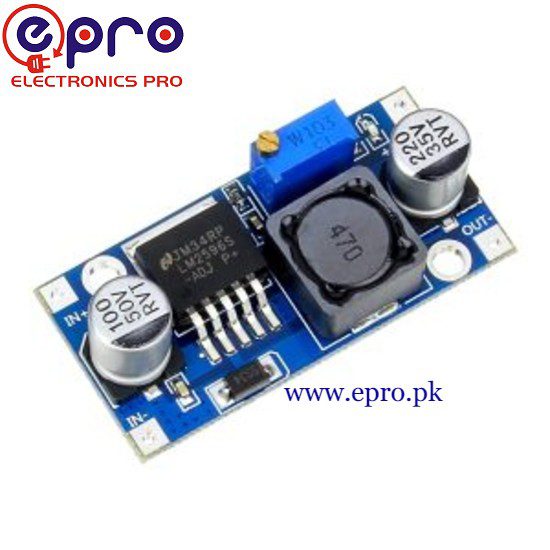
Last checked: 18 October 2026. Product prices and availability, where shown, are a snapshot of Epro listings checked on this date. Confirm the live listing before ordering.
An LM2596 buck converter is commonly used to reduce one DC voltage to another in hobby electronics. The adjustable module is useful for powering low-voltage circuits, but it must be configured and checked before connecting a valuable load.

This guide covers general setup principles for an adjustable step-down board. It is not a substitute for the exact module’s ratings. Work only with a suitable low-voltage DC supply; never connect a bare module directly to mains AC.
LM2596 buck converter: first checks
Identify the input and output terminals from the board labels. Confirm the supported input range, output range and polarity. The Texas Instruments LM2596 product reference describes the regulator IC; a module also depends on its diode, inductor, capacitors, layout and cooling.
Epro lists an LM2596 step-down module — PKR 180 and a display-equipped LM2596 module — PKR 470. Those examples are different board packages. Check the actual listing rather than assuming every online LM2596 photograph represents the same design.
1. Plan the source and load
Write down the lowest and highest input voltages and the required output voltage and current. A buck converter needs the input to remain sufficiently above the required output. It cannot boost a weak battery back up to a higher voltage. Leave the headroom required by the actual circuit.
2. Inspect the unpowered board
Look for solder bridges, bent leads, loose terminals and metal fragments. Mount the board so that its underside cannot touch a conductive case. Do not handle or reposition wiring while the circuit is powered. Even low-voltage batteries can deliver dangerous fault current into a short circuit.
3. Connect only the input supply first
Leave the final device disconnected. Check supply polarity with a meter, then connect to the board’s input terminals. Where practical, use a suitable current-limited bench supply during initial setup. A fuse and wiring must be selected for the complete circuit, not added at a random rating.
4. Measure the output correctly
Set the meter to DC voltage and use the voltage input socket. Measure across output positive and negative. Never place a meter configured for current directly across the output; that can create a short circuit. If you are unsure about meter operation, learn it on an unpowered setup first.
Newest in the store


5. Adjust slowly and verify
Turn the voltage adjustment a little at a time while watching the meter. Multi-turn potentiometers may need several turns before the output visibly changes. Do not assume a particular turning direction for every board. Stop if the output behaves unexpectedly or a component overheats.
6. Test using a suitable load
After setting the no-load output, connect an appropriately rated test load. Verify the voltage again. A resistor used for testing can become very hot and must be sized for its dissipated power. Start below the intended load, keep clear of hot parts and do not use an expensive controller as the first test load.
7. Check temperature and operating margin
The IC’s nominal current capability does not establish the safe continuous current of a small module. Monitor the regulator, inductor, diode and connections during a representative test. Enclosures and hot rooms reduce cooling. If operation is unstable or excessively hot, reduce load and select a better-suited converter rather than relying on an optimistic label.
8. Connect the real circuit only after verification
Recheck voltage and polarity before final connection. Observe behavior during startup and peak load, not only at idle. For sensitive circuits, evaluate ripple and transients with suitable instruments. A basic digital multimeter cannot reveal every short voltage spike.
What this module does not automatically provide
A standard voltage-adjustable LM2596 buck converter is not automatically a constant-current LED driver, battery-management system or chemistry-specific charger. Do not charge lithium cells with a generic module unless a complete charging design provides the required control and protection. Also, a common non-isolated module does not provide galvanic isolation.
Common questions
Why is the output lower under load?
Check input headroom, source current capability, wiring voltage drop, load current and module heating. Do not compensate blindly by raising the no-load voltage above the device limit.
Can it convert 5V to 12V?
Not as a buck-only converter. See buck-boost converter selection guide for topology selection.
How should I compare alternatives?
Use buck converter buying guide to compare voltage range, cooling and control features alongside the price.