


Vibration Sensor SW420: 7 Checks Before Buying

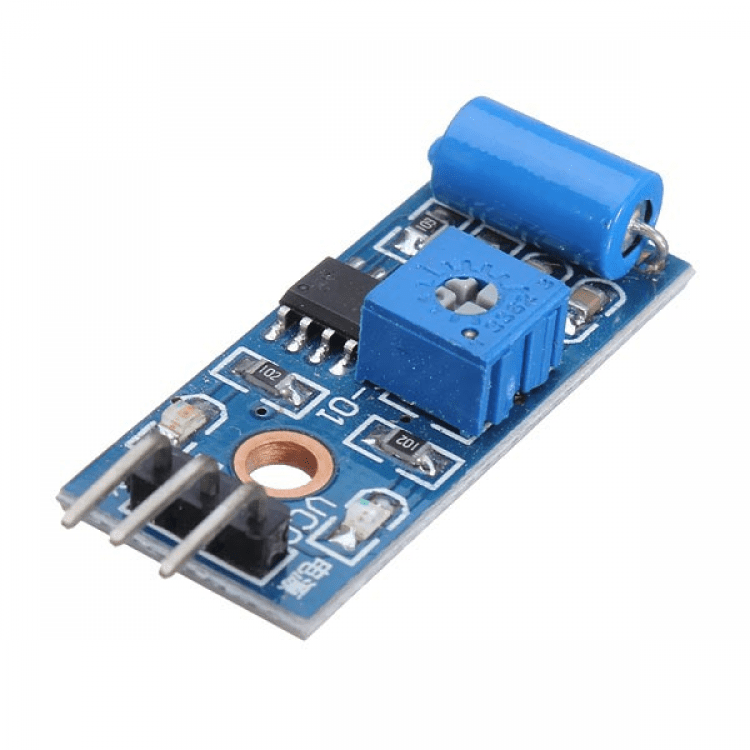
A vibration sensor built around an SW420 switch can flag a disturbance in a small educational project. It is a digital event detector, not a calibrated accelerometer, a vibration spectrum analyser or a certified earthquake warning instrument.
That distinction should drive the buying decision. If your project needs acceleration in g, a frequency spectrum or a defensible machine-condition measurement, choose suitable measurement hardware rather than assuming an adjustable switch module provides those quantities.

Vibration sensor price and package
| Listed item | Price (PKR) | Project role |
|---|---|---|
| SW420 Vibration Sensor Module in Pakistan | 140 | SW420 switch module with digital threshold output |
Price snapshot: Epro listings checked on 18 October 2026. Confirm the current price, availability, delivery charges and package quantity on the linked page before ordering. These are dated listing prices, not a quotation or an independent performance test.
The Epro SW420 module is listed as a 3.3–5 V board using comparator circuitry and an adjustable response. Check the actual board labels, mounting holes and supplied connector arrangement. The listing price does not include a tested alarm system or a calibrated mechanical installation.
1. Decide whether an event flag is enough
The module changes a digital output when its switch and threshold circuit respond to movement. The output does not directly state how far an object moved, how hard it was struck or the acceleration at a particular frequency.
A simple demonstration might turn an LED on after a box is disturbed. A machine-monitoring application may instead need repeatable amplitude, bandwidth and sampling specifications. Those are different requirements even though both projects mention vibration.
2. Confirm the exact module polarity
The Epro listing describes its output as LOW when stable, with a momentary HIGH response during vibration. Verify that behaviour on the board actually received before selecting a software edge or interpreting an LED.
Do not copy the polarity from a visually similar board without checking. For example, the Seeed Grove SW-420 documentation describes a different interface behaviour, with HIGH in the stable state and LOW during the event. A shared switch name does not make two module circuits identical.
3. Match supply and digital input levels
A board accepting 3.3–5 V supply does not automatically make every supply-and-controller combination safe. The output level depends on the actual comparator and pull-up arrangement. Identify the board’s documented interface before connecting a lower-voltage GPIO.
A conventional 5 V Uno is a straightforward context for the paired beginner tutorial. If moving to an ESP32, revisit the complete output range and supply choice rather than assuming a working Uno connection proves 3.3 V input compatibility.Newest in the store


4. Mount before adjusting sensitivity
How the board is attached changes the mechanical motion reaching the switch. A board loosely hanging from jumper wires can respond differently from one fixed to the intended surface. Cable movement can also disturb the board itself.
Test a safe, repeatable, gentle action in the intended orientation. Compare an undisturbed baseline with that action. Do not claim a detection distance or sensitivity setting from an unrelated tabletop arrangement.
5. Treat the potentiometer as a response adjustment
The adjustment helps set the module’s response threshold. It is not a calibrated dial in acceleration units, seismic magnitude or sound level. Record an observed position and test conditions instead of assigning unsupported physical units to the screw position.
Change it gradually with a suitable tool, avoiding accidental shorts. Recheck both unwanted triggers and missed intended disturbances. A setting that reacts to every nearby movement may be unsuitable even if it appears impressively sensitive in a demonstration.
6. Expect multiple pulses from one movement
The internal mechanical contact can produce several rapid transitions. Counting every electrical edge does not automatically count distinct knocks, impacts or equipment faults. Pulse timing and response depend on both the mechanical input and the module circuit.
For a visible beginner demonstration, a short LED latch can show that an event occurred without pretending each pulse represents a separate physical incident. A precise event counter needs an application-specific definition and validation.
7. Start with a harmless indicator
The vibration sensor Arduino SW420 code guide uses a digital input and the built-in LED. It explicitly documents the Epro listing’s polarity and explains how to change the edge only after verifying a different board.
Do not connect a hazardous load or describe this hobby circuit as certified theft, earthquake or personal-safety protection. A real monitoring system needs suitable sensing, fault detection, installation checks and an appropriate response design beyond a comparator module and a short sketch.