


TCA9548A I2C Multiplexer: Arduino Channel Scan in 7 Steps

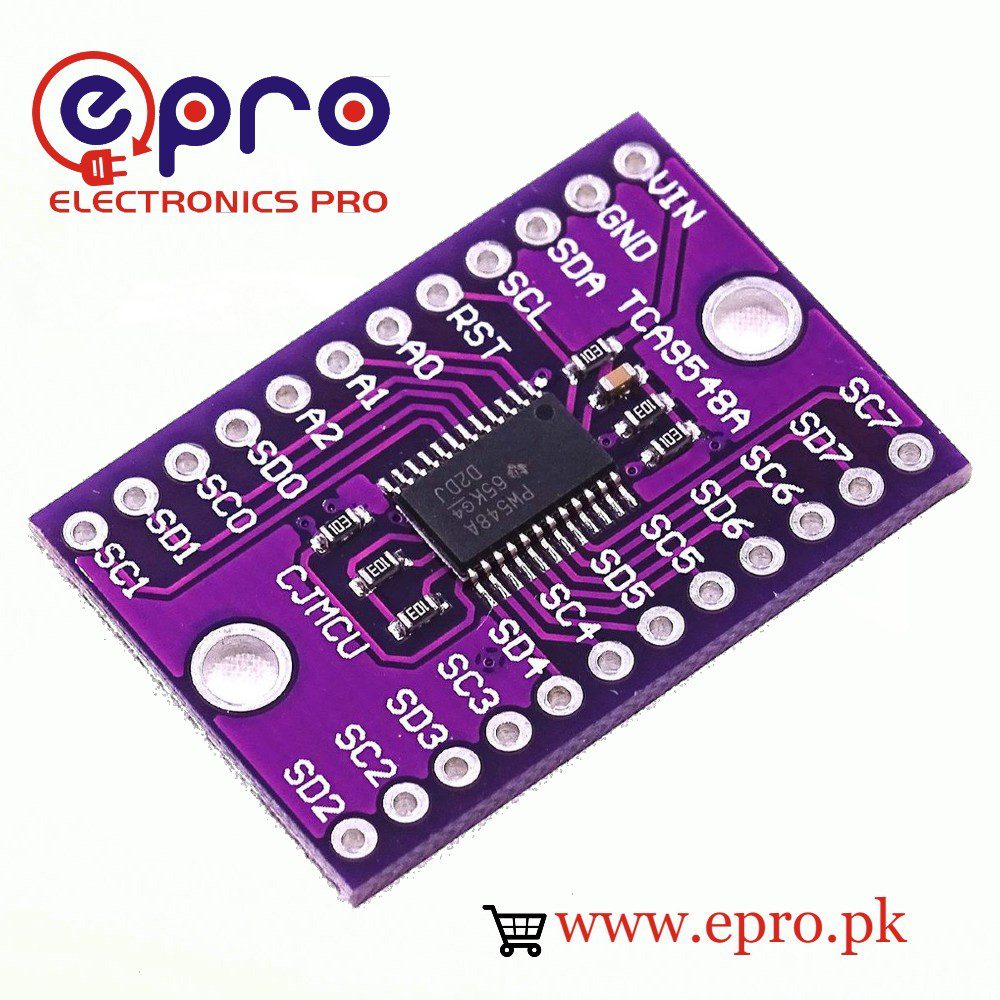
This TCA9548A I2C multiplexer example scans one branch at a time. A useful bench arrangement is two verified 5 V-compatible PCF8574 boards, both at address 0x20, separated onto branches zero and one.
The demonstration proves address acknowledgments on selected branches, not sensor accuracy or complete device functionality. Use the multiplexer board with short wiring and check its actual labels and pull-ups before applying power.

1. Wire the TCA9548A I2C multiplexer upstream side
| Multiplexer upstream pin | Conventional 5 V Uno |
|---|---|
| VIN | 5 V on the verified compatible breakout |
| GND | GND |
| SDA | A4 |
| SCL | A5 |
Disconnect all supplies while wiring. Keep reset in its documented inactive state; the referenced Adafruit design pulls it HIGH. If your supplied board differs, follow its actual circuit rather than leaving a required reset input floating.
2. Add two separate downstream branches
Connect the first PCF8574 board‘s SDA and SCL to SD0 and SC0. Connect the second board to SD1 and SC1. Both peripheral boards need their own appropriate 5 V supply connection and a common ground.
Do not connect both peripheral SDA/SCL pairs together downstream. Each branch must have appropriate pull-ups to its intended voltage; check whether the expansion boards already provide them. This specific demonstration avoids mixing 3.3 V-only sensors with 5 V wiring.
3. Confirm the upstream address and control mask
The example assumes the multiplexer is at 0x70. Verify address straps first. The Adafruit test guide selects branch i by writing 1 shifted left by i.
Writing zero disables every branch. Channel zero instead uses the mask 0x01. This difference matters: the channel number is not itself the command byte.
4. Upload the one-branch-at-a-time scanner
#include <Wire.h>
const byte MUX_ADDRESS = 0x70;
bool setMask(byte mask) {
  Wire.beginTransmission(MUX_ADDRESS);
  Wire.write(mask);
  return Wire.endTransmission() == 0;
}
void setup() {
  Serial.begin(9600);
  Wire.begin();
  Wire.setClock(100000);
  if (!setMask(0)) {
    Serial.println("Multiplexer not responding");
    while (true) { delay(100); }
  }
  for (byte channel = 0; channel < 8; channel++) {
    if (!setMask((byte)(1U << channel))) {
      Serial.println("Channel selection failed");
      break;
    }
    Serial.print("Branch "); Serial.println(channel);
    for (byte address = 0x08; address < 0x78; address++) {
      if (address == MUX_ADDRESS) continue;
      Wire.beginTransmission(address);
      byte error = Wire.endTransmission();
      if (error == 0) {
        Serial.print("Acknowledged 0x"); Serial.println(address, HEX);
      } else if (error == 4 || error == 5) {
        Serial.print("Bus error at 0x"); Serial.println(address, HEX);
      }
    }
  }
  if (!setMask(0)) Serial.println("Could not disable branches");
}
void loop() {}
Open Serial Monitor at 9600 baud. With the stated two-board arrangement, address 0x20 should appear on branches zero and one separately. Other active upstream devices can appear during every branch scan, so keep the first test minimal.
5. Interpret acknowledgments carefully
An address response does not identify the chip or prove that its application works. The scanner also does not automatically inspect every sensor register. Use the PCF8574 input/output tutorial for an actual functional test after confirming the bus.Newest in the store


6. Diagnose branch-specific faults
If 0x20 appears on only one branch, compare wiring, supply, straps and pull-ups between the boards. If the multiplexer itself fails to respond, check upstream power and SDA/SCL before changing peripheral code.
If communication hangs or reports bus errors, switch power off and inspect for a line held LOW. Do not short wires or move connectors while powered to force a result.
A useful isolation test is to connect only the first downstream board, confirm its branch, power down and then add the second. This makes a wrong connector easier to locate than starting with eight populated branches and an unexplained set of acknowledgments.
The scanner skips the multiplexer address because that upstream device remains visible regardless of the chosen branch. This is why the same upstream acknowledgment appearing repeatedly is not evidence that a peripheral has somehow been copied onto every channel.
The Wire return value zero represents success. Other values describe different transfer problems, as documented in the Arduino endTransmission reference. The sketch highlights general bus errors and timeouts, but it is not a full bus analyser and cannot prove correct electrical rise times.
After changing hardware, run the scan again rather than relying on an old result. A loose power connection or changed address strap can invalidate yesterday’s branch map without any change to the application source.
7. Keep selection in later application code
Select the intended branch before a device’s initialization and before every later transaction sequence. The TCA9548A buying guide explains why simultaneously enabling same-address branches or another multiplexer can recreate address conflicts. Expand gradually after the two-branch test is understood.