


QMC5883L Arduino: Raw-Axis Checks Before Compass Heading

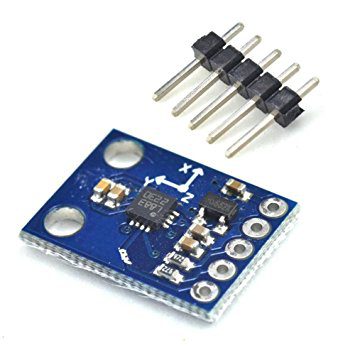
A QMC5883L Arduino compass should begin with raw X, Y and Z readings, not an immediately trusted north arrow. First confirm the sensor actually fitted to the module. The linked Epro listing has mixed QMC/HMC wording; this procedure applies only after the supplied part has been identified as a QMC5883L.
Establish a safe I2C connection

Use the actual board’s supported supply and pull-up arrangement. Connect common ground, SDA and SCL with power removed, using the controller’s documented bus pins. Do not infer safe five-volt I/O from a regulator alone. Start with one device and short wires so an address collision or cable problem does not obscure identification.
Confirm device-specific software
Use a documented QMC5883L driver and check for the expected default address, commonly 0x0D. Do not substitute HMC5883L register constants. Configure measurement mode, data rate, range and oversampling explicitly or record the driver’s defaults. A program that compiles and prints numbers is not by itself a sensor-identification test.
Read coherent signed axis data
Follow the driver or datasheet procedure for reading all six axis bytes and preserving signed values. Check the data-ready indication and overflow status. Missed samples and saturated channels should be marked as such, not silently treated as valid field observations. Keep a log of the selected magnetic range alongside the raw values.
Check response away from interference
Move the assembly away from speakers, steel tools, laptops and high-current wiring. Rotate it slowly through several orientations and observe smooth changes rather than testing by placing a strong magnet directly on it. If a channel clips or overflow persists, remove the field source and review the configuration before blaming the bus.
Collect calibration data in the mounted configuration
Record measurements over a broad set of orientations with the module installed as intended. Hard-iron correction addresses offsets; soft-iron effects can require more than independent axis min/max adjustment. Save both raw and corrected data. A simple min/max method is a learning approximation, not proof of a calibrated navigation instrument.
Calculate heading only with defined assumptions
A level-board atan2 calculation needs the correct axis order, signs and angle normalization. It references magnetic north unless an appropriate local declination adjustment is applied. For a tilted device, use a documented tilt-compensation method with additional orientation sensing. Do not hide mounting or calibration errors by adding an unexplained constant heading offset.
Newest in the store


Recheck after mechanical or electrical changes
New metal fasteners, a different battery position or motor current can change the observed field. Repeat stationary and rotation checks after modifications. This hobby procedure is not a validated navigation or safety system. Keep manual reference checks and state the environment in which the compass is expected to work.
Relevant Epro listing
Product information and prices were checked on 19 October 2026. This is a current snapshot, not a historical price associated with the publication timestamp. Stock, accessories and checkout prices can change. Listing claims are not independent performance or authenticity certifications.
| Product | Checked price | Stock |
|---|---|---|
| GY-271 QMC5883L Triple Axis Compass Magnetometer Sensor Module in Pakistan | PKR 450 | In stock |
Frequently asked questions
Why do headings jump near a speaker?
Its magnetic field can dominate the Earth’s field or saturate the sensor. Improve placement before adjusting software offsets.
Can two-axis heading work at every tilt?
No. A simple level-board calculation needs its level assumption; general tilt compensation requires additional orientation information.
Related Epro reading
Review breadboard connections before assembling a prototype. For controller expansion, the Mega 2560 pin guide explains why pin names and electrical limits must be checked together.
Technical references and test limitations
This guide uses the documentation linked below. The procedures are for a controlled, low-voltage learning setup; no independent hands-on test of the particular seller board is claimed. Record the actual part markings, wiring and firmware version before drawing conclusions from a test.