


ISD1820 Arduino: Trigger Playback Without Erasing a Message

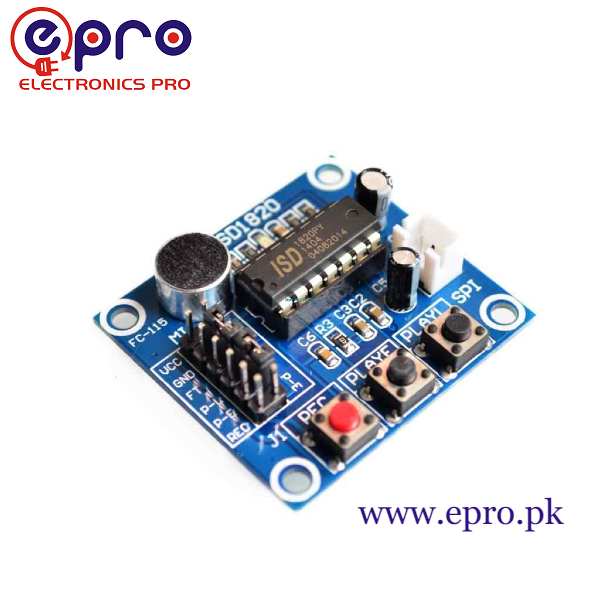
An ISD1820 Arduino project can trigger a previously recorded message with a digital control signal. Begin by proving manual record and playback operation, then add the host. This sequence reduces the chance of mistaking a power or audio problem for a programming fault, or accidentally overwriting the message through the REC input.
Test the module without the controller first

Connect the correct supported supply and a suitable speaker according to the actual board manual. Record a harmless short message using the manual REC control, release it and check playback. Keep volume modest and check that the recording remains available after a normal power cycle. Do not proceed with host wiring until this baseline works.
Choose the intended playback behavior
For the referenced module, PLAYE is edge-activated and starts playback through a rising transition; PLAYL uses a maintained level for playback. Choose the behavior deliberately. A repeated pulse or a permanently high input can produce a different result from the intended one-shot announcement. Consult the manual if the actual board labels or firmware differ.
Wire a valid logic interface
With power disconnected, connect the selected controller output to the documented playback input through any interface components the board requires. Provide a common signal reference when using a non-isolated connection. Verify voltage levels rather than assuming an Arduino GPIO can drive every module unchanged. Never connect a speaker output to a GPIO.
Keep REC inactive and startup predictable
REC can overwrite the stored message when active. Do not route an uninitialized or floating GPIO to it during a playback-only experiment. Use defined inactive input states and initialize the playback output before issuing a trigger. Check whether the module already includes pulls; add a suitable external default only after inspecting the actual circuit.
Issue one deliberate trigger
For an identified edge-triggered PLAYE input, use the module’s documented inactive level, then a valid high pulse and a return to inactive. Check required timing in the exact manual rather than adopting an unexplained universal pulse width. Allow the message to finish before requesting another playback unless retrigger behavior has been intentionally tested.
Debounce buttons and limit repetition
A physical button can bounce and an application condition can remain true for many loop iterations. Detect one deliberate event and apply a sensible lockout or state machine so it does not continuously retrigger playback. Keep other tasks responsive rather than inserting a long blocking delay without considering the rest of the application.
Newest in the store


Diagnose the correct layer
If buttons work but host triggering does not, check signal level, pin mapping, startup defaults and ground reference. If neither works, revisit supply, speaker, recording state and board controls. An empty recording is not a UART or library problem; these simple control pins do not require inventing a serial command protocol.
Relevant Epro listing
Product information and prices were checked on 19 October 2026. This is a current snapshot, not a historical price associated with the publication timestamp. Stock, accessories and checkout prices can change. Listing claims are not independent performance or authenticity certifications.
| Product | Checked price | Stock |
|---|---|---|
| ISD1820 Voice Recording Module in Pakistan | PKR 480 | In stock |
Frequently asked questions
Why did the old message disappear?
Check whether REC was driven active or left in an unintended state. Recording replaces the stored message.
Does playback triggering require an MP3 library?
Not for the documented direct control inputs. Verify your board, then use its specified logic control behavior.
Related Epro reading
Review breadboard connections before assembling a prototype. For controller expansion, the Mega 2560 pin guide explains why pin names and electrical limits must be checked together.
Technical references and test limitations
This guide uses the documentation linked below. The procedures are for a controlled, low-voltage learning setup; no independent hands-on test of the particular seller board is claimed. Record the actual part markings, wiring and firmware version before drawing conclusions from a test.