


Arduino HC06 Setup: A Two-Way Serial Link Test

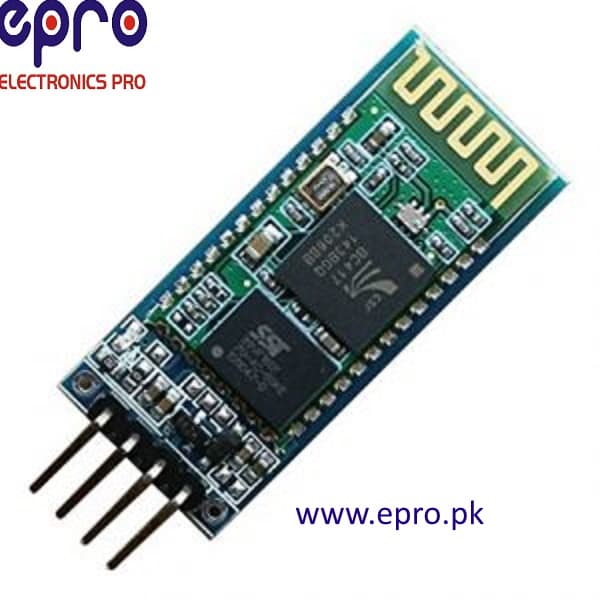
An Arduino HC06 setup should prove a simple two-way serial path before adding commands for motors or relays. Separate the wired UART connection, the Bluetooth pairing and the terminal application. This makes it possible to locate a failure without changing several settings at once.
Select a UART that will not conflict

Choose an available hardware UART where the Arduino board provides one. On boards with only one UART, understand its relationship to USB uploading and serial monitoring before connecting the radio. A software UART can be an option at suitable rates, but its timing and pin restrictions depend on the library and controller. Do not copy Mega serial-pin assignments onto an Uno.
Wire and measure with the radio disconnected first
Verify the controller signal voltage and the actual HC06 carrier power requirement. Connect grounds, module TX to controller RX and an appropriately level-adapted controller TX to module RX. A supply regulator on the carrier does not establish 5 V tolerance at RX. Never use an RS232 adapter in place of a logic-level UART connection.
Start with documented serial settings
Use the module’s documented data-mode baud rate and framing. The reference guide demonstrates 9600 baud with eight data bits, no parity and one stop bit, while warning that defaults vary. Save the original settings before changing anything. Avoid sending random configuration strings or applying a command procedure from a different Bluetooth board.
Pair and open the correct data channel
Pair the intended host with the module according to its documented credentials, then use a compatible Bluetooth Classic serial terminal. A paired indicator is only one stage of the test. On a computer that exposes more than one serial port, identify the outgoing data connection. Turn local terminal echo off when checking whether bytes really make the round trip.
Use distinguishable messages in both directions
Have the controller emit a short sequence such as device-001, device-002 and so on. Send a different host message and print received bytes with an explicit prefix. Do not create two automatic echo loops that endlessly retransmit one another. Compare message length, line endings and sequence numbers rather than accepting a blinking LED as proof of correct data.
Diagnose by the symptom
Garbled text suggests settings, signal levels or timing problems; readable one-way data suggests a missing reverse connection or application path. A silent link may involve the wrong port, pairing state, UART selection or power. Return to the minimal test after each change. Disconnect and reconnect once to verify predictable startup before adding any low-risk command handling.Newest in the store


Relevant Epro listing
Product information and prices were checked on 19 October 2026. This is a current snapshot, not a historical price associated with the publication timestamp. Stock, accessories and checkout prices can change. Listing claims are not independent performance or authenticity certifications.
| Product | Checked price | Stock |
|---|---|---|
| HC-06 HC06 HC 06 Bluetooth Serial 4 Pin Module in Pakistan | PKR 690 | In stock |
Frequently asked questions
Does pairing prove the Arduino UART works?
No. Pairing can succeed while the wired UART, baud rate or application channel is wrong.
Why do characters appear twice?
Check local echo and application echo behavior. Disable unnecessary echoes before judging the two-way link.
Related Epro reading
Review breadboard connections before assembling a prototype. For controller expansion, the Mega 2560 pin guide explains why pin names and electrical limits must be checked together.
Technical references and test limitations
This guide uses the documentation linked below. The procedures are for a controlled, low-voltage learning setup; no independent hands-on test of the particular seller board is claimed. Record the actual part markings, wiring and firmware version before drawing conclusions from a test.