


INA219 Circuit: Arduino Wiring, Code and 7 DC Checks

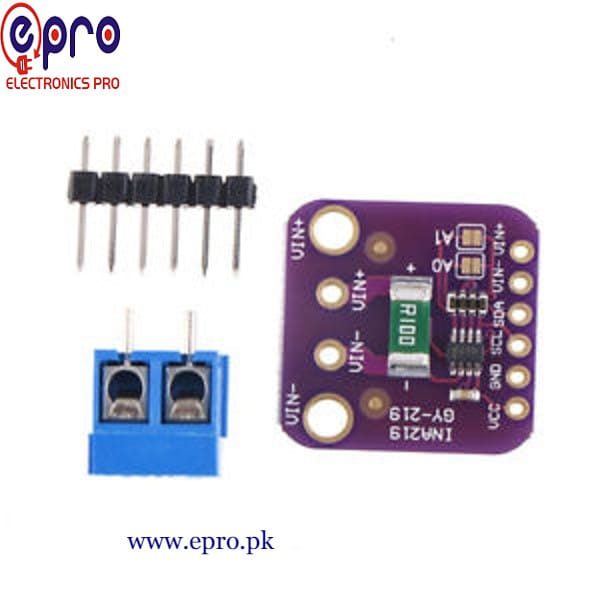
This INA219 circuit reads a small protected DC load with a conventional 5 V Uno. It prints the load-side bus voltage, shunt voltage, current and a calculated load-power estimate. It is not a mains energy-meter installation.
Use the GY-219 module only after checking its actual shunt value. The following preset assumes the listed 0.1 Ω resistor. A changed resistor needs corresponding calibration rather than a cosmetic adjustment to the displayed number.

1. Prepare a small protected load
Use an appropriately current-limited or otherwise protected source of no more than 5 V DC, with a suitable low-power load. Keep the experiment at a small current well within every component’s rating. Switch all power off before wiring.
The series measurement path is source positive to VIN+, then through the board’s shunt to VIN-, then to load positive. Load negative returns to source negative. Never place VIN+ and VIN- directly across the source, which creates a low-resistance path.
2. Connect the INA219 circuit logic side
| Module logic connection | Conventional Uno |
|---|---|
| VCC | 5 V |
| GND | Uno GND and test-source negative reference |
| SDA | A4 |
| SCL | A5 |
Logic VCC is separate from the sensed bus connection. Check the actual terminal labels before making the series path. The shared reference is required for this shunt-monitor arrangement; do not copy an isolated Hall-sensor diagram instead.
Keep initial wiring short. If using a 3.3 V controller later, revisit sensor supply and I²C pull-up voltage. A module that accepts 5 V power does not automatically make 5 V bus pull-ups safe for every controller.
3. Install the library and verify the address
Install Adafruit INA219 through Library Manager, including its requested dependencies. The standard constructor uses address 0x40. If the board’s address straps have changed, use the confirmed address in the constructor.
The Adafruit library reference distinguishes bus voltage, shunt voltage and current. The TI datasheet explains why current scaling depends on calibration and shunt resistance.
4. Upload the DC reading example
#include <Wire.h>
#include <Adafruit_INA219.h>
Adafruit_INA219 monitor(0x40);
void setup() {
  Serial.begin(9600);
  if (!monitor.begin()) {
    Serial.println("INA219 not found: check address and wiring");
    while (true) { delay(100); }
  }
  // Requires a verified 0.1 ohm shunt. This does NOT permit 32 V input.
  monitor.setCalibration_32V_2A();
}
void loop() {
  float busV = monitor.getBusVoltage_V();
  float shuntMV = monitor.getShuntVoltage_mV();
  float currentMA = monitor.getCurrent_mA();
  float loadPowerMW = busV * currentMA;
  Serial.print("Load-side bus V: "); Serial.println(busV, 3);
  Serial.print("Shunt mV: "); Serial.println(shuntMV, 3);
  Serial.print("Current mA: "); Serial.println(currentMA, 2);
  Serial.print("Estimated load power mW: "); Serial.println(loadPowerMW, 2);
  delay(1000);
}
The preset’s 32V name refers to a register range, not permission to exceed the chip’s 26 V sensed-bus limit. This tutorial remains at a protected 5 V or lower. The 2A name is also not a guarantee of the board’s continuous-current capability.Newest in the store


5. Interpret the measurement locations
Bus voltage is measured at VIN- relative to ground, so it describes the load side of the shunt. For this positive-current arrangement, adding shunt millivolts divided by 1,000 estimates the source-side voltage at VIN+.
Multiplying volts by milliamps gives milliwatts. The example’s power estimate uses load-side voltage and the reported current; it is not accumulated energy in watt-hours. Direction and sign should be understood rather than hidden with an absolute-value function.
6. Check plausibility before trusting precision
Compare a known small DC load against an appropriate reference meter. A small zero-current offset or fluctuating last digit does not justify claiming the display’s full decimal resolution as accuracy. Confirm the resistor, units and connection order first.
Test the no-load condition first, then a known small load, keeping the same wiring and measurement locations. Record the reference current and the displayed current together. A percentage correction derived at one point is not automatically valid over every current and temperature.
The library reads several quantities in separate transactions. If the load changes quickly between those reads, the printed voltage and current need not describe precisely the same instant. This slow display is therefore more suitable for a steady DC bench load than for claims about brief startup peaks or fast switching waveforms.
If the reported current stays zero while voltage appears plausible, verify library calibration and the series path. A bypass wire around the shunt can let the load operate while leaving the sensor with almost no differential voltage.
7. Keep the limits visible
The INA219 current sensor buying guide explains shunt heating and address conflicts. Do not use this display as overcurrent protection, and do not extend the wiring to mains or high-energy batteries. A useful first result is a plausible, clearly labelled DC reading under controlled conditions.