


INA219 Current Sensor: 7 Buying and Calibration Checks

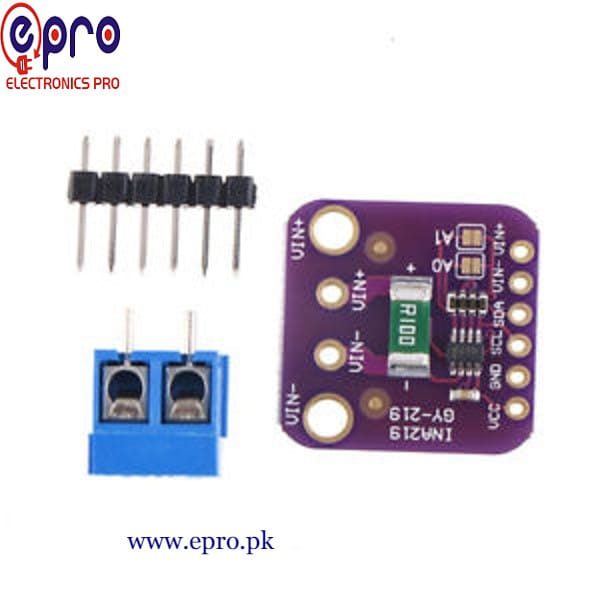
An INA219 current sensor measures the voltage across a shunt resistor and reports current, bus voltage and power through I²C. It is a useful DC monitoring interface, but its usable current range depends on the board’s resistor and its software calibration.
Do not buy it as a universal isolated ammeter. This guide explains the actual measurement path and the checks that matter before a small, protected low-voltage experiment. It does not report independent calibration results.

INA219 current sensor price and module package
| Listed item | Price (PKR) | Project role |
|---|---|---|
| INA219 Bi-Direction DC Power Supply Sensor GY-219 Module in Pakistan | 530 | GY-219 current and voltage monitoring module |
Price snapshot: Epro listings checked on 19 October 2026. Confirm the current price, availability, delivery charges and package quantity on the linked page before ordering. These are dated listing prices, not a quotation or an independent performance test.
The Epro GY-219 listing describes a 0.1 Ω shunt, a terminal connection and selectable addresses. Confirm the actual supplied resistor marking, board layout and connector package. The listing’s general accuracy wording is not a certificate for the individual assembly.
1. Separate sensor supply from measured bus voltage
The Texas Instruments INA219 datasheet specifies a 3–5.5 V device supply and a sensed bus range of 0–26 V. Those are different connections with different functions.
The measured voltage is not applied to the module’s VCC pin merely because the sensing inputs tolerate it. For a beginner demonstration, use a small protected source of no more than 5 V DC and keep all connections within the actual module and controller ratings.
2. Check the shunt and software together
The chip measures the small voltage difference across the shunt. Current is calculated using the expected resistor value. A library preset intended for a 0.1 Ω board will give the wrong current scale if the supplied board uses a different resistor.
The listing’s ±3.2 A measurement figure comes from the stated shunt and full-scale differential voltage. It is not automatically a safe continuous-current rating for the terminal block, PCB or surrounding wiring. Thermal limits and the complete current path still matter.
3. Understand the voltage drop you introduce
A shunt is not a zero-resistance wire. With a 0.1 Ω resistor, a 100 mA DC current creates an ideal 10 mV drop. Higher current increases both the drop and heating. That insertion effect may matter to a sensitive low-voltage load.
The example calculation follows Ohm’s law; it is not an observed result from an Epro board. Choose the measurement arrangement with the load’s tolerance in mind rather than assuming a monitoring circuit has no effect on the system it measures.Newest in the store


4. Confirm the I²C address and pull-ups
The common default address is 0x40. The module listing describes jumper-selectable alternatives. Check the actual address with a suitable scanner, then configure the library for that address rather than changing unrelated wires until initialization succeeds.
A PCA9685 board can also appear at 0x40, so two working modules can conflict when connected together. Address planning is important even when each device works alone. Pull-ups must also use a voltage acceptable to the controller.
5. Do not confuse this with an isolated Hall sensor
The INA219 uses a shunt and needs the appropriate shared reference for its voltage measurement. It does not provide the Hall-effect isolation arrangement associated with an ACS712 chip. Neither device’s name certifies a hobby board for hazardous wiring.
Do not attach this beginner module to household mains, a traction battery or a high-energy battery pack. A digital interface does not remove electrical hazards or provide a protective current cutoff.
6. Verify current, voltage and power separately
The datasheet explains that the current and power registers depend on programmed calibration. A visible bus-voltage reading is not proof that current scaling is correct. Library initialization and the selected calibration preset should be checked deliberately.
Compare a known small DC load with an appropriate reference instrument. Check units too: millivolts, volts, milliamps and milliwatts are different quantities. Averaging a display does not correct an incorrect shunt value or create a traceable calibration.
7. Start with a limited DC bench project
The INA219 circuit and Arduino code guide shows the distinction between the logic connections and the series measurement path. Power down before changing wiring, and never connect the two shunt terminals directly across a voltage source.
Use the first readings to check plausibility and units, not to claim a finished energy meter. Long-term energy measurements require time integration, appropriate sampling and validation beyond a single current-and-voltage display.