


LCD Display 16×2: 7 Checks Before Buying

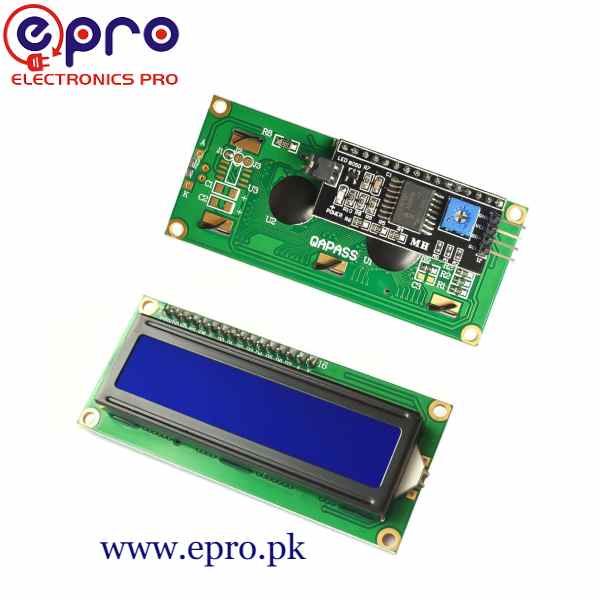
An LCD display 16×2 shows two rows of sixteen character positions. It is a useful option for a small counter, sensor readout or menu, but it is not a sixteen-inch monitor or a freely addressable graphic display.
The main purchase decision is often the interface: a bare parallel module and an assembled I2C-backpack module can look similar from the front while needing quite different wiring. This guide keeps those packages separate.

LCD display 16×2 prices and interfaces
| Listed item | Price (PKR) | Project role |
|---|---|---|
| 1602 Character LCD 16X2 (Green Color) in Pakistan | 250 | Green parallel 16×2 module listing |
| Lcd Display 1602 Character 16X2 Blue Color in Pakistan | 250 | Blue parallel 16×2 module listing |
| I2C LCD 1602 in Pakistan | 580 | Blue 16×2 module with I2C interface |
Price snapshot: Epro listings checked on 18 October 2026. Confirm the current price, availability, delivery charges and package quantity on the linked page before ordering. These are dated listing prices, not a quotation or an independent performance test.
Check the rear photographs and included parts on each linked page. A bare display does not become an I2C device simply because a library is available. The I2C LCD1602 listing describes an HD44780-compatible display with a PCF8574 backpack and contrast adjustment.
1. Count characters rather than pixels
The 16×2 format means sixteen character cells per row and two rows. Normal text is placed in those cells. A long message needs deliberate shortening, scrolling or pagination instead of assuming it will fit automatically.
Before ordering, sketch the intended screen. A temperature label, value and unit may fit comfortably; a full sentence may not. Leading spaces, decimal places and negative signs all consume positions. Choose the layout before building the rest of the enclosure around it.
2. Choose parallel or I2C wiring
A conventional bare module exposes a sixteen-pin connection and uses control and data signals for its parallel interface. It also needs the appropriate power, contrast and backlight connections. Four-bit mode reduces the number of data wires but does not turn the interface into I2C.
An I2C backpack reduces the controller connections to supply, ground, SDA and SCL. It adds its own address and pin-mapping considerations. Decide whether the goal is to learn the parallel interface or conserve controller pins for other inputs.
3. Match the supply and logic levels
The current Epro I2C listing specifies 5 V operation. A conventional Uno is a straightforward starting platform for that module. Do not assume a 5 V backpack is safe to connect directly to a 3.3 V-only controller such as an ESP32.
Newest in the store


In particular, backpack pull-up resistors may raise SDA and SCL to the supply voltage. A display that powers up is not proof of safe logic levels. A mixed-voltage project needs a suitable interface arrangement and verification of the exact hardware, not just a software pin change.
4. Check contrast before rewriting code
A lit backlight does not prove that readable characters are being initialized. The contrast setting strongly affects what is visible. The backpack typically provides a small adjustment potentiometer; a bare parallel module needs its contrast input connected appropriately.
Start with a simple two-line text test and adjust contrast gradually. Solid blocks can indicate power without correct initialization. A completely blank display can have several causes, so inspect wiring and supply before assuming the panel itself has failed.
5. Use a library that matches the backpack
Several libraries have similar names but different initialization calls and assumptions. The maintained hd44780 library provides an I2Cexp class that supports compatible expander backpacks and can discover their address and pin mapping.
Do not treat 0x27 or 0x3F as a universal address. An acknowledgment from an I2C scanner establishes that something answered, not that the display mapping is correct. The library’s I2CexpDiag example is useful when the basic display test does not initialize.
6. Check text and enclosure requirements
Character ROM variants do not automatically provide every language or Unicode symbol used on a computer. A few custom glyphs can support limited icons, but the available custom-character memory is small. Verify the exact character requirements before promising a multilingual display.
Measure the board, mounting holes and viewing window from the supplied drawing or physical module. The visible character area is not the same as the complete PCB outline. Leave clearance for the backpack, connector and contrast adjustment behind the panel.
7. Start with a fixed message
Follow the 16×2 LCD Arduino code guide for a 5 V Uno and compatible I2C module. Confirm that both rows work before connecting a sensor or menu input. This separates a display problem from an unrelated sensor, library or formatting problem.