


ULN2003 Arduino: 28BYJ-48 Wiring, Code and 7 Checks

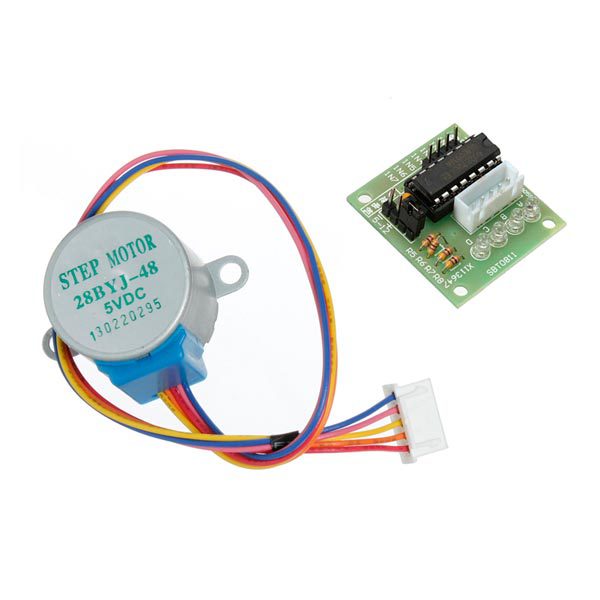
A ULN2003 Arduino test should begin with a short unloaded movement, not an assumed exact revolution. That confirms the coil sequence and direction while keeping gearbox ratio, load and position calibration separate from basic wiring.
This tutorial uses a conventional Uno-compatible board, a compatible ULN2003 module and the listed 5 V five-wire geared motor. It is not a CNC controller, a feedback positioning system or a universal circuit for every stepper type.

1. Verify the motor and driver package
The 28BYJ-48 and ULN2003 kit lists a 5 V motor. Confirm that rating on the actual label. Do not connect a different-voltage motor by appearance alone or substitute a four-wire bipolar motor into this five-wire arrangement.
Disconnect all supplies before fitting the motor connector or changing phase wires. Check the board’s input labels and supply terminals rather than relying on connector orientation from a different photograph.
2. Wire the ULN2003 Arduino inputs and power
| Driver connection | Conventional Uno test arrangement |
|---|---|
| IN1 | D8 |
| IN2 | D9 |
| IN3 | D10 |
| IN4 | D11 |
| Motor connector | Matching five-wire motor plug |
| Motor supply + | Suitable regulated 5 V source for this motor |
| Driver ground | Supply ground and Uno GND |
Power the Uno from USB for programming and the motor from the suitable external supply. Share ground but do not casually connect the external positive rail to the USB-powered Uno’s 5 V rail. Motor current must not flow through a GPIO output.
Secure the unloaded motor on the bench and keep the shaft clear. Stop if the motor, driver or wiring heats unexpectedly. The driver is a switching interface, not an automatic guarantee that the motor supply or current is appropriate.
3. Install AccelStepper and check constructor order
Install AccelStepper by Mike McCauley through Library Manager. Its class reference documents HALF4WIRE mode and the need to call run frequently.
For the common motor phase arrangement in this example, constructor pins follow IN1, IN3, IN2, IN4. That differs from the physical table’s straight numerical order. The explicit 8, 10, 9, 11 sequence below is deliberate, not a typographical mistake.Newest in the store


4. Upload a short back-and-forth example
#include <AccelStepper.h>
AccelStepper motor(AccelStepper::HALF4WIRE,
                   8, 10, 9, 11);
void setup() {
  motor.setMaxSpeed(300);
  motor.setAcceleration(100);
  motor.moveTo(512);
}
void loop() {
  motor.run();
  if (motor.distanceToGo() == 0) {
    motor.moveTo(-motor.currentPosition());
  }
}
The target is expressed in the library’s half-step units, not degrees. The first move reaches positive 512; later moves alternate between positive and negative 512 around the startup reference. The sketch intentionally avoids claiming that either move is an exact fraction of a shaft revolution.
5. Observe movement before increasing speed
The motor should turn smoothly in alternating directions if the module and sequence match. If it vibrates without rotating, remove power and review input order, motor connection and supply. Do not randomly raise voltage to force movement.
The chosen speed and acceleration are starter settings, not measured maximums or a torque rating. Test modestly and without an attached load first. Gearbox backlash may be visible when the direction reverses.
6. Keep the main loop responsive
AccelStepper run must be called often enough to perform scheduled steps. Long delays or blocking work added later can disrupt motion. A display or sensor task needs to be scheduled without starving the motor update.
The library’s currentPosition tracks commanded steps. It does not detect a stalled shaft or establish an absolute home. Power-up zero is only a software reference unless a separate position-finding procedure is implemented.
7. Review holding and application limits
This repeated-movement sketch can leave coils energized during operation. Evaluate heat and holding requirements before extending runtime. Disabling outputs removes holding drive and is not safe for every supported load. The ULN2003 driver board buying guide explains current, gearbox and positioning limits before the demonstration becomes a mechanism.