


4×4 Matrix Keypad: 7 Checks Before Buying

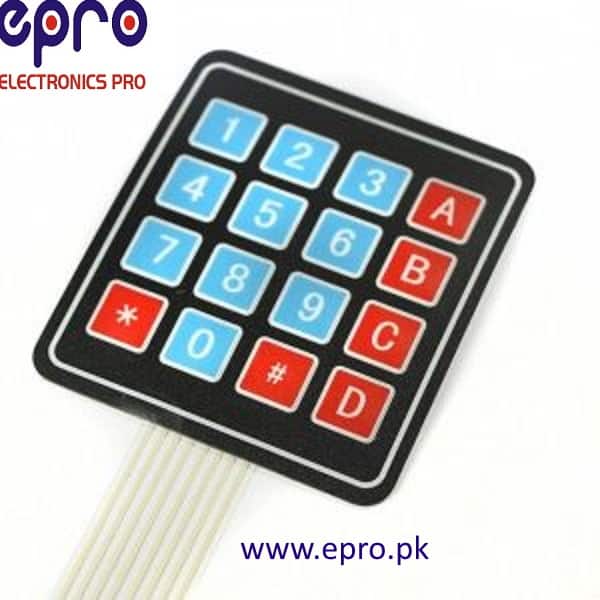
A 4×4 matrix keypad provides sixteen labelled buttons through a shared row-and-column arrangement. It can be a convenient input for a calculator demonstration, menu or data-entry experiment without requiring one dedicated controller input per key.
The common membrane version is a passive switch matrix, not a complete password-security system. This guide separates its wiring needs from powered touch modules and explains the checks to make before ordering or mounting it.

4×4 matrix keypad price and alternatives
| Listed item | Price (PKR) | Project role |
|---|---|---|
| Arduino 4X4 Keypad Matrix Keypad Membrane Switch in Pakistan | 145 | Sixteen-key passive 4×4 membrane matrix |
| 4×3 Matrix Keyboard 12 Key Membrane Switch Numeric Keypad in Pakistan | 135 | Twelve-key 4×3 matrix alternative |
| TTP229 16 Keys Capacitive Touch Keypad Module in Pakistan | 300 | Powered capacitive touch alternative; different interface |
Price snapshot: Epro listings checked on 18 October 2026. Confirm the current price, availability, delivery charges and package quantity on the linked page before ordering. These are dated listing prices, not a quotation or an independent performance test.
The 4×4 membrane keypad listing describes sixteen keys and an eight-conductor connection. The alternatives serve different requirements: a twelve-key matrix has fewer columns, while a capacitive touch board needs its own documented electrical interface and software.
1. Understand how the matrix reduces wires
Sixteen switches are arranged where four rows cross four columns. A controller scans the lines to determine which connection is closed. That is why a conventional passive 4×4 matrix uses eight signal conductors rather than sixteen separate button wires.
The matrix ribbon does not have a dedicated VCC and GND pair in the same sense as a powered sensor module. Do not arbitrarily attach a supply across two unknown conductors. Identify rows and columns before deciding how they will connect to the controller.
2. Count the keys the interface actually needs
A common 4×4 face includes digits, star, hash and four letter-labelled keys. A 4×3 numeric keypad omits the additional letter column and may be sufficient for a smaller menu. Check the actual printed legends rather than assuming every sixteen-key product uses the same symbols.
Plan the functions of confirm, cancel and back before ordering. Printed letters do not force a particular software action; the program maps row-and-column positions to characters. Choose a face layout that users can understand without a complicated instruction sheet.
3. Verify the ribbon pin order
Connector orientation and internal routing can vary. A drawing that calls the first four pins rows may not match the actual keypad in hand. Use a continuity test on the disconnected passive keypad to identify the conductors joined by each pressed key.
Newest in the store


Record the mapping and connector viewpoint. If keys later produce consistently wrong characters, review the row order, column order and key map before replacing the keypad. A neat but incorrect wiring diagram can still produce repeatable wrong results.
4. Budget for controller pins
A direct four-by-four scan uses eight suitable digital pins. Check what remains after the display, serial connection and other peripherals are allocated. A project that needs fewer wires may require a separately designed expander arrangement rather than a different label on the same membrane keypad.
The Keypad library supports a conventional scanned matrix using explicit row pins, column pins and a character map. Its setup must match the physical matrix; a touch controller with a separate communication protocol is not a drop-in substitute.
5. Keep voltage and scanning assumptions appropriate
A passive switch matrix does not justify applying a high voltage to controller GPIO. Use the logic and current levels appropriate for the controller and scan circuit. A switch-contact maximum in a catalog is not a recommendation for direct microcontroller wiring.
For the first test, use one key at a time and a documented library arrangement. Multi-key presses can create ambiguity or ghosting in a matrix without suitable isolation. Do not promise gaming-keyboard rollover or reliable arbitrary key combinations from a simple membrane panel.
6. Check mounting and environment
Measure the membrane face, ribbon exit and connector before cutting a panel. A flexible adhesive keypad needs a suitable flat support and room for the ribbon bend. Do not crease the cable sharply or strain the connector while closing an enclosure.
A membrane surface does not automatically establish a waterproof rating for the whole assembly. Verify environmental claims, adhesive suitability and the installation requirements for the actual supplied item. This guide does not claim an independently tested service life or ingress-protection classification.
7. Begin with visible test characters
Follow the 4×4 keypad pinout and Arduino code guide and confirm every key before adding application logic. Use non-sensitive test input in the serial monitor. A working matrix scan is not secure access control: a real lock needs an appropriate threat model, credential handling, hardware protection and safe failure behaviour.