


BMP280 Sensor: 7 Checks Before Buying

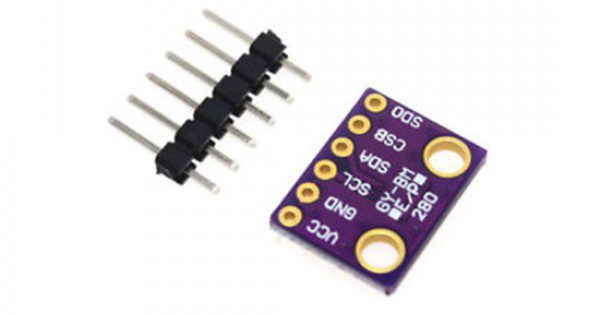
A BMP280 sensor measures barometric pressure and temperature. It can be useful in an educational weather display or pressure-logging project, but it does not measure humidity. That distinction matters when similar-looking environmental modules appear in the same search results.
This guide explains the Epro listing and practical selection checks. It does not claim that the supplied board has been independently calibrated or that a hobby module meets an aviation, medical or industrial measurement requirement.

BMP280 sensor price and listing scope
| Listed item | Price (PKR) | Project role |
|---|---|---|
| BMP280 Pressure Sensor in Pakistan | 350 | BMP280 pressure and temperature module listing |
Price snapshot: Epro listings checked on 18 October 2026. Confirm the current price, availability, delivery charges and package quantity on the linked page before ordering. These are dated listing prices, not a quotation or an independent performance test.
The BMP280 product page lists I2C and SPI support and a supply range of 1.71–3.6 V. Do not assume a generic module is electrically identical to a branded breakout that adds a regulator and level shifting. The exact board design determines how it should be connected.
1. Decide whether humidity is required
BMP280 and BME280 are different sensor families. A BMP280 does not gain a humidity channel when a different library is installed. If the project needs relative humidity as well as pressure and temperature, choose a sensor explicitly specified for that function and verify the actual chip supplied.
A broad product photograph or a seller’s mixed naming should not replace chip identification. The Bosch BMP280 datasheet defines the pressure sensor’s capabilities. This guide does not imply that a BME280 alternative is currently stocked by Epro.
2. Match supply and bus levels
The bare sensor and the current listing are low-voltage devices. A 5 V supply or 5 V I2C pull-up should not be assumed safe. A native 3.3 V controller can make the first project easier, provided the selected module is compatible and its bus levels are verified.
Check both the power input and signal pins. A board’s regulator, if present, does not automatically prove that its data pins have level translation. Review the actual labels and circuitry before using an Uno or another 5 V logic controller.
3. Choose I2C or SPI deliberately
I2C can reduce wiring for a simple display or logger. SPI uses a different signal arrangement and can help in a design with several devices that would otherwise share an I2C address. A four-pin board may expose only the connections needed for one interface, even when the underlying chip supports both.
For boards with extra pins such as CSB and SDO, those pins need defined states for the selected interface. Do not leave configuration inputs floating and expect the library to resolve an electrical ambiguity.Newest in the store


4. Check the address and library
The BMP280’s I2C address is selected through SDO: 0x76 when low and 0x77 when high, as documented by Bosch. A module may fix that selection in hardware. Verify the board’s arrangement rather than treating one example address as universal.
Use software that checks for the expected chip. An I2C acknowledgment alone does not establish that the device is a BMP280 rather than a similarly addressed sensor. The BMP280 pinout and ESP32 code guide starts with a modest pressure-reading test.
5. Separate resolution, accuracy and units
A library can print many digits while the actual uncertainty remains larger. Sensor configuration, mounting, supply noise and environmental conditions all influence a finished instrument. Do not advertise the number of decimal places in a sketch as independently verified accuracy.
Check whether software returns pascals or hectopascals. Dividing pascals by 100 gives hectopascals. A unit mistake can make a healthy sensor appear wildly wrong, particularly when comparing it with a weather service that reports a different pressure reference.
6. Understand altitude assumptions
Pressure changes with height, but also with weather. Estimating altitude requires an appropriate reference pressure and model. A fixed sea-level assumption does not produce a permanent, accurate elevation reading under every weather condition.
Likewise, local station pressure is not the same as a weather service’s sea-level-adjusted pressure. Compare quantities with the same definition before concluding that a module needs calibration.
7. Plan enclosure and placement
The pressure port needs appropriate access to ambient air, while the board still needs protection from liquid and contamination. Do not seal it in an arbitrary airtight enclosure and expect outdoor pressure changes to reach it normally. Avoid direct heating from regulators or a processor when evaluating temperature readings.
Follow the wiring and pressure-code tutorial before adding displays or automation. For a simple I2C status screen, the existing OLED tutorial is a separate reference, but controller pin and voltage compatibility must be reviewed before combining circuits.