


MPU6050: 7 IMU Buying Checks for Motion Projects

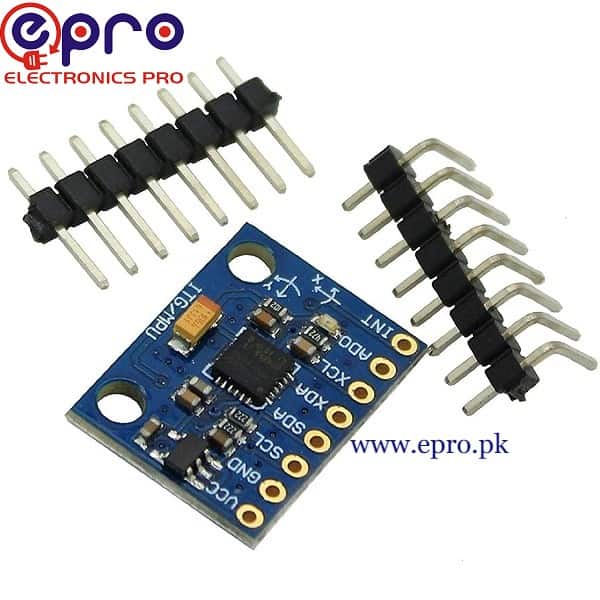
An MPU6050 module combines a three-axis accelerometer and a three-axis gyroscope for motion-sensing experiments. It can be useful in a classroom tilt display or a robotics prototype, but it does not independently provide a compass heading or a reliable position estimate.
This guide explains the Epro GY-521-style listing and the checks needed before purchasing. It distinguishes the sensor’s actual functions from broad motion-processing claims, without presenting an untested hobby module as a ready-made navigation or flight-control system.

MPU6050 module price and naming checks
| Listed item | Price (PKR) | Project role |
|---|---|---|
| MPU6050 Analog Gyroscope Sensor 3 Axis in Pakistan | 490 | GY-521-style MPU6050 module listing |
Price snapshot: Epro listings checked on 18 October 2026. Confirm the current price, availability, delivery charges and package quantity on the linked page before ordering. These are dated listing prices, not a quotation or an independent performance test.
The MPU6050 product title uses the word analog, while the description also mentions nine-axis processing. The device itself provides digital sensor data and contains six sensing axes: three acceleration and three angular-rate axes. It does not contain a built-in magnetometer.
External sensors and additional processing can be part of a larger motion system, but they should not be assumed to be included in this module. Confirm the actual supplied board and chip before basing a project on a broad catalog description.
1. Choose the measurement you actually need
An accelerometer senses acceleration, including the effect of gravity in its stationary orientation. A gyroscope measures angular rate. Neither measurement alone is the same as an absolute angle, compass bearing or distance travelled.
A slow tilt demonstration may use gravity as a reference under appropriate conditions. A moving robot adds other accelerations, so a simple tilt calculation can become misleading. Select hardware and software for the real motion scenario, not only for an attractive example animation.
2. Verify supply and I2C voltage separately
The listing describes a module with an onboard regulator and a supply range that includes 3.3 V. Confirm that the supplied board matches those specifications. A regulator on VCC does not automatically establish that the I2C lines tolerate a 5 V pull-up.
A compatible 3.3 V arrangement with a native 3.3 V controller can simplify a beginner test. For any other arrangement, inspect the actual module’s bus levels and the controller’s input limits rather than copying a branded breakout’s wiring diagram.
3. Check address and exposed pins
MPU6050 modules commonly use I2C address 0x68 or 0x69 according to the address pin configuration. Verify the actual board. Extra pins such as interrupt or auxiliary-bus connections are not automatically required for a basic polling example.Newest in the store


If several devices share a bus, check for address conflicts before buying multiples. A matching connector size does not prove that two boards can share the same bus without changes.
4. Allow for range and sampling choices
Acceleration and gyroscope range settings trade measurable span against scale and sensitivity. A setting that suits a gentle tilt demonstration may saturate during faster motion. Choose filter and sampling settings appropriate to the intended signal rather than leaving an unexplained configuration in place.
A larger printed sample rate does not prove a better finished measurement. Filtering, timing consistency, mechanical vibration and the application’s processing all influence what the readings mean.
5. Plan mounting and axis labels
Mount the board securely and record its axis directions relative to the mechanism. Loose wires, flexible mounting or an unexplained board rotation can make a correct sensor appear wrong. Keep the first test stationary, then change one orientation at a time.
Do not assume the breakout’s drawn arrows match the orientation of every library display or enclosure coordinate system. Document any sign changes and axis remapping explicitly.
6. Understand drift and calibration limits
Gyroscope bias can accumulate into angle drift when rates are integrated. An accelerometer is not a universal cure during arbitrary motion, and the module has no internal compass to supply an absolute yaw reference. Estimating position through repeated integration introduces further drift.
Use suitable calibration and sensor-fusion methods for the actual application, with independent validation. Do not promote an introductory sensor log into a guaranteed navigation, balance or stabilization solution.
7. Start with raw physical-unit readings
The MPU6050 ESP32 code guide prints acceleration and angular rate with their units before attempting orientation estimates. Adafruit’s MPU6050 library guide is a useful software reference, but its branded breakout’s electrical features should not be assumed for every generic board.