


ACS712 Arduino: Low-Voltage DC Wiring and Calibration Code

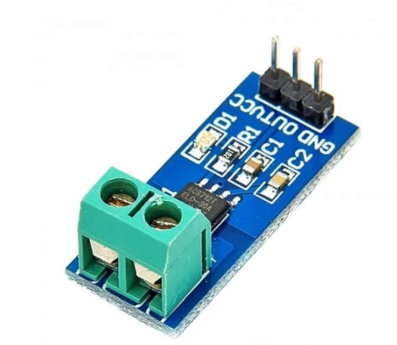
This ACS712 Arduino project estimates a small DC current with a conventional 5 V Uno and a verified 5 A sensor. It uses a no-current baseline and the nominal sensitivity of that variant. It is not an AC RMS meter or a mains-wiring guide.
Identify the actual part before uploading. The ACS712 range listing includes multiple options; selecting the wrong sensitivity can produce believable-looking but incorrect numbers. Use the ACS712 buying and calibration guide if the variant or package is unclear.

1. Prepare a protected low-voltage experiment
Use only a small, suitably current-limited or otherwise appropriately protected DC source of no more than 5 V and a low-power load. Keep the load current comfortably within every relevant component and wiring rating, not merely below the sensor headline.
Disconnect all power while assembling or changing connections. Never place the sensor’s IP+ and IP- current terminals directly across a voltage source: that creates a low-resistance path rather than a current measurement in series with a load.
2. Wire the ACS712 Arduino signal side
| Sensor signal pin | Conventional Uno |
|---|---|
| VCC | 5 V |
| GND | GND |
| OUT | A0 |
The primary current path is a separate series path through the appropriately marked current terminals and the load. Hall sensing does not require joining that primary circuit to the Uno signal ground simply to make the measurement work. Confirm the actual board arrangement and documentation.
This tutorial’s signal wiring is for a conventional 5 V Uno. A 5 V-powered ACS712 output can exceed a 3.3 V ADC’s limit as current changes. Do not copy these connections directly to an ESP32 or another lower-voltage analogue input.
3. Confirm sensitivity and create a no-current baseline
The Allegro datasheet gives nominal sensitivities of 0.185 V/A for the 5 A part, 0.100 V/A for 20 A and 0.066 V/A for 30 A at the nominal supply. The example deliberately selects the verified 5 A value.
Leave the primary load source switched off during startup while USB powers the Uno and sensor. The sketch averages 1,000 no-current samples. Only after the ready message should the already safely wired, protected low-voltage load source be enabled.Newest in the store


4. Upload the DC estimate example
const byte SENSOR_PIN = A0;
const float NOMINAL_REFERENCE = 5.0;
const float VOLTS_PER_AMP = 0.185; // verified 5 A variant only
float zeroCounts = 0;
float averageCounts(unsigned int count) {
  unsigned long total = 0;
  for (unsigned int i = 0; i < count; i++) {
    total += analogRead(SENSOR_PIN);
    delay(2);
  }
  return (float)total / count;
}
void setup() {
  Serial.begin(9600);
  delay(500);
  Serial.println("Keep primary load source OFF: calibrating zero");
  zeroCounts = averageCounts(1000);
  Serial.println("Zero ready: enable only the protected DC test load");
}
void loop() {
  float counts = averageCounts(100);
  float deltaVolts = (counts - zeroCounts) * NOMINAL_REFERENCE / 1024.0;
  float amps = deltaVolts / VOLTS_PER_AMP;
  Serial.print("Estimated DC amps: ");
  Serial.println(amps, 3);
  delay(300);
}
The startup averaging takes approximately two seconds plus conversion overhead. Open Serial Monitor at 9600 baud. The displayed decimals are formatting, not a promise of milliamp accuracy.
5. Check offset, sign and gain separately
With no primary current, small fluctuating readings may remain because of sensor noise, ADC noise or changing offset. Do not repeatedly recalibrate while a real load is connected, because that can subtract the current you intended to measure.
The current direction determines the sign. A negative value is not automatically a wiring fault, and forcing it positive hides useful information. Switch the load source off before changing the series wiring if a different direction is needed.
The 5.0 V reference in this sketch is nominal. Reference error and actual sensor sensitivity affect the scale. Compare a known small DC load with a suitable reference meter before treating the number as quantitative evidence.
6. Recognise what this sketch does not measure
Averaging improves a steady DC display but does not calculate AC RMS, peak capture or high-speed transient current. Opposite AC excursions can cancel. A valid AC measurement requires a deliberately designed sampling and calibration method.
Finally, IC isolation does not certify a breakout board, breadboard or terminal assembly for mains. Keep this exercise at protected low voltage and low power. It is not a circuit breaker, battery protection system or verified equipment-monitoring instrument.