


Reed Switch Arduino: Wiring and Nonblocking Debounce Code

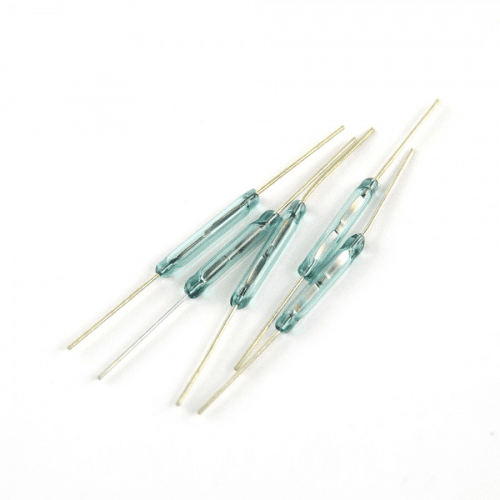
This reed switch Arduino example uses a verified normally open, two-wire contact and the Uno’s internal pull-up. A nearby magnet closes the contact, pulling the input LOW. The program reports stable state changes rather than counting every contact bounce.
Use the bare glass reed switch only after confirming its actual behaviour with an unpowered continuity test. The listed normally open door contact is another two-wire option to check. A powered KY-021 module needs different, board-specific supply wiring.

1. Verify the contact before connecting the Uno
With the switch disconnected from all powered circuits, use an appropriate continuity test. Confirm open with the magnet absent and closed when it is brought into the intended operating position. If the result is opposite, identify the contact type before following this example.
Move the magnet slowly from several directions. Mark a repeatable working orientation rather than assuming a circular sensing zone. A preliminary check can also reveal an unsuitable magnet or a contact damaged during handling.
2. Make the reed switch Arduino connections
| Two-wire contact lead | Conventional Uno connection |
|---|---|
| First lead | D2 |
| Second lead | GND |
| Separate VCC connection | None for this bare contact circuit |
Disconnect power before wiring. The INPUT_PULLUP setting holds the input HIGH when the contact is open; the closed contact connects it to ground. This avoids a floating input without requiring a separate resistor for this short bench demonstration.
Do not wire the contact between 5 V and ground. Do not interpret a three-pin module’s signal and supply terminals as interchangeable switch leads. The SparkFun hookup reference explains the underlying contact-and-pull-up approach.
3. Upload the nonblocking debounce example
const byte CONTACT_PIN = 2;
const unsigned long DEBOUNCE_MS = 25;
int lastRaw;
int stableState;
unsigned long changedAt;
void reportState(int state) {
  Serial.println(state == LOW ? "Magnet contact closed" : "Contact open");
  digitalWrite(LED_BUILTIN, state == LOW ? HIGH : LOW);
}
void setup() {
  Serial.begin(9600);
  pinMode(CONTACT_PIN, INPUT_PULLUP);
  pinMode(LED_BUILTIN, OUTPUT);
  lastRaw = digitalRead(CONTACT_PIN);
  stableState = lastRaw;
  changedAt = millis();
  reportState(stableState);
}
void loop() {
  unsigned long now = millis();
  int raw = digitalRead(CONTACT_PIN);
  if (raw != lastRaw) {
    lastRaw = raw;
    changedAt = now;
  }
  if (now - changedAt >= DEBOUNCE_MS && stableState != raw) {
    stableState = raw;
    reportState(stableState);
  }
}
Open Serial Monitor at 9600 baud. One initial message describes the startup state; later messages appear only after a changed input remains stable for at least 25 ms. The built-in LED follows the accepted closed-contact state.
Newest in the store


4. Understand the timing trade-off
The code tracks the most recent raw transition and waits for stability. It does not pause the whole program with a long delay, so other nonblocking tasks can be added later. Unsigned elapsed-time subtraction also avoids a simple absolute-deadline comparison.
The 25 ms value is a practical starting point for slow manual movement, not a measured specification for every switch. Very short closures can be rejected intentionally. This sketch is therefore not a validated high-RPM rotation counter or a guarantee of detecting every pulse.
5. Diagnose a fixed or unstable input
If the input stays HIGH, check ground continuity, the D2 connection and whether the magnet actually closes the verified contact. If it stays LOW, check for a short to ground, a nearby magnet or a different contact type.
If states flicker near one position, first improve magnet alignment and mounting stability. Software cannot correct a magnet that repeatedly moves across the operating boundary. Keep initial wires short; a long cable installation introduces additional noise and protection considerations.
6. Keep the demonstration separate from security claims
Do not directly switch motors, solenoids or mains with this setup. The Uno input is a sensing circuit. The reed switch buying guide explains package selection, glass handling and contact-rating limitations.
A closed magnetic contact does not establish a locked or secure door. This unsupervised two-wire example can confuse a broken wire with an open contact and can be influenced by another magnet. Use it for learning position sensing, not as a certified intrusion or personal-safety system.