


MLX90614 Arduino: Stable Object and Ambient Readings

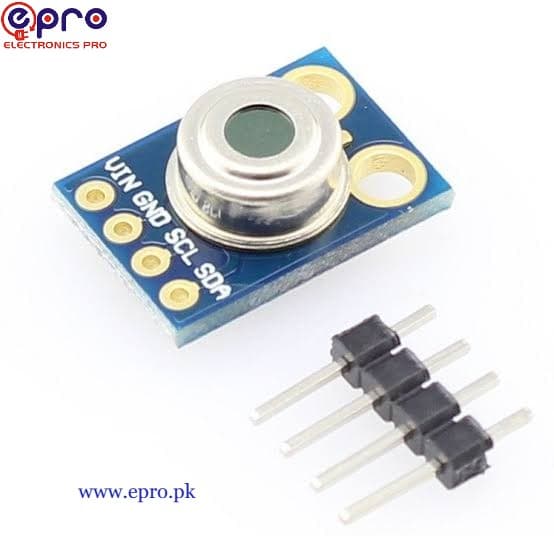
An MLX90614 Arduino project needs a controlled target as well as a working bus. This guide explains a staged first test for object and ambient readings without overstating accuracy. Use the actual module’s voltage documentation and a maintained driver that supports the sensor’s SMBus-compatible interface.
Start with the exact board and sensor suffix

Inspect the module for its regulator, pull-ups and sensor marking. Check whether the supplied device is the nominal three-volt or five-volt version, and confirm what the board’s input pin accepts. The family name alone is insufficient. Avoid powering an unidentified module until the supplier provides adequate electrical information.
Connect the documented digital interface
With power removed, connect supported power, common ground, SDA and SCL to the controller’s actual I2C pins. Check pull-up voltage and logic compatibility in both directions. Keep leads short and test only one sensor initially. Do not assume that a pin-compatible cable or a generic scanner makes a higher-voltage bus safe.
Use a driver’s basic example first
Install a documented MLX90614 library and run its supplied object/ambient example before adding displays, wireless links or EEPROM writes. Match the example’s initialization and bus requirements to the host. Record library version and any changed address. If initialization fails, diagnose power and communication before trying to correct temperature values.
Label the channels clearly
Display object temperature and ambient or sensor-die temperature with units and separate labels. They measure different things and need not match while viewing a warm target. Keep a short time series so settling and fluctuations are visible. Extra decimal places indicate output formatting, not a demonstrated improvement in measurement accuracy.
Control the target and the sensor’s thermal state
Use a broad, stable target that fills the actual field of view. Keep the sensor at a repeatable distance and angle and avoid warming its can with your fingers. Allow the assembly to settle after moving between environments. Nearby warm electronics and drafts can create gradients, which are different from a genuine target-temperature change.
Investigate disagreement without rewriting calibration
For inconsistent results on reflective metal, consider emissivity and reflected surroundings first. Ordinary visible transparency does not guarantee transparency at the sensor’s infrared wavelengths, so do not assume it measures correctly through a window. Do not overwrite EEPROM or factory-related configuration as an initial troubleshooting technique. Follow Melexis procedures only when a justified application requires a change.
Newest in the store


Keep the conclusion within the test
A stable number confirms only that this setup produced repeatable readings under the recorded conditions. It does not validate the complete optical range, clinical use or critical-temperature protection. For demanding measurements use an appropriate reference and a properly designed comparison procedure, with uncertainty and target conditions explicitly considered.
Relevant Epro listing
Product information and prices were checked on 19 October 2026. This is a current snapshot, not a historical price associated with the publication timestamp. Stock, accessories and checkout prices can change. Listing claims are not independent performance or authenticity certifications.
| Product | Checked price | Stock |
|---|---|---|
| Infrared Thermometer sensor Module MLX90614 in Pakistan | PKR 1,590 | Out of stock |
Frequently asked questions
Why do ambient and object temperature differ?
Ambient relates to the sensor’s own thermal state; object temperature is estimated from received infrared radiation.
Should I change emissivity until the value matches another thermometer?
Not as a shortcut. First verify target coverage, thermal settling, reference method and the material’s infrared behavior.
Related Epro reading
Review breadboard connections before assembling a prototype. For controller expansion, the Mega 2560 pin guide explains why pin names and electrical limits must be checked together.
Technical references and test limitations
This guide uses the documentation linked below. The procedures are for a controlled, low-voltage learning setup; no independent hands-on test of the particular seller board is claimed. Record the actual part markings, wiring and firmware version before drawing conclusions from a test.