


VL53L0X ESP32: Wiring, Range Code and 7 Practical Checks

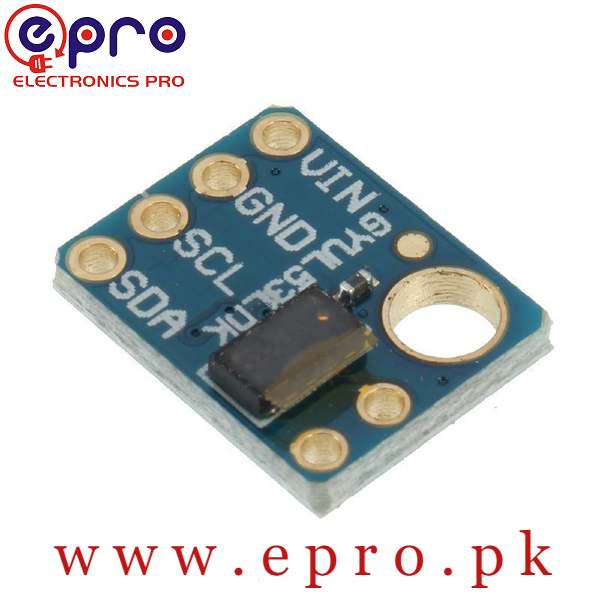
This VL53L0X ESP32 example reads one optical distance module using Arduino IDE. It checks both the library call and the reported range status before printing a distance, rather than treating every returned number as valid.
Use a conventional ESP32 development board and a verified GY-530 module that accepts 3.3 V power with 3.3 V-compatible I²C pull-ups. The listed VIN range alone does not establish the voltage of every signal on every clone board.

1. Check the VL53L0X ESP32 electrical arrangement
| Verified module pin | Conventional ESP32 connection |
|---|---|
| VIN or VCC | 3.3 V, only for a module verified to accept it |
| GND | GND |
| SDA | GPIO21 |
| SCL | GPIO22 |
Disconnect power before wiring. Confirm those GPIO labels exist on your particular board; an ESP32-C3 or another variant may use a different default pin arrangement. This tutorial specifies a conventional ESP32 board rather than every device sharing the ESP32 name.
Leave shutdown and interrupt pins in their documented inactive arrangement for the single-sensor example. If a supplied board requires a particular shutdown connection, follow its verified documentation instead of leaving a required input floating.
2. Install the correct library
Install Adafruit VL53L0X and requested dependencies through Library Manager. Select the correct ESP32 board and serial port in Arduino IDE. This is not the same library as one for a VL53L1X or another optical range sensor.
The maintained Adafruit example shows the measurement structure and ranging interface. This sketch uses a stricter display rule: only status zero is accepted as a distance for this demonstration.
3. Upload the single-sensor range example
#include <Wire.h>
#include <Adafruit_VL53L0X.h>
Adafruit_VL53L0X sensor;
void setup() {
  Serial.begin(115200);
  Wire.begin(21, 22);
  if (!sensor.begin()) {
    Serial.println("VL53L0X initialization failed");
    while (true) { delay(100); }
  }
}
void loop() {
  VL53L0X_RangingMeasurementData_t measurement = {};
  VL53L0X_Error result = sensor.rangingTest(&measurement, false);
  if (result != VL53L0X_ERROR_NONE) {
    Serial.print("Ranging call error: "); Serial.println((int)result);
  } else if (measurement.RangeStatus == 0) {
    Serial.print("Accepted distance mm: ");
    Serial.println(measurement.RangeMilliMeter);
  } else {
    Serial.print("Measurement not accepted; status: ");
    Serial.println(measurement.RangeStatus);
  }
  delay(250);
}
Open Serial Monitor at 115200 baud. A successful initialization establishes basic communication, not accuracy across the module’s complete advertised range. A nonzero status is reported explicitly rather than silently reused as a distance.
4. Begin with a clear indoor target
Use a stable, matte target facing the sensor at a modest distance. Compare several known positions measured from a consistent reference point. Record invalid readings as well as accepted values, keeping the mounting and target material unchanged.
Millimetres are the output units. They are not a promise of ±1 mm accuracy under arbitrary lighting and surface conditions. The VL53L0X buying guide explains why a long-range headline should not be read as a guaranteed result for every object.Newest in the store


5. Diagnose initialization separately from range failures
If initialization fails, check power, shared ground, SDA/SCL assignment, the actual sensor type and the usual address 0x29. Keep only one sensor connected while establishing the basic interface.
If initialization succeeds but measurements are rejected, inspect the target position, obstruction, optical window and lighting. Repeatedly changing I²C pins is unlikely to fix an optical problem that occurs after communication is already working.
For a repeatability check, hold the target at one position and note several readings and rejected statuses. Then move it to another measured position without changing the mounting. This separates variation at a fixed position from a systematic difference between positions.
Repeat the check with the material your project actually needs to detect. A good result from a white card does not validate transparent plastic, dark fabric or a sloping reflective surface. Change lighting only after the basic indoor arrangement is understood, so one changing variable does not hide another.
Do not turn a rejected reading into zero distance to simplify a robot program. Zero is a meaningful geometric value, while an invalid measurement represents uncertainty. Decide explicitly what the application should do when the sensor cannot provide an accepted result.
6. Plan multiple sensors deliberately
Two modules starting at 0x29 need address sequencing or a multiplexer. With a multiplexer, select the intended branch before initialization and before each later measurement. Separate software objects alone do not resolve an electrical address collision.
7. Keep the application noncritical
Do not point modified optics at people, alter the emitter or use the demonstration as a protective stop. A robot needs deliberate invalid-reading behaviour and independent protection appropriate to its hazards; a stream of plausible serial numbers is not validation of collision avoidance.