


VL53L0X Distance Sensor: 7 Checks Before Buying

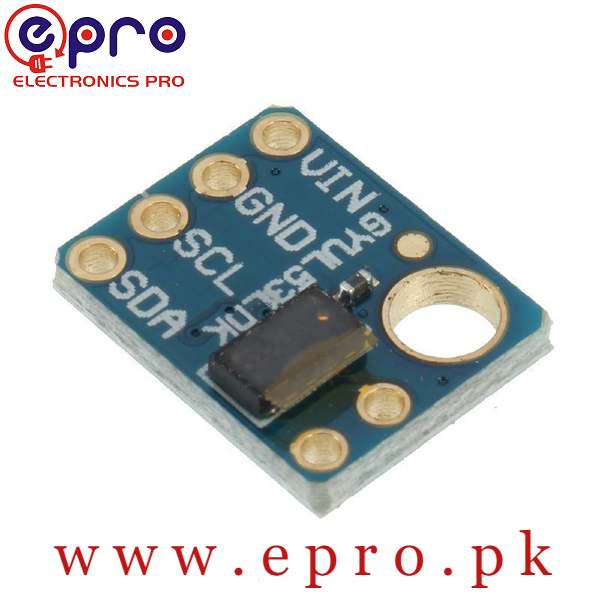
A VL53L0X distance sensor uses optical time of flight to estimate the distance to a target. It is a compact alternative for some projects where an ultrasonic sensor is awkward, but it does not measure every surface equally well in every environment.
The useful buying questions concern the complete breakout board, expected target and actual operating conditions. This guide separates a catalog range statement from a guaranteed result and does not claim an independently measured distance or accuracy.

VL53L0X price and the GY-530 package
| Listed item | Price (PKR) | Project role |
|---|---|---|
| GY-530 VL53L0X LASER Distance Sensor in Pakistan | 630 | GY-530 optical time-of-flight distance module |
Price snapshot: Epro listings checked on 19 October 2026. Confirm the current price, availability, delivery charges and package quantity on the linked page before ordering. These are dated listing prices, not a quotation or an independent performance test.
The Epro GY-530 listing describes a board with onboard power management, a 2.8–5 V input range and an advertised distance up to 1.2 metres. Check the actual supplied module’s pin labels and electrical interface before connecting it to a controller.
1. Separate chip specifications from breakout wiring
The bare sensing component and a regulated breakout board are different electrical products. A breakout’s stated VIN range does not automatically describe every signal pin’s voltage tolerance. Review SDA, SCL, shutdown and interrupt connections individually.
For an ESP32 project, use a verified board arrangement whose I²C pull-ups remain at an acceptable 3.3 V level. Do not infer 5 V logic tolerance from a 5 V-capable power input. Power down before changing wires.
2. Interpret the advertised range as conditional
The Epro listing’s 1.2-metre figure is not a promise for a dark, angled or strongly illuminated target. Measurement mode, signal quality, ambient infrared and target properties can affect the useful result.
The Adafruit overview describes different results under particular modes and target conditions. Do not combine an optimistic range from one board or mode with an accuracy statement from another and present that as a universal product guarantee.
3. Test the actual target and surroundings
A matte card facing the sensor is a clearer starting target than a transparent bottle, a narrow edge or a shiny surface at an angle. Begin indoors with a stable target, then test the intended material and lighting.
Outdoor sunlight and optical reflections can create very different conditions from a short indoor bench test. Evaluate missed or invalid measurements as well as successful numbers; a few plausible readings do not establish reliable detection for every target.Newest in the store


4. Leave the optical area unobstructed
Mounting holes, adhesive and an enclosure can affect alignment or block part of the optical path. Avoid touching or contaminating the sensing window. Check whether any shipping film needs removal according to the supplied module instructions.
Adding a transparent cover is not automatically harmless. Cover material, spacing and reflections can introduce optical crosstalk. A final enclosure may need calibration and validation appropriate to the application rather than reuse of an uncovered demonstration result.
5. Plan the I²C address before adding a second sensor
The usual starting address is 0x29. Two identical sensors at that address cannot simply share an active bus and be independently identified. A scanner showing one response does not prove both are working separately.
The Adafruit multi-sensor guidance explains assigning addresses with controlled shutdown sequencing. A TCA9548A multiplexer is another way to separate same-address devices onto selected branches, with its own wiring and pull-up requirements.
6. Treat status as part of the reading
A distance number without its validity status can be misleading. Software should distinguish an accepted measurement from an invalid or out-of-range result rather than displaying a stale or arbitrary number as a valid obstacle distance.
Do not equate millimetre display units with millimetre accuracy in all conditions. Timing budget, calibration and environment affect the result. Compare against known positions over the range actually needed by your project.
7. Start with a controlled demonstration
The VL53L0X ESP32 wiring and range example starts with one sensor, explicit I²C pins and status checks. Establish communication and plausible measurements before adding more sensors or a complex enclosure.
Do not modify the optical emitter, add focusing optics or treat a catalog laser-class statement as permission for arbitrary optical changes. This hobby ranging arrangement is not validated collision avoidance, personal-safety protection or a substitute for certified protective sensing.