


BTS7960 Arduino Connection: A Current-Limited First Motion Test

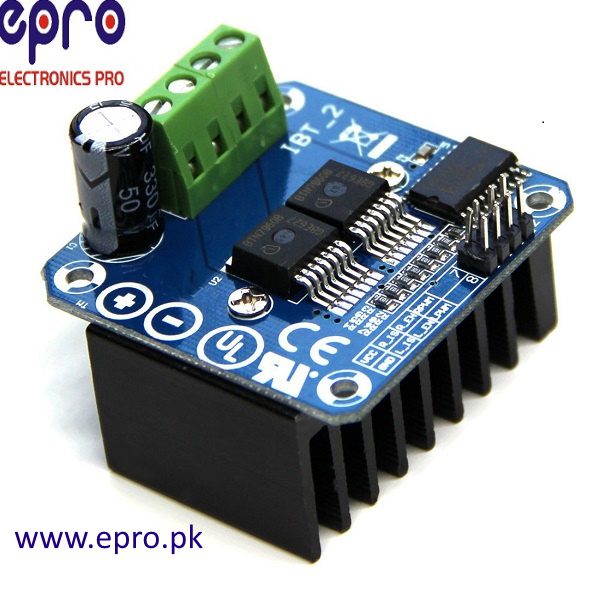
A BTS7960 Arduino connection is not finished when a motor turns. The first test should verify disabled startup, one direction at a time and predictable stopping with a small, secured motor and a current-limited low-voltage supply. Do not begin with a large battery or an unknown mechanical load.
Create a wiring record from the actual board

Identify motor supply positive and negative, the two motor outputs, logic supply, ground, enables and PWM inputs from the supplied board documentation. Header order can differ between products. Record the exact labels and controller pins in a table before assembly. Do not use the Infineon IC package pin numbers as the module-header pinout.
Plan power paths before signal paths
Use a supply voltage suitable for both the motor and the documented module. Keep motor current out of breadboard rails and Arduino power pins. Provide appropriate wiring and fuse protection, and maintain the required logic reference between controller and driver. Confirm polarity with power removed and verify the rail voltage before connecting the motor.
Arrange an inactive reset state
Follow the module circuit to establish which enable and input states disable drive. Ensure these are maintained during boot, reset and disconnected-controller conditions rather than relying only on the first lines of a sketch. Check logic-level compatibility explicitly. Do not connect a pin described as current sense straight to an ADC without understanding its scaling and fault behavior.
Verify signals without commanding movement
With the motor disconnected, inspect controller PWM and enable behavior using suitable low-voltage measurement tools. Keep PWM inactive until all initialization is complete. Never attach an earth-grounded oscilloscope ground clip to an arbitrary bridge motor terminal; bridge outputs are not ordinary ground-referenced logic signals.
Test one direction with conservative limits
Secure a small motor so it cannot roll or entangle wires, remove the mechanical load and keep clear of its shaft. Use the documented module control sequence, a conservative duty cycle and current limit. Enable briefly, stop, and inspect current, supply stability and heating. If direction is unexpected, power off before changing connections.
Check stopping and fault recovery deliberately
Establish the documented disabled, coast and brake behavior at low energy before depending on it. Return drive to inactive, allow rotation to stop and only then test the opposite direction. Verify that reset does not cause unintended motion. If supply limiting, abnormal heating or unexpected movement occurs, stop and correct the cause instead of raising current or duty cycle.Newest in the store


Relevant Epro listing
Product information and prices were checked on 19 October 2026. This is a current snapshot, not a historical price associated with the publication timestamp. Stock, accessories and checkout prices can change. Listing claims are not independent performance or authenticity certifications.
| Product | Checked price | Stock |
|---|---|---|
| 43A H Bridge Drive PWM BTS7960B IBT2 in Pakistan | PKR 1,490 | In stock |
Frequently asked questions
Can the motor be powered from an Arduino 5 V pin?
Do not route the motor load through an Arduino power pin. Use an appropriately protected motor supply and suitable wiring.
Should a first test reverse the motor immediately?
No. Begin with brief one-direction motion, stop safely and verify behavior before testing reversal.
Related Epro reading
Review breadboard connections before assembling a prototype. For controller expansion, the Mega 2560 pin guide explains why pin names and electrical limits must be checked together.
Technical references and test limitations
This guide uses the documentation linked below. The procedures are for a controlled, low-voltage learning setup; no independent hands-on test of the particular seller board is claimed. Record the actual part markings, wiring and firmware version before drawing conclusions from a test.