


ADS1115 ESP32: Safe Wiring, Code and 7 Checks

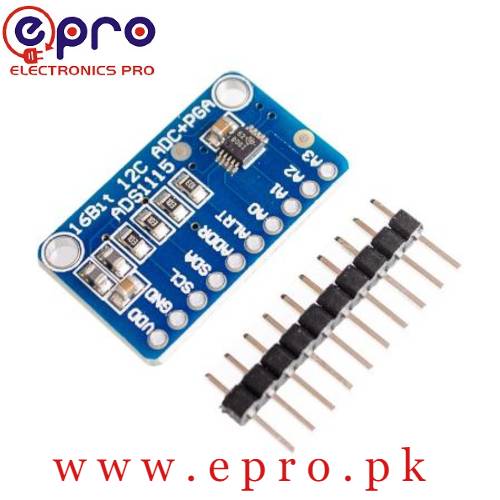
An ADS1115 ESP32 test is easiest to diagnose with one known, low-voltage input. A potentiometer supplied from the same 3.3 V rail provides a simple adjustable source without requiring an unknown sensor transfer equation.
This tutorial uses a classic ESP32-WROOM development board and a compatible ADS1115 breakout. Pin assignments vary on other ESP32 families. The sketch is a starting example, not a tested precision voltmeter or an isolated measurement instrument.

1. Check the module before connecting it
Identify VDD, GND, SCL, SDA, ADDR and A0 on the actual ADS1115 module. Do not infer the pin order from a different seller’s picture. Check that the board is compatible with a 3.3 V supply and that its I2C pull-ups will not pull the ESP32 pins to 5 V.
A converter’s broad supply range does not change the controller’s GPIO limits. Disconnect USB power while wiring. Keep this first test away from mains, higher-voltage batteries and circuits whose ground cannot safely be shared with the controller.
2. Wire the ADS1115 ESP32 bench circuit
| Module connection | Classic ESP32 destination |
|---|---|
| VDD | 3.3 V |
| GND | GND |
| SDA | GPIO21 |
| SCL | GPIO22 |
| ADDR | GND, selecting 0x48 |
| A0 | Wiper of a 10 kΩ potentiometer |
Connect the potentiometer’s outer terminals to 3.3 V and ground. Its wiper should therefore remain within that supply range. Verify the wiring before applying power; the converter’s gain setting is not an overvoltage protection mechanism.
3. Install the correct library
Install Adafruit ADS1X15 through Arduino Library Manager and accept its required dependencies. Select the correct ESP32 board and port. The Adafruit library supports both ADS1015 and ADS1115 devices, but their resolution differs; instantiate the correct class.
The example explicitly initializes the I2C pins and the ground-selected address. If the board uses different safe pins or a different ADDR connection, update those choices deliberately rather than trying random values.
Newest in the store


4. Upload a one-channel voltage example
#include <Wire.h>
#include <Adafruit_ADS1X15.h>
Adafruit_ADS1115 ads;
void setup() {
  Serial.begin(115200);
  Wire.begin(21, 22);
  if (!ads.begin(0x48)) {
    Serial.println("ADS1115 not found");
    while (true) { delay(100); }
  }
  ads.setGain(GAIN_ONE);
}
void loop() {
  int16_t raw = ads.readADC_SingleEnded(0);
  float volts = ads.computeVolts(raw);
  Serial.print("A0 raw: "); Serial.print(raw);
  Serial.print("  volts: "); Serial.println(volts, 4);
  delay(500);
}
Open Serial Monitor at 115200 baud. Turn the potentiometer slowly and observe the trend. The code uses the library’s gain-aware voltage conversion instead of hard-coding an ADC multiplier that could become wrong when the gain changes.
5. Interpret the selected gain correctly
GAIN_ONE selects a ±4.096 V full-scale conversion setting. With VDD at 3.3 V, the physical input must still remain within the permitted supply range. It is normal that a safe input does not reach the positive full-scale code associated with 4.096 V.
Single-ended mode measures A0 relative to ground. It is not permission to apply a negative voltage to A0. Differential measurements can represent a negative difference while both individual input pins still obey the manufacturer’s voltage limits.
6. Diagnose communication and reading faults separately
If initialization fails, check power, common ground, SDA, SCL and ADDR. A disconnected input or a wiper on the wrong terminal is a different problem from a missing I2C device. Avoid treating a plausible-looking number as proof that all connections are correct.
If readings sit near a limit, measure the input with a suitable reference and review the selected range. For unstable values, inspect short breadboard connections and supply noise before adding averaging. Averaging can smooth noise but cannot safely recover a clipped or overvoltage signal.
7. Expand only after a stable reference test
Compare several stable wiper positions with an appropriate meter. Printed decimal places do not establish accuracy. The ADS1115 buying guide explains multiplexed channel timing, while the TI datasheet defines the electrical requirements for a more advanced design.