


Arduino Nano Pinout: 7 Classic Board Wiring Checks

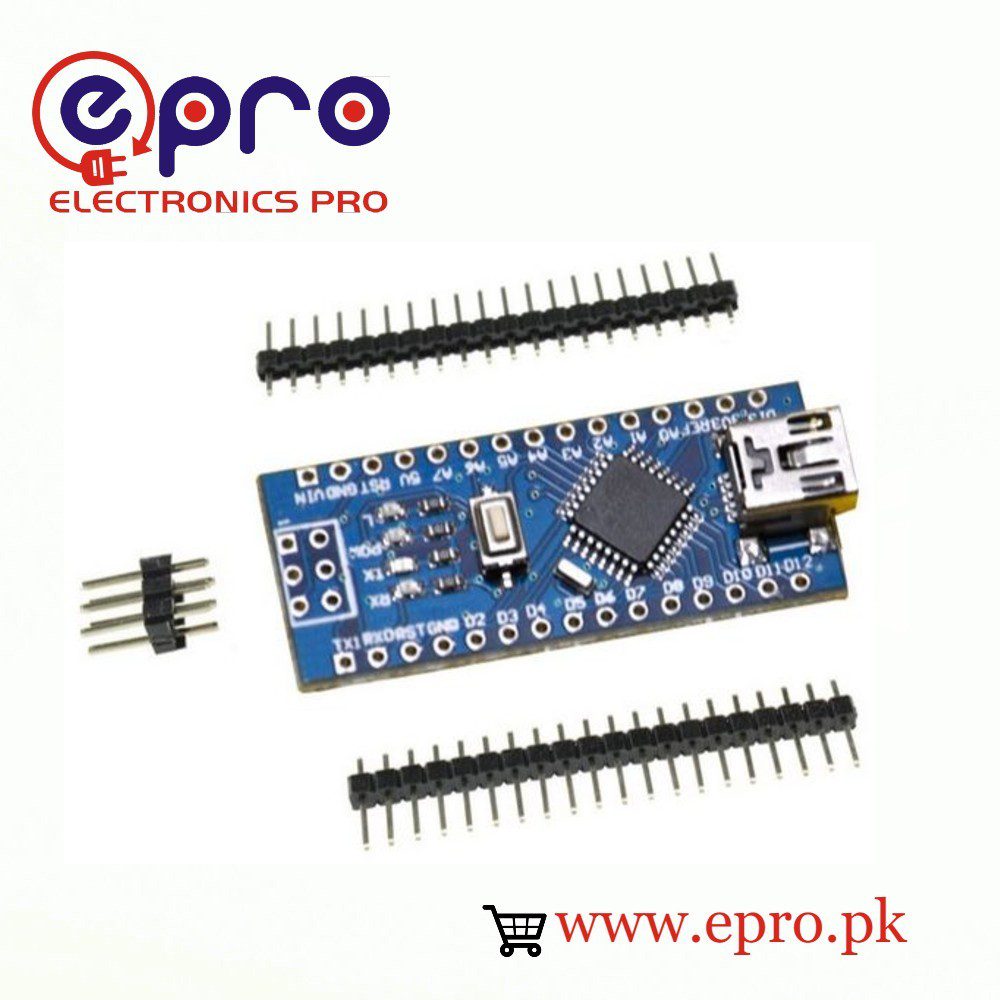
This Arduino Nano pinout guide is for the classic ATmega328P-based Nano, not the Nano Every, Nano 33, Nano ESP32 or Nano R4. Similar outlines can hide different processors and voltage limits. Identify the exact board first, then use the following checks before connecting a sensor or plugging a Nano into a breadboard.
1. Confirm the classic Nano variant

Look at the microcontroller marking, USB bridge and connector, then compare the board with the official classic Nano pinout. A seller’s version label does not by itself establish that the board uses 3.3 V logic. Classic ATmega328P Nano designs normally operate at 5 V; other Nano-family boards can have different requirements. Treat every unfamiliar revision as a separate board until verified.
2. Map digital functions before wiring
| Function | Classic Nano labels | Important limit |
|---|---|---|
| USB serial UART | D0/RX and D1/TX | Can interfere with uploads |
| I2C | A4/SDA and A5/SCL | Check bus pull-up voltage |
| SPI | D10/SS, D11/MOSI, D12/MISO, D13/SCK | D13 is also associated with the built-in LED |
| PWM | D3, D5, D6, D9, D10, D11 | PWM is not a high-current analog supply |
| Analog-only inputs | A6 and A7 | Not general-purpose digital I/O on the classic Nano |
When a library accepts a digital pin number, verify that it supports the pin you chose. A6 and A7 are a common trap: they add measurement channels but are not interchangeable with A0–A5 for digitalRead or digitalWrite on the classic board.
3. Keep power pins distinct
VIN, 5V, 3V3 and GND are not equivalent. Start with USB power and no external circuitry. Do not connect a battery to the 3V3 output or assume an adapter’s 5 V pin belongs on VIN. Regulator capability and protection can differ on third-party boards. Consult the actual board documentation before combining USB and external power.
4. Check breadboard alignment without power
The Nano should straddle the breadboard’s center gap so the two header rows do not short together. Confirm pin labels rather than counting from a product photo. Check that header pins are straight, solder joints are sound and no rail jumper accidentally links 5 V with GND. A continuity test should be performed only with power removed.
5. Try a pull-up button input
Wire a normally open pushbutton between D2 and GND. This example enables the internal pull-up: a released button reads HIGH, and a pressed button reads LOW. It reports state changes but intentionally does not claim to debounce mechanical contacts.
const byte BUTTON_PIN = 2;
int previous = HIGH;
void setup() {
  Serial.begin(9600);
  pinMode(BUTTON_PIN, INPUT_PULLUP);
}
void loop() {
  int state = digitalRead(BUTTON_PIN);
  if (state != previous) {
    Serial.println(state == LOW ? "Pressed" : "Released");
    previous = state;
  }
}
Several rapid transitions from one press can be contact bounce. First verify that the button’s legs do not already share a connection, then add a debounce method if the application needs one event per press.
Newest in the store


6. Match signal voltage to the peripheral
A classic Nano output can be too high for an unprotected 3.3 V device. Use a correctly chosen level shifter or divider for the actual signal type, not merely a different supply label. I2C, SPI and UART have different direction and speed requirements. Avoid powering a disconnected sensor indirectly through its signal pin.
7. Leave a usable upload path
Keep D0 and D1 free during the first upload and identify the serial port that appears when the board is connected. The USB bridge driver and the processor/bootloader selection are separate settings. If a wiring change breaks uploading, disconnect the new peripheral and retest the bare board before changing drivers.
Epro parts and availability
These are relevant Epro listings, not independent authenticity or performance certifications. Prices below were checked on 19 October 2026; they are a dated snapshot rather than a historical price implied by this article’s publication date. Confirm the exact variant, included accessories, stock and current checkout price before ordering.
| Listing | Checked price | Stock at check |
|---|---|---|
| Arduino Nano Micro-controller V3.0 in Pakistan | PKR 650 | In stock |
| Arduino NANO V3.3 with Cable in Pakistan | PKR 830 | In stock |
Frequently asked questions
Can A6 and A7 drive LEDs?
Not as normal digital outputs on the classic ATmega328P Nano. Use an appropriate digital I/O pin instead.
Does every Nano use this pinout?
No. Nano is a board family. Confirm the processor and exact hardware model before following a classic Nano diagram.
Related Epro guides
Technical references and verification
The guidance above is based on the manufacturer documentation linked here and the listed product information. Example procedures and sketches are provided for a controlled low-voltage bench setup; no independent hands-on test of your particular board or adapter is claimed. Check the markings and documentation for your actual revision.