


MT3608 Circuit Diagram: Read the Power and Feedback Paths

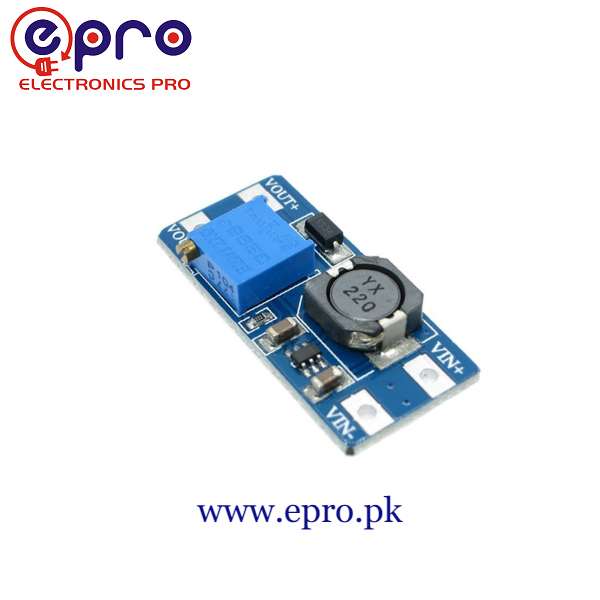
An MT3608 circuit diagram is easiest to understand when you follow two different paths: the high-current energy-transfer path and the low-power feedback path. The trimmer belongs to feedback; it does not directly carry the full output current. This guide explains the common boost arrangement and a cautious diagnostic sequence for a small, unmodified module.
Follow energy from the input to the output

In a typical boost converter, the input source feeds an inductor connected to a switching node. The IC repeatedly switches that node, and a diode provides a path toward the output capacitor and load during the appropriate part of the cycle. The capacitor helps support the load between switching events. This explanation is functional: use the actual schematic to identify the pins on your specific IC package.
Find the feedback divider
The output is sampled by a resistor network connected to the feedback input. On an adjustable board, a trimmer changes part of that divider so the controller regulates at a different output voltage. A wrong resistor connection or damaged trimmer can upset regulation. Do not bridge components or replace the trimmer on a powered module in an attempt to force a particular output.
Do not confuse the switch node with a supply terminal
The switching node carries a fast waveform, not a clean DC output suitable for powering a sensor. Keep probes and loose wires away from adjacent small IC leads. For a beginner’s check, measure only the labeled input and output terminals with an appropriate meter. Detailed waveform measurements require suitable equipment, probe technique and a clear understanding of ground connections.
Use the labels on the real PCB
| Board connection | Purpose | Check |
|---|---|---|
| IN+ and IN− | DC source input | Confirm polarity with power off |
| OUT+ and OUT− | Load supply output | Set voltage with the load disconnected |
| Trimmer | Feedback adjustment | Do not assume rotation direction |
| Inductor and diode | Energy-transfer components | Their ratings limit the module |
| Input/output capacitors | Local energy storage and filtering | Observe voltage ratings and polarity |
Some modules share input and output ground, but confirm the actual design rather than using that as permission to join unrelated external supply rails. Never connect mains directly to this non-isolated board.
Adjust with a controlled bench setup
Start with a documented low-voltage input and a conservative current limit, with no load on the output. Measure the labeled output while slowly adjusting the trimmer. If the output does not change, stop and verify input voltage, board orientation and the expected adjustment range. Multi-turn trimmers may need several turns, but forcing an end stop or turning blindly while a sensitive load is connected is not a safe diagnosis.
Diagnose output near the input voltage
A conventional boost topology can have an input-to-output conduction path even when active boosting is absent. Seeing approximately the input voltage at the output does not prove regulation or prove the IC is healthy. Check whether the source is collapsing, the requested output is above the input and the load is within a reasonable test envelope. Do not assume turning the trimmer can make a boost-only board regulate below its input.
Newest in the store


Separate a wiring fault from an overload
If the unloaded setting is correct but output collapses when a load starts, check the source current capability, wire drop, load startup current and module heating. Test with a smaller known load only within the module’s supported conditions. If the source current limit is active, the board is not receiving the intended supply. Stop after abnormal heat, damage or unstable behavior; repeated overload attempts can make the fault worse.
Keep the original circuit drawing, measured terminal voltages and load details with the project. A replacement board may have different component ratings even when it carries the same IC name. The useful conclusion is a verified operating point for one setup, not a universal output-current promise.
Epro parts and availability
These are relevant Epro listings, not independent authenticity or performance certifications. Prices below were checked on 19 October 2026; they are a dated snapshot rather than a historical price implied by this article’s publication date. Confirm the exact variant, included accessories, stock and current checkout price before ordering.
| Listing | Checked price | Stock at check |
|---|---|---|
| MT3608 DC-DC Boost Converter Step Up Module in Pakistan | PKR 140 | In stock |
Frequently asked questions
Why is there output when the converter is not boosting?
A conventional boost power path may pass input through the inductor and diode. That voltage is not proof of active regulation.
Can the diagram prove a board’s current rating?
No. Actual component choices, thermal design and measured operating conditions also matter.
Related Epro guides
Technical references and verification
The guidance above is based on the manufacturer documentation linked here and the listed product information. Example procedures and sketches are provided for a controlled low-voltage bench setup; no independent hands-on test of your particular board or adapter is claimed. Check the markings and documentation for your actual revision.