


Sound Sensor Arduino: Digital Threshold Wiring and Code

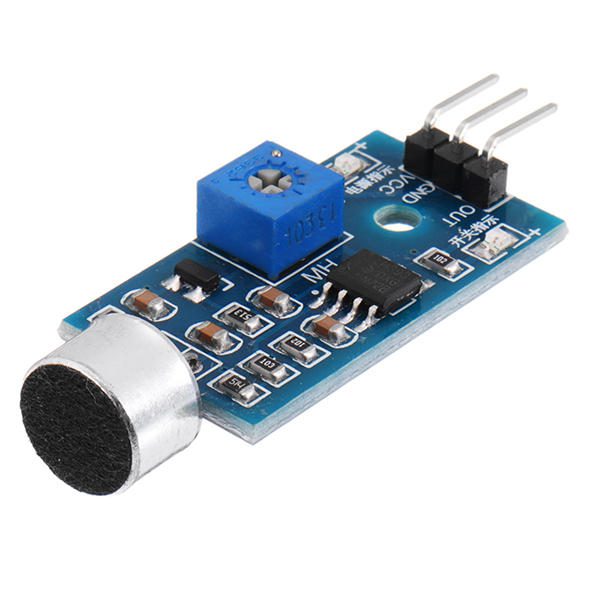
This sound sensor Arduino project reads a digital threshold output and briefly lights the built-in LED after an accepted transition. It does not record audio, identify words, measure calibrated decibels or reliably distinguish claps from other noises.
The example uses the Epro Arduino-compatible sound module, whose listing describes HIGH in quiet conditions and LOW when sound crosses the adjusted threshold. Verify the supplied board and output state before uploading.

1. Identify the digital sound sensor Arduino pins
| Module connection | Conventional 5 V Uno |
|---|---|
| VCC | 5 V |
| GND | GND |
| Digital OUT | D2 |
Switch off power before making or changing connections. Follow the board’s labels rather than assuming a connector order from a photograph of another sound module. This example does not need an analogue output pin.
The listing specifies 3.3–5 V operation. If moving to a 3.3 V controller, review supply and output compatibility for the actual module. A signal driven by a 5 V-powered board may require a different electrical arrangement.
2. Establish a quiet baseline
Place the module on a stable surface away from a loudspeaker. Adjust the threshold gradually until it is not continuously triggering in the normal background environment, then make a modest nearby test sound.
A response to one test sound does not prove sound recognition. Speech, a tap or a closing door may all cause the same output transition. If the board remains LOW continuously, adjust the threshold and confirm its actual polarity before interpreting the program.
3. Upload the accepted-edge demonstration
const byte SOUND_PIN = 2;
const unsigned long EVENT_SPACING_MS = 250;
const unsigned long LED_HOLD_MS = 150;
int previousState = HIGH;
bool haveEvent = false;
unsigned long lastEventAt = 0;
uint32_t acceptedEvents = 0;
void setup() {
  Serial.begin(9600);
  pinMode(SOUND_PIN, INPUT);
  pinMode(LED_BUILTIN, OUTPUT);
  delay(100);
  previousState = digitalRead(SOUND_PIN);
}
void loop() {
  unsigned long now = millis();
  int state = digitalRead(SOUND_PIN);
  bool activeEdge = state == LOW && previousState != LOW;
  if (activeEdge && (!haveEvent || now - lastEventAt >= EVENT_SPACING_MS)) {
    haveEvent = true;
    lastEventAt = now;
    acceptedEvents++;
    Serial.print("Accepted threshold event: ");
    Serial.println(acceptedEvents);
  }
  bool ledOn = haveEvent && now - lastEventAt < LED_HOLD_MS;
  digitalWrite(LED_BUILTIN, ledOn ? HIGH : LOW);
  previousState = state;
}
Open Serial Monitor at 9600 baud. An accepted HIGH-to-LOW transition increments the displayed threshold-event count. The program waits at least 250 ms between accepted events, and the LED stays on for approximately 150 ms after one is accepted.
Newest in the store


4. Understand what the count represents
The count is a software-filtered number of threshold transitions. One physical sound may create several electrical transitions, while several sounds can merge into one sustained active period. The spacing rule intentionally rejects some closely timed events.
Consequently, do not rename the variable a clap count and claim reliable clap recognition. This simple polling loop can also miss short pulses, especially if future changes add slow tasks. It is an educational response indicator, not an event-capture instrument with a specified detection probability.
5. Troubleshoot the interface before changing the algorithm
For no response, check the supply, shared ground, correct digital output and the threshold adjustment. Confirm the actual HIGH/LOW behaviour separately. A module with the opposite polarity needs a deliberately revised edge test, not random changes to timing values.
For continuous responses, check environmental noise and module placement. Vibration transmitted through the mounting surface can affect practical behaviour. Keep the demonstration volume comfortable rather than using loud sounds to compensate for an incorrectly wired board.
6. Choose different hardware for different measurements
This digital output cannot provide an audio waveform or a sound-pressure value. The sound sensor module buying guide explains why a bare microphone, an analogue amplifier and a digital threshold module are different interfaces.
The program samples a logic state and does not record audio, but it is not a complete privacy or security product. Do not connect a mains relay or hazardous actuator to extend this example. Keep the response on the built-in LED until the intended application has an appropriate electrical, timing and failure-response design.