


Sound Sensor Module: 7 Checks Before an Arduino Project

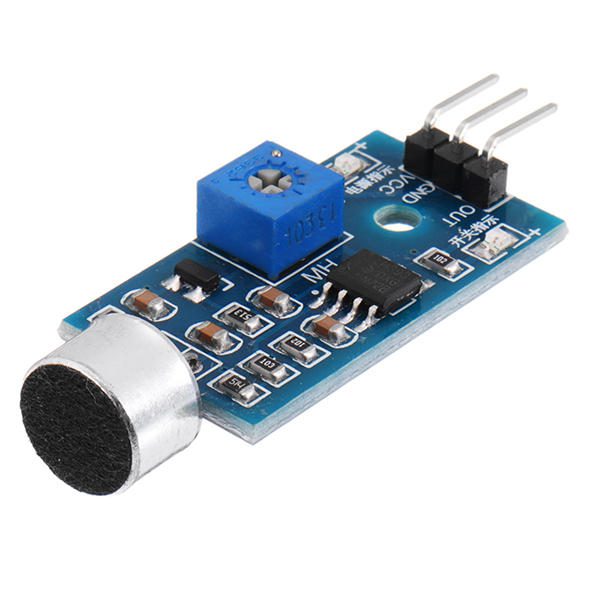
A sound sensor can mean several very different products: a bare microphone, an analogue audio front end or a digital threshold module. Selecting the wrong kind can leave an Arduino project unable to measure what its title promises.
The Epro module covered here is described as a digital threshold detector. It can indicate a threshold crossing, but that output is not a calibrated sound-pressure level, an audio waveform or a recognised spoken command.

Sound sensor prices and the hardware difference
| Listed item | Price (PKR) | Project role |
|---|---|---|
| Sound Sensor Arduino Compatible in Pakistan | 130 | Arduino-compatible digital threshold module |
| Mini Microphone – Mic – Sound Sensor in Pakistan | 15 | Mini microphone listing; do not assume a complete interface board |
Price snapshot: Epro listings checked on 18 October 2026. Confirm the current price, availability, delivery charges and package quantity on the linked page before ordering. These are dated listing prices, not a quotation or an independent performance test.
The Arduino-compatible module and the mini microphone are not equivalent purchases. Check the supplied package and pin labels. A bare microphone generally needs an appropriate bias and amplifier arrangement before it can serve as a controller interface.
1. Choose the output your project actually needs
For an LED that responds when the module detects enough sound, a digital threshold output may be sufficient. It communicates a state, not the detailed shape or magnitude of the original signal.
For waveform sampling, frequency analysis or a more informative amplitude estimate, select suitable analogue or digital audio hardware with documented specifications. Do not plan an analogueRead program for a module that exposes only a digital threshold pin.
2. Read the actual listing rather than a similar-board tutorial
The linked Epro listing describes an electret-based, adjustable module with a HIGH output in the quiet condition and LOW when its sound threshold is crossed. It does not establish a separate analogue output for this product.
Other boards may offer AO and DO terminals or different active states. Their wiring and sketches do not automatically apply here. Confirm the board supplied, its terminal labels and its documented truth table before connecting it.
3. Treat the adjustment as a threshold setting
An adjustable screw is not automatically a calibrated gain control or a decibel dial. On the listed module, use it to find a useful switching response under the actual test conditions.
Small changes in location, orientation, background noise or enclosure can change which sounds cross the threshold. Record the practical conditions and repeat the test, rather than claiming that a particular screw position detects every sound at a specified distance.Newest in the store


4. Check power and controller input limits
The module listing specifies 3.3–5 V operation. The controller’s GPIO still needs to accept the resulting signal voltage. A board working from a 5 V supply is not proof that its output is safe for a 3.3 V-only input.
A conventional 5 V Uno is the context for the paired beginner example. Review the actual output circuit and a suitable interface before changing controller families. Connect the signal ground correctly and power down before moving jumper wires.
5. Do not mistake threshold detection for sound recognition
A clap, a door closing, nearby speech or a dropped object may all cross the same threshold. A single digital output does not identify which event occurred. A count of accepted output transitions is therefore not automatically a count of claps.
Similarly, a quiet-state indication does not prove silence. It only describes whether this module’s configured threshold circuit has switched under the current conditions. Avoid product descriptions that suggest voice identification or reliable intrusion detection without the required sensing and validation.
6. Separate an experiment from a calibrated level meter
Decibels of sound pressure require a defined reference, microphone response, processing and calibration. This board’s HIGH or LOW output does not supply those quantities. Adding a numerical label in software would not turn it into a compliant noise meter.
Even an analogue microphone tutorial, such as Adafruit’s amplitude-measurement example, uses a different front end and sampling method. Its analogue code should not be copied onto this digital-only interface or interpreted as calibration for this product.
7. Begin with a harmless visible response
Use the sound sensor Arduino threshold code guide to illuminate the built-in LED after an accepted event. Adjust the threshold gently in the intended environment and check unwanted responses as well as intended ones.
The starter circuit is not a certified alarm, hearing-safety instrument or noise-compliance tool. Keep loads harmless and describe the result as a threshold demonstration, not as an independently tested ability to recognise a particular sound.