


74HC595 Arduino: Wiring and a One-LED-at-a-Time Sketch

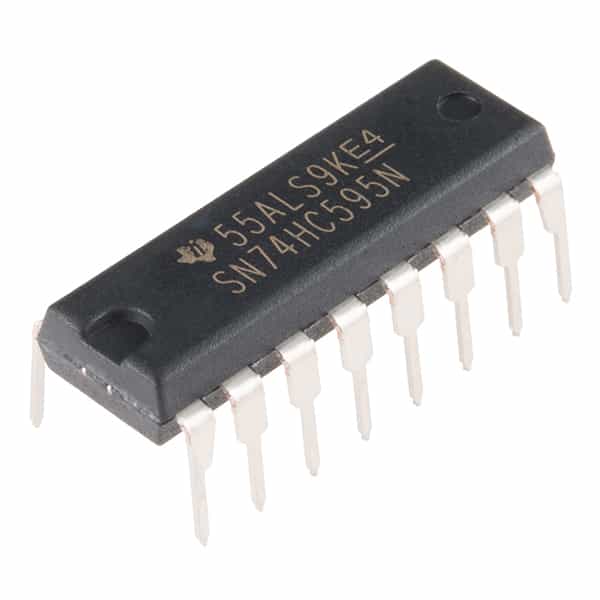
This 74HC595 Arduino example uses a 5 V Uno-compatible board and a matching 74HC595 supply to move one active bit through eight resistor-limited LEDs. It demonstrates data, shift-clock and latch-clock operation without an extra library. Do not apply the same 5 V wiring unchanged to a 3.3 V-only controller.
Gather the low-current test parts

Use a documented 16-pin DIP 74HC595, an Uno-compatible 5 V board, eight LEDs, eight individual 2.2 kΩ resistors and a 100 nF bypass capacitor. The relatively large LED resistors keep this demonstration conservative; actual brightness depends on LED forward voltage. Confirm resistor values and chip orientation with power disconnected.
Wire power and control inputs
| 74HC595 pin | Connection |
|---|---|
| 16 VCC | Arduino 5 V |
| 8 GND | Arduino GND |
| 14 SER | Arduino D11 |
| 11 SRCLK | Arduino D12 |
| 12 RCLK | Arduino D8 |
| 13 OE | GND for this simple always-enabled LED test |
| 10 SRCLR | 5 V |
| 15, 1–7 QA–QH | Each output through its own 2.2 kΩ resistor and LED to GND |
| 9 QH′ | Leave unconnected for this single-register test |
Connect each LED anode toward its output/resistor and its cathode to GND. Place the bypass capacitor close to pins 16 and 8. Tie grounds together and avoid adding another uncontrolled power source.
Load and latch one byte
The sketch holds the latch low while shifting a byte, then raises it to transfer that byte to the visible outputs. MSBFIRST defines how bits are transmitted. The example walks a single set bit through the byte; if the physical LED order looks reversed, check QA-to-QH wiring and bit order before changing the circuit.
const byte DATA_PIN = 11;
const byte CLOCK_PIN = 12;
const byte LATCH_PIN = 8;
void showByte(byte value) {
  digitalWrite(LATCH_PIN, LOW);
  shiftOut(DATA_PIN, CLOCK_PIN, MSBFIRST, value);
  digitalWrite(LATCH_PIN, HIGH);
}
void setup() {
  pinMode(DATA_PIN, OUTPUT);
  pinMode(CLOCK_PIN, OUTPUT);
  pinMode(LATCH_PIN, OUTPUT);
  digitalWrite(CLOCK_PIN, LOW);
  showByte(0);
}
void loop() {
  for (byte bitIndex = 0; bitIndex < 8; bitIndex++) {
    showByte((byte)(1U << bitIndex));
    delay(300);
  }
}
Verify the result one stage at a time
Upload with the circuit inspected and no other peripherals connected. One LED should be selected at a time if the build is correct. If no LED lights, check OE, SRCLR, supply, common ground and LED polarity. If the pattern changes during shifting, verify that the latch signal reaches RCLK rather than SRCLK. A broken breadboard rail can make correct code appear faulty.
Understand the startup limitation
Because OE is tied low here, outputs are enabled before the application has initialized the register. The sketch clears them during setup, but it does not guarantee an all-off state throughout power-up. This is acceptable only for a harmless LED demonstration. A consequential control application needs a deliberate hardware-enable design and safe defaults.
Newest in the store


Expand only within electrical limits
Each LED needs its own resistor; one shared resistor does not provide reliable per-output current limiting. Keep output and package currents within the datasheet’s operating constraints. To cascade a second register, follow the documented serial-output connection and send the required extra byte before latching. Use external driver stages for loads beyond the shift register’s capabilities.
Epro parts and availability
These are relevant Epro listings, not independent authenticity or performance certifications. Prices below were checked on 19 October 2026; they are a dated snapshot rather than a historical price implied by this article’s publication date. Confirm the exact variant, included accessories, stock and current checkout price before ordering.
| Listing | Checked price | Stock at check |
|---|---|---|
| Shift Register 8 Bit Dip SN74HC595 IC in Pakistan | PKR 68 | In stock |
Frequently asked questions
Does this sketch need a 74HC595 library?
No. It uses Arduino’s built-in shiftOut function and ordinary digital pins.
Can I replace the Uno with ESP32 without changing the interface?
Not automatically. Check supply and logic thresholds; a 3.3 V signal is not always a guaranteed high for HC logic supplied at 5 V.
Related Epro guides
Technical references and verification
The guidance above is based on the manufacturer documentation linked here and the listed product information. Example procedures and sketches are provided for a controlled low-voltage bench setup; no independent hands-on test of your particular board or adapter is claimed. Check the markings and documentation for your actual revision.