


CH340 USB to TTL: 7 Wiring and Loopback Checks

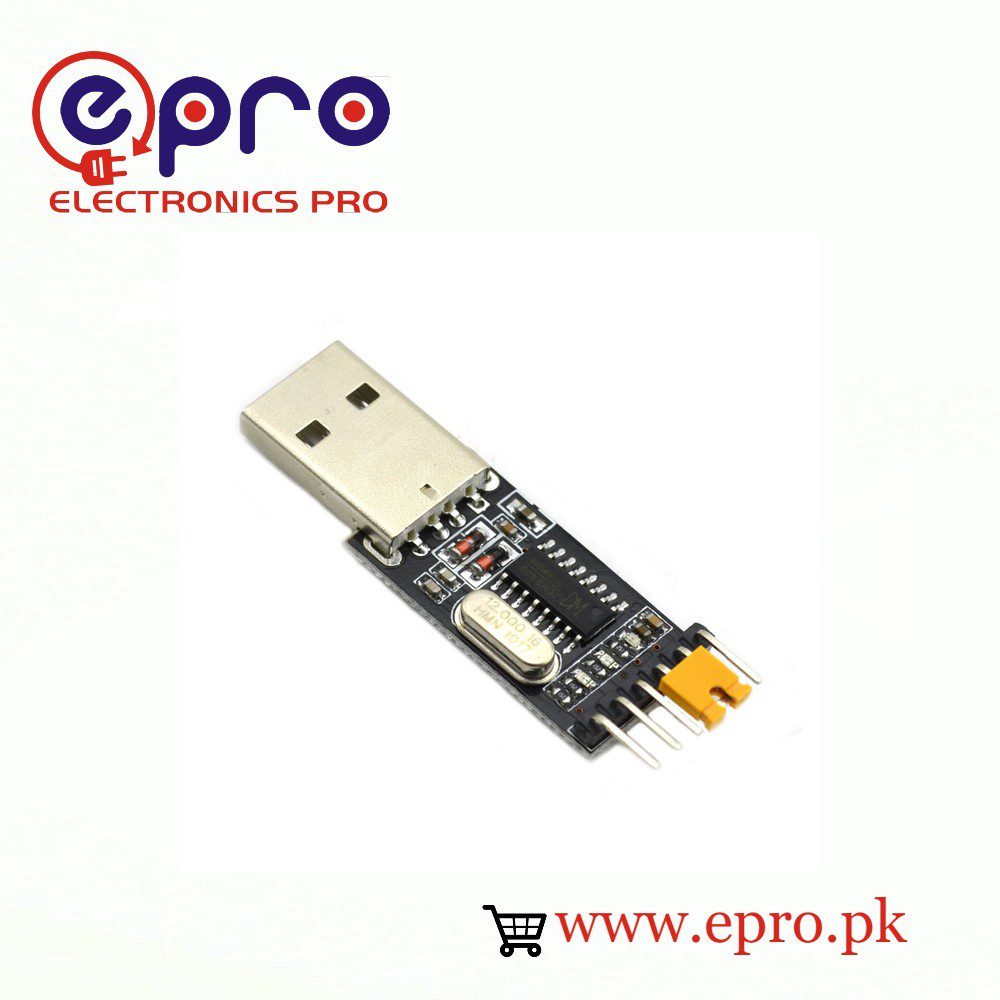
A CH340 USB-to-TTL adapter connects a computer to a logic-level UART. It is not automatically an RS-232 converter, a high-current power supply or a complete programmer for every microcontroller. Before connecting a target board, use these seven checks to establish driver operation, signal direction and compatible voltage levels.
1. Identify the adapter rather than trusting a generic diagram

Read the labels printed beside the header on your actual module. Header order is not universal: two visually similar adapters can arrange GND, TXD, RXD and power differently. Compare the product photo and board documentation, and identify any voltage-selection jumper. Never count pins from a rotated marketplace image and assume the order is correct.
2. Separate TTL UART from RS-232
A TTL UART uses logic-level signals referenced to ground. Conventional RS-232 uses different electrical signaling and requires an appropriate transceiver. A listing that loosely mentions serial or RS232 does not prove that the header provides RS-232 levels. For a microcontroller UART, use a documented TTL-level interface; for an actual RS-232 instrument, select a suitable converter instead.
3. Verify the signal voltage and power pin independently
Do not infer TXD voltage solely from a 3.3 V/5 V jumper or an exposed 3V3 pin. Some modules switch only the supply output. Consult the schematic or measure the documented idle signal under controlled conditions before connecting a sensitive target. Use a properly specified level shifter when required. Do not use an adapter’s regulator as an assumed supply for a radio module with high startup current.
4. Run a target-disconnected loopback test
Install the appropriate WCH driver if the operating system needs it and identify the adapter’s serial port. Leave the microcontroller disconnected. With the adapter unplugged, join its TXD and RXD pins if its documentation permits a normal loopback. Reconnect, open a serial terminal, disable local echo and send a short test line. The received line should match what was sent.
If local echo is enabled, seeing text is not proof of a successful loopback. Compare results with the TXD/RXD jumper fitted and removed. Close the terminal before removing the adapter, and disconnect USB before changing wiring. A successful loopback checks the computer-to-bridge data path; it does not verify a target bootloader or an exact electrical timing specification.
5. Cross UART data lines and share ground
| Adapter connection | Target connection | Condition |
|---|---|---|
| TXD | RX | Compatible signal voltage required |
| RXD | TX | Compatible signal voltage required |
| GND | GND | Common reference for the signal |
| VCC or power output | Usually leave disconnected initially | Use only under a verified power plan |
| DTR/RTS, if provided | Board-specific reset/control circuit | Not universally a direct RESET connection |
Power the target through its documented input. Avoid connecting a second positive supply simply because it is present on the adapter. Never join two driven outputs together; TXD-to-TXD is not a normal UART data connection.
Newest in the store


6. Match serial settings on both ends
Set the same baud rate, data bits, parity and stop bits as the target application. A terminal showing gibberish often has a baud mismatch or an incorrect reference connection. A silent device may transmit only at boot or after a command. Do not assume that an upload protocol and the running application use the same baud rate.
7. Understand what extra programming controls may be needed
An adapter can carry UART data without automatically controlling reset or boot mode. ESP-family boards may need documented boot-strapping states; AVR boards may need an appropriate auto-reset circuit and bootloader. Establish ordinary serial communication first, then follow the specific target’s programming instructions. Keep a wiring sketch and restore the target’s normal boot connections after the operation.
Epro parts and availability
These are relevant Epro listings, not independent authenticity or performance certifications. Prices below were checked on 19 October 2026; they are a dated snapshot rather than a historical price implied by this article’s publication date. Confirm the exact variant, included accessories, stock and current checkout price before ordering.
| Listing | Checked price | Stock at check |
|---|---|---|
| USB to Serial TTL Converter CH340 in Pakistan | PKR 160 | In stock |
Frequently asked questions
Can CH340 power an ESP32 by itself?
Do not assume so. Verify the adapter’s documented output capability and the target’s startup requirements; a suitable independent regulated supply is often needed.
Does a loopback prove a target board is working?
No. It tests the adapter data path with the target disconnected. Target power, voltage compatibility, boot mode and firmware remain separate checks.
Related Epro guides
Technical references and verification
The guidance above is based on the manufacturer documentation linked here and the listed product information. Example procedures and sketches are provided for a controlled low-voltage bench setup; no independent hands-on test of your particular board or adapter is claimed. Check the markings and documentation for your actual revision.