


DRV8825 Arduino: STEP and DIR Wiring for a Slow Bench Test

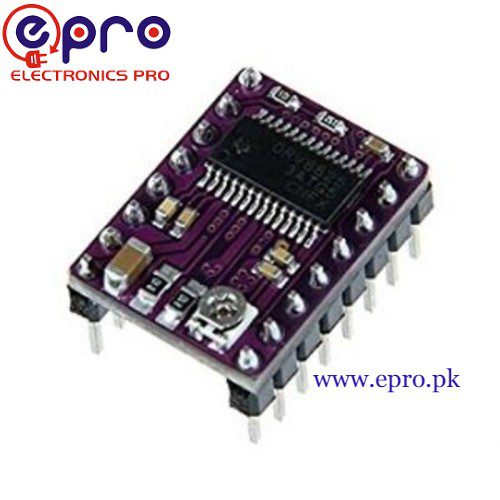
This DRV8825 Arduino procedure starts with a slow, unloaded bipolar stepper test. It assumes a documented carrier, a correctly adjusted current limit and an external motor supply suitable for both motor and board. It is not a complete CNC controller and should not be connected to an unguarded machine.
Make the power-off inspections first

Identify the motor coil pairs and carrier orientation. Connect one coil to A1/A2 and the other to B1/B2 according to the actual board labels; do not rely on wire colors. Inspect the motor-supply polarity and local capacitor requirements. Secure the motor so it cannot roll or catch a loose lead when motion begins.
Wire control separately from motor power
For a suitable Uno-compatible controller use D2 for STEP and D3 for DIR, with a common ground between the controller and driver. Use the external supply only at the documented motor-power terminals. Do not feed the motor from an Arduino GPIO or its small onboard regulator. Check the carrier schematic for every remaining control connection.
Define enable, reset and sleep states
The driver needs nRESET and nSLEEP in their documented high states for normal operation, and nENBL low to enable outputs. Use a valid logic rail and the carrier’s recommended wiring rather than tying pins blindly to motor voltage. For this basic full-step test, keep MODE0–MODE2 low. Some carriers add pull-ups or connections that change what must be wired externally.
Confirm current limit before requesting motion
Set the reference using the actual sense-resistor relationship and a safe carrier-specific procedure. Start within the motor and carrier’s supported current limits. Supply current is not the phase-current setting. Leave adequate cooling and stop if thermal shutdown or unstable behavior appears. Never disconnect a motor winding as a way to troubleshoot a powered driver.
Send deliberately slow pulses
The example keeps STEP high for 10 microseconds and low for 10000 microseconds, comfortably longer than the datasheet minimum pulse durations. Direction is fixed and settled before pulses start. Actual shaft speed depends on motor full-step angle and the selected mode. There is no acceleration ramp, so this sketch is intentionally limited to a slow unloaded experiment.
Interpret vibration before increasing speed
A vibrating shaft that does not turn can indicate incorrect coil pairing, an excessive starting step rate, inadequate current or mechanical binding. Check wiring with power removed, then retry at the same conservative rate. A successful no-load rotation does not establish available loaded torque, positioning accuracy or safe machine behavior.Newest in the store


Minimal slow-pulse sketch
const byte STEP_PIN = 2;
const byte DIR_PIN = 3;
void setup() {
  pinMode(STEP_PIN, OUTPUT);
  pinMode(DIR_PIN, OUTPUT);
  digitalWrite(STEP_PIN, LOW);
  digitalWrite(DIR_PIN, LOW);
  delay(100); // Driver controls and current limit must already be correct.
}
void loop() {
  digitalWrite(STEP_PIN, HIGH);
  delayMicroseconds(10);
  digitalWrite(STEP_PIN, LOW);
  delayMicroseconds(10000);
}
Relevant Epro listing
Product information and prices were checked on 19 October 2026. This is a current snapshot, not a historical price associated with the publication timestamp. Stock, accessories and checkout prices can change. Listing claims are not independent performance or authenticity certifications.
| Product | Checked price | Stock |
|---|---|---|
| DRV8825 Stepper Motor Driver in Pakistan | PKR 560 | In stock |
Frequently asked questions
Can the Arduino 5 V pin power the motor?
Do not use it as the motor supply. Use a suitable external motor supply and the documented common-ground arrangement.
How many pulses make one revolution?
That depends on motor step angle and microstep mode. Verify those values instead of assuming one fixed pulse count.
Related Epro reading
Review breadboard connections before assembling a prototype. For controller expansion, the Mega 2560 pin guide explains why pin names and electrical limits must be checked together.
Technical references and test limitations
This guide uses the documentation linked below. The procedures are for a controlled, low-voltage learning setup; no independent hands-on test of the particular seller board is claimed. Record the actual part markings, wiring and firmware version before drawing conclusions from a test.