


ADXL345 Arduino: I2C Bring-Up and Six-Orientation Checks

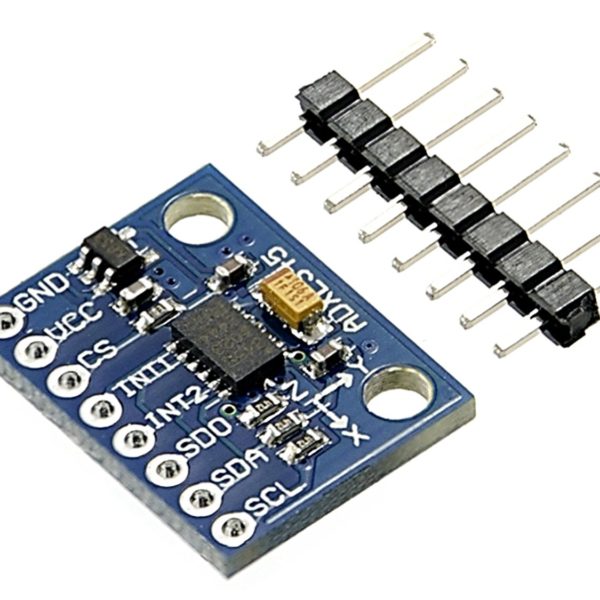
An ADXL345 Arduino setup should establish communication and sensible gravity readings before calculating tilt or logging vibration. This procedure is for a documented low-voltage breakout and a supported controller interface. It separates an I2C address response from a correctly configured acceleration measurement.
Verify supply and bus voltage before connecting

Inspect the breakout schematic and use a supported supply. Ensure the bus pull-ups and logic levels are safe for both host and sensor. Connect common ground, SDA and SCL with power removed. Arduino pin assignments vary: a classic Uno uses A4/A5 for I2C, while a Mega uses different pins. Follow the exact controller documentation.
Select I2C and confirm the address
Hold CS high as specified for I2C operation. Set SDO/ALT ADDRESS to a defined state: low commonly selects 0x53 and high 0x1D. Check whether the breakout already includes these straps. A scanner can confirm an address response, but does not establish the identity, acceleration range or measurement mode of the responding device.
Check identity and enter measurement mode
The DEVID register at 0x00 is documented as 0xE5. Read it using a suitable driver or a carefully implemented register transaction. Configure range, resolution and data rate, then enable the Measure bit in POWER_CTL. The device powers up in standby, so a responding sensor with unchanged data is not necessarily defective.
Read and label all three axes
Use a documented ADXL345 driver and its basic example rather than mixing register constants from other sensors. Preserve signed two’s-complement data and use the configured scale. Label whether the output is raw counts, g or metres per second squared. An approximately one-g gravity response is not a signal to subtract one from every axis indiscriminately.
Use six stationary orientations
Place each axis approximately upward and downward in turn, allowing the board to settle before recording samples. The main gravity contribution should change sign on that axis; the other axes should be nearer zero when alignment is good. Offsets, misalignment and noise remain. Save averages and the physical orientation instead of selecting only a favorable single reading.
Treat tilt calculations as a separate stage
An atan2-based tilt estimate assumes the measured vector is dominated by gravity and uses a defined axis convention. Linear acceleration invalidates that simple assumption. A six-orientation sanity check does not establish dynamic orientation accuracy. Check units, sign and mounting first, then introduce filtering with its latency and limitations documented.
Newest in the store


Diagnose constant or clipped readings
For all-zero or frozen output, revisit standby state, bus transactions and supply. Values near a range limit suggest clipping or an incorrect conversion rather than unlimited acceleration. If multiple sensors are attached, check address conflicts. Change one configuration at a time and retain the initial working example so later software changes can be compared meaningfully.
Relevant Epro listing
Product information and prices were checked on 19 October 2026. This is a current snapshot, not a historical price associated with the publication timestamp. Stock, accessories and checkout prices can change. Listing claims are not independent performance or authenticity certifications.
| Product | Checked price | Stock |
|---|---|---|
| ADXL345-3 Axis Digital Acceleration, Gravity and Tilt Sensor Module in Pakistan | PKR 400 | In stock |
Frequently asked questions
Why does an I2C scanner work but acceleration stay fixed?
Check that measurement mode is enabled and that the driver reads the correct data registers.
Does this procedure calibrate dynamic vibration measurements?
No. It is an initial communication and gravity-response check, not a complete calibration or bandwidth validation.
Related Epro reading
Review breadboard connections before assembling a prototype. For controller expansion, the Mega 2560 pin guide explains why pin names and electrical limits must be checked together.
Technical references and test limitations
This guide uses the documentation linked below. The procedures are for a controlled, low-voltage learning setup; no independent hands-on test of the particular seller board is claimed. Record the actual part markings, wiring and firmware version before drawing conclusions from a test.