


DHT22 with Arduino: Wiring, Read Timing and Failed-Reading Checks

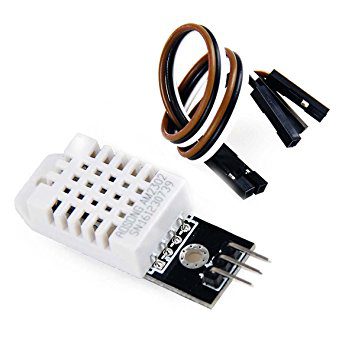
Using a DHT22 with Arduino begins with three separate decisions: which sensor form is fitted, which voltage the controller uses and which library timing is selected. A stable first test logs valid readings and failures clearly before the sensor is connected to a display, network or control output.
Document the exact connection

With power removed, identify the sensor supply, ground and data connection from the package drawing or module labels. Bare four-pin packages include an unused pin; do not infer the breakout header from that drawing. Connect sensor ground to controller ground. Choose a documented general-purpose digital input/output pin that is free of another peripheral function in the sketch.
Check the data-line idle voltage
Use a sensor supply and pull-up arrangement compatible with the exact Arduino board. A classic 5 V Uno and a 3.3 V controller are not electrically interchangeable. If a breakout pulls data to its supply, account for that before attaching it to a lower-voltage input. Keep the first cable short and inspect whether the board already provides the required pull-up.
Configure the correct sensor model
Install a maintained DHT library and its declared dependencies using the IDE library manager. Start from its DHT22/AM2302 example and set the actual data-pin number and DHT22 sensor type. Do not leave the example configured for DHT11. Record the library version and selected controller so a later change can be reproduced.
Allow startup and schedule readings
Wait more than two seconds after power-up before the first request, then leave at least two seconds between requests as required by the referenced manual. A longer interval is sensible for a basic room monitor. If using a nonblocking schedule, keep its interval independent of serial printing, display refresh and other application events.
Represent an invalid transaction honestly
Use the library’s failure or invalid-number checks before formatting temperature and humidity. Print an error with a timestamp or sample counter, and do not substitute zero. If retaining the previous valid value, label it stale and track its age. This prevents a disconnected sensor from appearing to report a sudden real environmental change.
Isolate errors before expanding the project
If reads fail, return to the minimal example and inspect supply, ground, pin number, model selection, pull-up and interval. Disconnect optional display and radio wiring while diagnosing conflicts. After several stable readings, add one subsystem at a time and log failures again. Comparisons with a reference instrument need stable conditions and allowance for response time; plausible-looking serial output alone does not establish accuracy.Newest in the store


Relevant Epro listing
Product information and prices were checked on 19 October 2026. This is a current snapshot, not a historical price associated with the publication timestamp. Stock, accessories and checkout prices can change. Listing claims are not independent performance or authenticity certifications.
| Product | Checked price | Stock |
|---|---|---|
| DHT22 Digital Temperature and Humidity Sensor Module in Pakistan | PKR 650 | In stock |
| Humidity and Temperature Sensor DHT22 | PKR 740 | In stock |
Frequently asked questions
Why is every reading invalid?
Check the actual wiring, sensor type selected in the library, data pull-up and measurement interval before replacing the part.
Should an unsuccessful reading be displayed as zero?
No. Show an error or explicitly stale value so a communications failure is not confused with a real measurement.
Related Epro reading
Review breadboard connections before assembling a prototype. For controller expansion, the Mega 2560 pin guide explains why pin names and electrical limits must be checked together.
Technical references and test limitations
This guide uses the documentation linked below. The procedures are for a controlled, low-voltage learning setup; no independent hands-on test of the particular seller board is claimed. Record the actual part markings, wiring and firmware version before drawing conclusions from a test.