


NRF24L01 Arduino: Wiring, Code and 7 Radio Checks

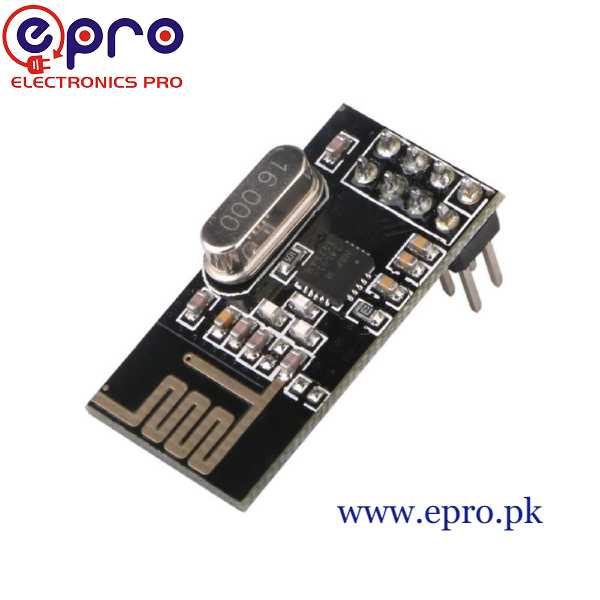
An NRF24L01 Arduino link is easier to troubleshoot when it sends a simple counter instead of controlling a motor. The first goal is to prove local SPI communication and then a short, acknowledged radio exchange between two endpoints.
This example uses two conventional Uno-compatible boards and two standard transceiver modules with documented 5 V-tolerant control inputs. The radios still require suitable regulated 3.3 V power. Verify the actual devices before applying this arrangement.

1. Prepare both endpoints and their supplies
Use two standard NRF24L01 modules, not a single module and a phone. A compatible regulator adapter can help provide radio power when wired according to its documentation. The radio VCC itself must not receive 5 V.
Use short connections and suitable local decoupling; the RF24 troubleshooting guide discusses a 10 µF capacitor near the supply pins. Observe polarity and rating. This is not a substitute for a regulator capable of the module’s transient demand.
2. Wire each NRF24L01 Arduino endpoint
| Radio pin | Conventional Uno destination |
|---|---|
| VCC | Suitable regulated 3.3 V source |
| GND | Supply ground and Uno GND |
| CE | D9 |
| CSN | D10 |
| SCK | D13 |
| MOSI | D11 |
| MISO | D12 |
| IRQ | Unused in this example |
Disconnect power while wiring and confirm the module connector’s viewpoint. Supply and logic limits are separate: the Nordic specification sets conditions for 5 V-tolerant inputs. Do not generalise the Uno signal wiring to an unidentified radio clone.
3. Install RF24 and configure the roles
Install RF24 by TMRh20 through Library Manager. Upload the same sketch to both boards, but set TRANSMITTER to true on one and false on the other. Keep the address, channel, data rate and payload size identical.
#include <SPI.h>
#include <RF24.h>
RF24 radio(9, 10);
const bool TRANSMITTER = true;
const byte address[6] = "Epro1";
uint32_t counter = 0;
void setup() {
  Serial.begin(115200);
  if (!radio.begin()) {
    Serial.println("Radio SPI initialization failed");
    while (true) { delay(100); }
  }
  radio.setPALevel(RF24_PA_LOW);
  radio.setDataRate(RF24_1MBPS);
  radio.setChannel(76);
  radio.setPayloadSize(sizeof(counter));
  radio.setAutoAck(true);
  if (TRANSMITTER) {
    radio.openWritingPipe(address);
    radio.stopListening();
  } else {
    radio.openReadingPipe(1, address);
    radio.startListening();
  }
}
void loop() {
  if (TRANSMITTER) {
    bool ok = radio.write(&counter, sizeof(counter));
    Serial.println(ok ? "Acknowledged" : "No acknowledgment");
    counter++;
    delay(1000);
  } else if (radio.available()) {
    radio.read(&counter, sizeof(counter));
    Serial.print("Received: "); Serial.println(counter);
  }
}
4. Run a short bench test
Open both serial monitors at 115200 baud and power both radios. Keep the standard modules a modest distance apart on the bench. The receiver should print counter values while the sender reports acknowledgments; this is an expected test outcome, not a claim that this particular hardware has been tested.
Newest in the store


When both boards are connected to one computer, identify each serial port and its assigned role before opening the monitors. Uploading the receiver configuration to the wrong board can leave two senders, even though both uploads completed successfully. Keep a small written label with each endpoint during diagnosis.
5. Separate SPI failure from a missing link
If initialization fails, inspect local supply, CE/CSN and SPI wiring. If initialization succeeds but acknowledgments fail, confirm the receiver role and matching settings before changing hardware. Both ends set to transmitter cannot complete this example.
6. Interpret acknowledgment honestly
A missing acknowledgment does not prove the receiver never saw a packet; the return path may have failed. Keep auto-ack enabled for this test instead of disabling it to obtain a misleading success result. Repeated failures warrant a supply and configuration review.
The counter increments for each attempted send in this demonstration. A gap at the receiver can therefore indicate an unsuccessful attempt, but this simple output is not a formal packet-loss measurement with a controlled observation window. Record attempts, acknowledgments and received values separately if later evaluating link reliability.
Do not extend the SPI leads to solve an antenna-placement problem. Longer controller-to-radio connections can introduce another source of signal trouble. Start with short local wiring and change one condition at a time so supply, software and radio-environment changes are not confused.
7. Expand only after stable packet exchange
This sketch provides no encryption, authentication or actuator timeout. The NRF24L01 buying guide explains range and PA/LNA power limits. Validate the intended installation separately before replacing harmless counters with commands that affect physical equipment.