


PCA9685 Arduino: LED PWM Wiring, Code and 7 Checks

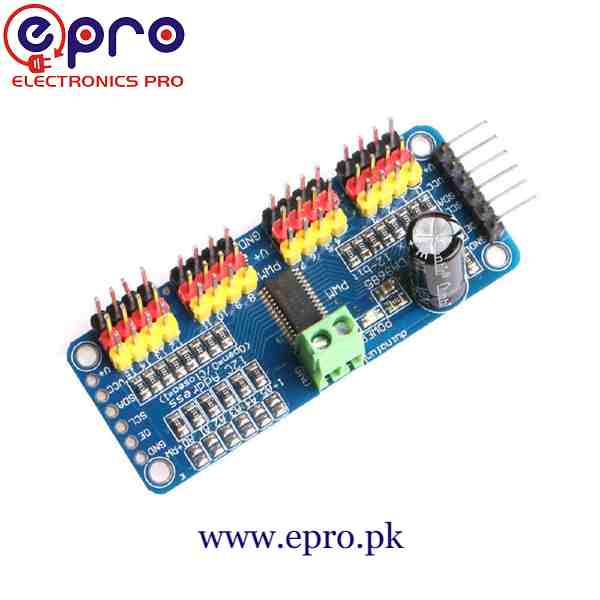
This PCA9685 Arduino example fades one small LED from channel zero. It is deliberately an LED exercise, not a servo sweep. A harmless signal-level demonstration makes it easier to understand the board before connecting a moving load.
Use a conventional 5 V Uno and the verified PCA9685 breakout. No servo or motor should be attached during this example because its requested 1 kHz PWM setting is intended for an LED, not conventional analogue servo control.

1. Make the PCA9685 Arduino logic connections
| Breakout logic pin | Conventional Uno |
|---|---|
| VCC | 5 V logic supply |
| GND | GND |
| SDA | A4 |
| SCL | A5 |
Switch off power while wiring. Confirm address 0x40 and the actual board’s labels. Keep OE, if exposed, in the documented enabled state; on the usual design it is active LOW and has an appropriate default arrangement.
The Adafruit hookup guide distinguishes logic VCC from the separate V+ servo-power rail. Leave V+ unpowered for this small LED circuit, which uses only the signal output and logic supply.
2. Connect one low-current LED
Connect channel zero’s signal output through a 1 kΩ resistor to a small LED’s anode. Connect the LED cathode to GND. Verify the signal row rather than accidentally using the adjacent V+ row.
The series resistor is mandatory. With a typical small indicator LED, it keeps the test current modest. Do not substitute an LED strip, large lamp, motor or relay coil directly on the signal output.
3. Install the maintained library
Install Adafruit PWM Servo Driver and any requested dependencies through Library Manager. The library’s PWM example demonstrates the 4,096-step counter and notes that oscillator calibration affects the actual output frequency.
This sketch requests a nominal 1 kHz frequency. It does not claim an independently measured timing accuracy. The same frequency setting applies across the board, which is why no servos should remain connected during the test.
4. Upload the channel-zero fade example
#include <Wire.h>
#include <Adafruit_PWMServoDriver.h>
Adafruit_PWMServoDriver pwm(0x40);
void setLedLevel(uint16_t level) {
  if (level == 0) pwm.setPWM(0, 0, 4096); // full off
  else pwm.setPWM(0, 0, level);
}
void setup() {
  Serial.begin(9600);
  if (!pwm.begin()) {
    Serial.println("PCA9685 not found: check address and wiring");
    while (true) { delay(100); }
  }
  pwm.setOutputMode(true); // push-pull outputs for this small LED
  pwm.setPWMFreq(1000);   // LED test only; no servos attached
  for (byte channel = 0; channel < 16; channel++) {
    pwm.setPWM(channel, 0, 4096);
  }
}
void loop() {
  for (int level = 0; level <= 3840; level += 256) {
    setLedLevel(level);
    delay(40);
  }
  for (int level = 3840; level >= 0; level -= 256) {
    setLedLevel(level);
    delay(40);
  }
}
The special off value stops the output fully at zero brightness. Other values select a portion of the shared PWM period. The limited set of steps keeps the demonstration readable rather than suggesting a calibrated brightness response.Newest in the store


5. Interpret PWM rather than analogue voltage
The output switches between logic levels; it does not generate a smooth adjustable DC voltage. The eye integrates the LED’s changing on-time, so visible brightness changes. A meter’s displayed average is not a complete description of the waveform.
LED brightness is not necessarily linear with the numerical duty setting. This program demonstrates control, not photometric calibration or a precision dimming curve.
6. Diagnose wiring before increasing current
If initialization fails, check address, VCC, common ground and SDA/SCL. If initialization works but the LED stays dark, inspect polarity, the resistor, OE and the selected signal header. Never remove the resistor to compensate for a wrong connection.
Check the lowest and highest visible levels without assuming a linear brightness scale. At level zero the helper requests full off. At the top value the LED remains under full duty, which is sufficient to demonstrate the trend without a special full-on command.
All other channels are deliberately set off during setup. That is a useful startup habit, but it is not protection for an actuator that should never be attached to this LED test in the first place. Keep the surrounding wiring limited to the stated single indicator.
If exact frequency or pulse timing matters in a later project, inspect the output with a suitable instrument and calibrate the oscillator setting. Changing the printed frequency label in software does not correct the physical waveform.
7. Treat a servo project as a separate stage
The PCA9685 buying guide explains external servo power, common frequency and pulse calibration. Before attaching a servo, change to its documented timing, provide a suitable separate load supply and establish safe travel limits. This LED test does not validate a multi-motor power or mechanical design.