


BH1750 Arduino Library: ESP32 Wiring and Lux Readings

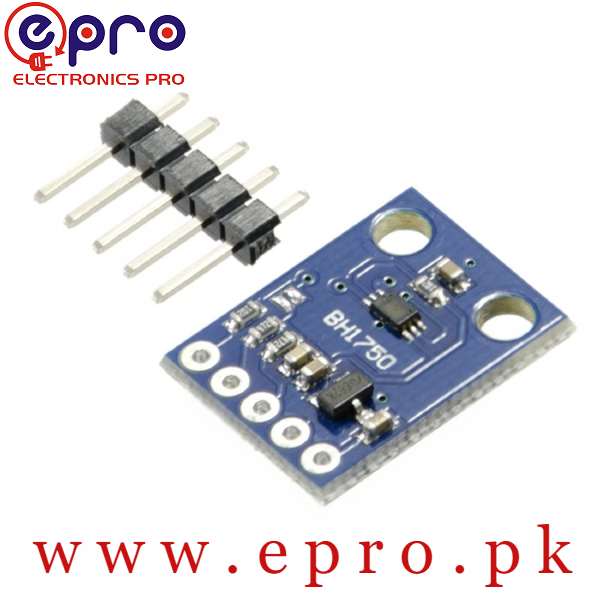
The BH1750 Arduino library by Christopher Laws can read a compatible BH1750 module over I2C. This example uses a classic ESP32 development board with a documented 3.3 V-compatible breakout. It starts with one sensor, explicit bus pins and a slow reporting interval so wiring and measurement problems are easier to separate.
Inspect the board before wiring

Confirm that the breakout can operate at 3.3 V and that its SDA and SCL pull-ups are not connected to a higher voltage. Use the module documentation, not only a marketplace photograph. Do not connect a 5 V-pulled-up I2C bus directly to ESP32 pins. Disconnect power while changing jumpers or moving leads.
Use an explicit classic ESP32 connection
For this example connect documented module VCC to 3.3 V, GND to GND, SDA to GPIO21 and SCL to GPIO22. ADDR is low for address 0x23. These GPIO choices are for a suitable classic ESP32 board, not a universal mapping for ESP32-C3, S2 or every compact variant. Match the printed GPIO labels rather than counting header positions.
Install the intended library
In Arduino IDE Library Manager, install BH1750 by Christopher Laws and select the correct ESP32 board and port. The library requires the application to initialize Wire; it does not choose the bus pins automatically. Use the supplied basic example if the installed library API differs, and keep the library version with your project notes.
Allow a complete measurement
The example uses continuous high-resolution mode and reports once per second. At default measurement time this is slower than a full integration cycle. Negative return values indicate an error condition rather than negative illumination. Diagnose bus and initialization faults before plotting the values as real light readings.
Compare readings under controlled changes
Hold sensor orientation fixed and shade it without touching exposed conductors. Move to a brighter location and allow the next sample to arrive. Do not expect a linear relationship between a lamp dimmer knob and measured lux. Flicker, the source spectrum and shadows can all influence observations; keep those conditions in a useful measurement log.
Troubleshoot missing or frozen values
If initialization fails, check the supply, common ground, selected address and swapped SDA/SCL. Test with a single sensor and short leads before adding other devices. An address response alone does not prove that a measurement mode was configured successfully. When changing measurement-time settings, revisit both conversion scaling and the time allowed before reading.Newest in the store


Example sketch
#include <Wire.h>
#include <BH1750.h>
BH1750 lightMeter;
void setup() {
  Serial.begin(115200);
  Wire.begin(21, 22);
  if (!lightMeter.begin(BH1750::CONTINUOUS_HIGH_RES_MODE, 0x23)) {
    Serial.println("BH1750 initialization failed");
    while (true) delay(1000);
  }
}
void loop() {
  float lux = lightMeter.readLightLevel();
  if (lux < 0) Serial.println("Read error: check bus and sensor");
  else { Serial.print(lux, 1); Serial.println(" lx"); }
  delay(1000);
}
Relevant Epro listing
Product information and prices were checked on 19 October 2026. This is a current snapshot, not a historical price associated with the publication timestamp. Stock, accessories and checkout prices can change. Listing claims are not independent performance or authenticity certifications.
| Product | Checked price | Stock |
|---|---|---|
| Light Intensity Sensor BH1750 in Pakistan | PKR 460 | In stock |
Frequently asked questions
Which pins does this example use?
GPIO21 for SDA and GPIO22 for SCL on a suitable classic ESP32 board. Verify your exact board.
Why wait one second between prints?
It provides a straightforward reporting interval longer than the default high-resolution integration time; it is not a requirement for every application.
Related Epro reading
Review breadboard connections before assembling a prototype. For controller expansion, the Mega 2560 pin guide explains why pin names and electrical limits must be checked together.
Technical references and test limitations
This guide uses the documentation linked below. The procedures are for a controlled, low-voltage learning setup; no independent hands-on test of the particular seller board is claimed. Record the actual part markings, wiring and firmware version before drawing conclusions from a test.