


CP2102 USB to UART: 7 Safe Wiring Checks

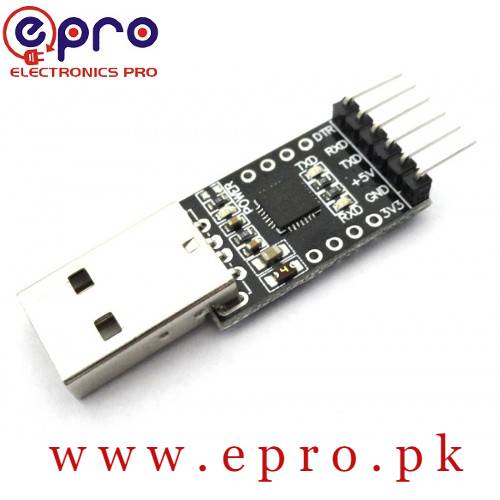
A CP2102 USB-to-UART module can be a convenient bridge between a computer and a microcontroller, but its header labels and voltage levels must be checked first. This guide focuses on safe bench wiring and a basic loopback test, not on treating every CP2102 module as a universal programmer or power supply.
1. Read your module’s pin labels

Locate GND, TXD, RXD and any supply or control pins on the actual adapter. Connector order varies between manufacturers. A six-pin header does not establish a universal six-pin pinout. Check the product image, silkscreen and available schematic, then draw the orientation with the USB connector shown so you cannot accidentally reverse the header.
2. Distinguish a supply output from a logic-level selection
An exposed 5 V pin is commonly associated with USB power, while another pin may offer a regulated output. Neither label by itself proves the TXD logic level or input tolerance of the complete module. Verify the bridge variant and board implementation before connecting a 5 V or 3.3 V target. Do not treat a jumper as a guaranteed signal-level converter unless the module documentation explicitly says it is.
3. Check the host connection before the target
Connect the adapter alone with a data-capable cable, install the supported Silicon Labs VCP driver if needed and identify the serial port. Open it in one terminal application. This checks the USB side without exposing the target to a wiring mistake. If the computer cannot detect the adapter, a target bootloader setting is not the first thing to change.
4. Use a meaningful loopback test
With USB disconnected and the target absent, join the module’s TXD and RXD pins where the module documentation permits it. Reconnect the adapter and use a normal UART setting such as 9600 baud, 8 data bits, no parity and one stop bit. Turn local echo off. Send a recognizable line and check that the received bytes match. Repeat with the jumper removed so locally displayed text is not mistaken for returned data.
Loopback success establishes a basic path through the USB bridge and terminal. It does not prove that a separate target uses the same baud rate, accepts the same voltage or has an appropriate bootloader. Disconnect USB again before removing the test jumper and wiring the target.
5. Make a minimal three-wire UART connection
| Adapter pin | Target pin | Check before power |
|---|---|---|
| TXD | RX | Target input accepts the adapter’s signal level |
| RXD | TX | Adapter input accepts the target’s output level |
| GND | GND | Both share the same signal reference |
| Supply output | Not connected by default | Only use if the full power plan is verified |
Use the target’s documented power input and avoid connecting another positive rail unintentionally. A common signal ground is normally required for a non-isolated TTL connection. Keep the test on low-voltage electronics; this adapter is not an isolation barrier for hazardous equipment.
Newest in the store


6. Match the target’s serial protocol
Use the target firmware’s baud, parity, data-bit and stop-bit settings. A UART bridge cannot translate an arbitrary protocol into Arduino sketches by itself. Some targets send text only at startup, while others wait for a command. Keep a short log of what you transmit and receive so a baud mismatch can be separated from an incorrect command or a missing ground.
7. Add programming control only from target documentation
Reset and boot-mode signals depend on the target board. DTR or RTS, when present, is not universally meant to connect straight to RESET. A bare ESP module, a Nano and an STM32 can require entirely different programming arrangements. Follow the exact target instructions, remove any temporary boot straps afterward and preserve a drawing of the final wiring.
Epro parts and availability
These are relevant Epro listings, not independent authenticity or performance certifications. Prices below were checked on 19 October 2026; they are a dated snapshot rather than a historical price implied by this article’s publication date. Confirm the exact variant, included accessories, stock and current checkout price before ordering.
| Listing | Checked price | Stock at check |
|---|---|---|
| CP2102 USB 2.0 to TTL Module in Pakistan | PKR 510 | In stock |
Frequently asked questions
Is CP2102 an RS-232 interface?
A typical CP2102 module header is a logic-level UART. An actual RS-232 connection requires suitable level conversion; do not connect the interfaces directly.
Can I connect TXD to TXD?
For a normal two-device UART connection, the transmitter goes to the other device’s receiver. Connecting two actively driven transmitters is not the intended wiring.
Related Epro guides
Technical references and verification
The guidance above is based on the manufacturer documentation linked here and the listed product information. Example procedures and sketches are provided for a controlled low-voltage bench setup; no independent hands-on test of your particular board or adapter is claimed. Check the markings and documentation for your actual revision.