


XL6009 Boost Converter Circuit Diagram and Setup

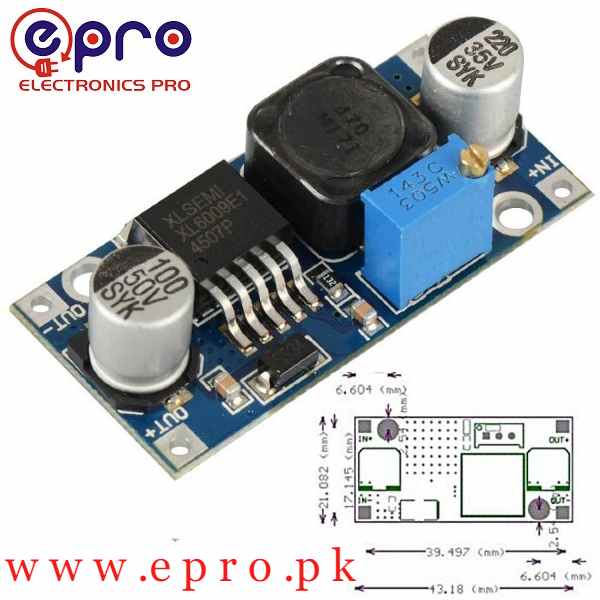
Use an XL6009 boost converter circuit diagram to understand the module before adjusting it. A typical step-up board combines an inductor, switch, diode, capacitors and feedback divider. This guide explains those blocks and a controlled setup procedure; it does not claim that every XL6009 PCB has the same layout or protection features.
Read the diagram as functional blocks

The inductor and switching path transfer energy toward the output. The diode and output capacitor form part of the step-up power path, while the resistor divider reports output voltage to the controller. The trimmer changes the feedback ratio. These functions help explain the circuit, but the terminal markings and actual schematic remain the authority for where a wire belongs.
Distinguish a boost circuit from another XL6009 application
The same controller family name can appear in different converter arrangements. A boost-only board cannot be assumed to regulate an output below its input simply because the controller supports other application circuits. Before connecting a source that crosses the desired output, verify that the particular module is designed for both step-up and step-down regulation.
Prepare an unloaded terminal check
| Stage | Action | Reason |
|---|---|---|
| Power off | Identify IN+/IN− and OUT+/OUT− | Avoid reversed connections |
| Before the load | Use a documented low-voltage source with a conservative current limit | Limit fault energy |
| Adjustment | Measure output directly while turning the trimmer slowly | Prevent an unknown setting reaching the load |
| After adjustment | Remove input power before attaching the load | Keep wiring changes controlled |
| Loaded check | Measure input at the module and output at the load | Separate source drop from converter behavior |
Use a suitable meter range and insulated leads. Keep this procedure on low-voltage bench electronics, not on a mains supply or a high-energy battery pack. Check that the load remains disconnected during the initial setting.
Account for the input-to-output path
A conventional boost circuit may pass a voltage toward the output through its passive power path even when it is not actively regulating. An output near the input voltage is therefore not a complete functional test. Verify that your requested output is within the actual module’s supported boost conditions and that the source has not fallen into current limiting.
Set voltage without relying on trimmer direction
There is no safe universal clockwise instruction for all third-party boards. Watch the meter, make small changes and do not force a mechanical stop. A multi-turn trimmer may take several turns before an obvious response. If the output becomes excessive or erratic, disconnect the source and investigate the module rather than attaching a load in the hope that it will stabilize the setting.
Interpret a loaded voltage drop
If the unloaded output is correct but the load causes droop, measure the input at the converter terminals. A falling input suggests source or wiring limitations; a steady input with an unstable output may point toward overload, thermal limits, adjustment or a module fault. Check the load’s startup current as well as its steady current. Reduce the test load instead of repeatedly stressing the board.
Newest in the store


Know what a meter does not show
A DC meter cannot fully describe switching ripple or fast transient overshoot. Equipment with a tight supply specification may need further filtering or a different regulator architecture, supported by appropriate measurements. Keep the acceptance record tied to the exact board, input, output setting, load and ambient conditions. Do not convert one successful unloaded reading into a continuous-current certification.
For permanent installation, secure the PCB, insulate its underside and provide appropriate wiring and system protection. Review the final schematic whenever you change the source or load; an operating point that worked for a small sensor may not support a larger display or motor.
Epro parts and availability
These are relevant Epro listings, not independent authenticity or performance certifications. Prices below were checked on 19 October 2026; they are a dated snapshot rather than a historical price implied by this article’s publication date. Confirm the exact variant, included accessories, stock and current checkout price before ordering.
| Listing | Checked price | Stock at check |
|---|---|---|
| XL6009 DC to DC Boost Converter Voltage Booster in Pakistan | PKR 220 | In stock |
Frequently asked questions
Why can’t I turn a standard boost module down below its input?
The circuit topology limits regulation. Use a suitable buck or documented buck-boost module for step-down behavior.
Is a correct no-load output enough?
No. Verify regulation under the actual load and evaluate temperature, source capability and transient requirements.
Related Epro guides
Technical references and verification
The guidance above is based on the manufacturer documentation linked here and the listed product information. Example procedures and sketches are provided for a controlled low-voltage bench setup; no independent hands-on test of your particular board or adapter is claimed. Check the markings and documentation for your actual revision.